

Introduction
Agent Testing lets you run automated test scenarios against your pathways and personas to catch issues before they reach customers. A simulated test agent calls your pathway, follows a scripted behavior, and evaluates predefined assertions to measure whether your agent handled the conversation correctly.Scenario-Based Testing
Define test scenarios with tester personas that simulate real callers — angry customers, voicemail systems, gatekeepers, and more. Customers can also import pre-built scenario templates.
Assertion Engine
10 assertion types including LLM judges, variable extraction checks, node traversal validation, and regex matching
Batch & Simulation Runs
Run multiple scenarios at once, or run the same scenario N times to detect flaky behavior
Fix Thoroughly
Iterative auto-fix loop that runs tests, analyzes failures, applies fixes, and retests until everything passes
Core Concepts
Scenarios
A scenario defines a test case for your pathway. Each scenario contains:- Tester Persona — A prompt that tells the simulated caller how to behave (e.g., “You are an angry customer who was charged twice”)
- Assertions — Rules that evaluate whether the agent handled the conversation correctly
- Configuration — Max turns, starting node, request data overrides, and more
Assertions
Assertions are the pass/fail criteria for a test run. Each scenario can have multiple assertions, each with a type, weight, and required flag.Test Runs
When you execute a scenario, a test run is created. The system:- Creates a simulated call
- The tester persona converses with your pathway up to a predefined maximum turn depth
- Captures the full chat history, extracted variables, and nodes visited
- Evaluates all assertions against the conversation
- Computes an overall score (weighted average of assertion scores)
PENDING → RUNNING → PASSED | FAILED | ERROR | CANCELLED
Batches
A batch runs multiple scenarios together. This is useful for running your full test suite against a pathway version before promoting it to production. Batches can also be triggered automatically during pathway promotion — scenarios markedis_required_for_promotion act as a gate that must pass before the version goes live.
Scenario Categories
Bland provides out-of-box templates for common testing scenarios. You can clone these to your pathway and customize them.Voicemail
Voicemail
Tests how your agent handles reaching voicemail — leaving a coherent message, handling a full mailbox, etc.
Call Screener
Call Screener
Simulates Google Call Screen or a suspicious gatekeeper. Tests whether your agent identifies itself clearly to get through.
Angry Caller
Angry Caller
Progressively escalating frustration. Tests de-escalation skills — empathy, ownership, and professionalism under pressure.
Belligerent Caller
Belligerent Caller
Abusive language and personal attacks. Tests whether your agent maintains professional boundaries and escalates appropriately.
Confused Caller
Confused Caller
Rambling, off-topic caller who isn’t sure what they need. Tests patience, clarification questions, and gentle redirection.
Happy Path
Happy Path
Cooperative callers following the expected flow — appointment scheduling, information requests, etc. Validates your core conversation logic.
Edge Case
Edge Case
Unusual situations that test the boundaries of your pathway’s handling.
Custom
Custom
Your own custom scenarios tailored to your specific use case.
Getting Started
1
Open the Scenarios Panel
From the pathway editor, click the Scenarios button in the top toolbar to open the scenarios panel. This shows your existing scenarios organized by Gates (required for promotion) and Tests (standard scenarios), along with recent run history.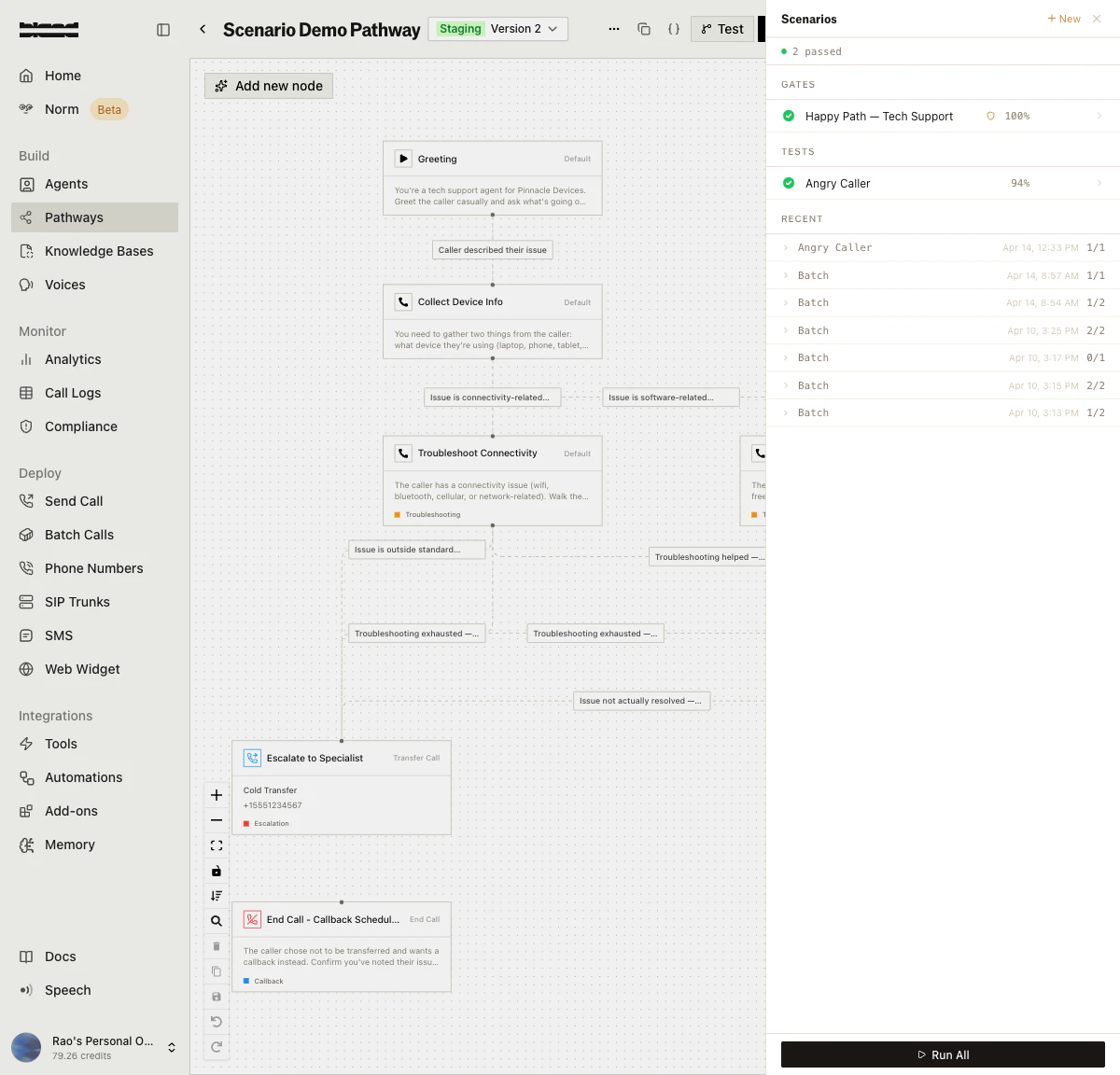
2
Create a Scenario
Click + New to open the scenario creation form. You can start from one of the 9 pre-built scenario templates, generate from a call log, or build one from scratch.Fill in the scenario name, describe the test caller persona (how the simulated caller should behave), toggle Bland Tone scoring, and add assertions to define your pass/fail criteria.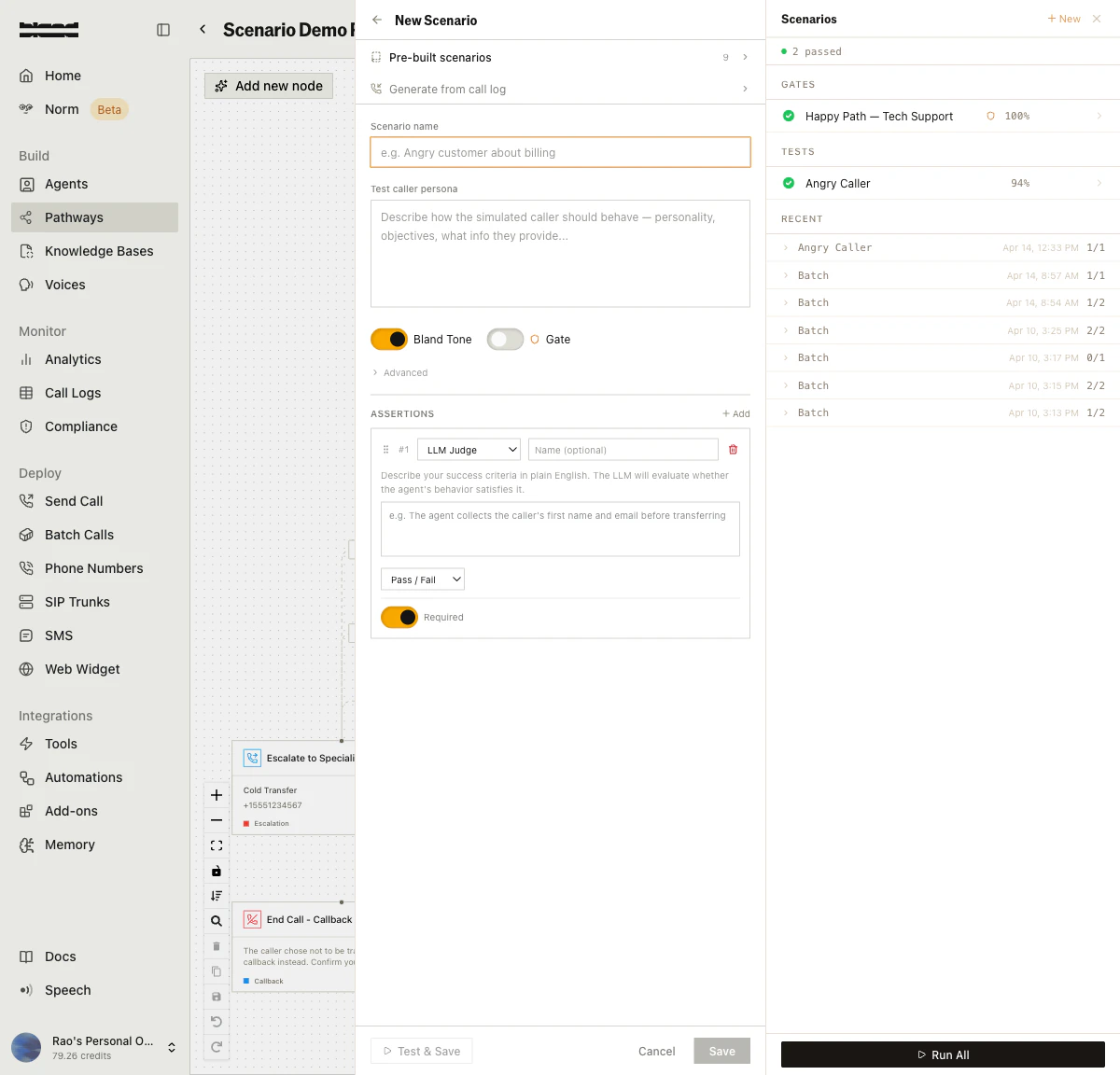
3
Run and Review Results
Run a single scenario with the Run button, or click Run All to execute your entire test suite. Results appear on the pathway splash page showing pass/fail status, score percentages, assertion breakdowns, tone scores, and AI-generated reasoning.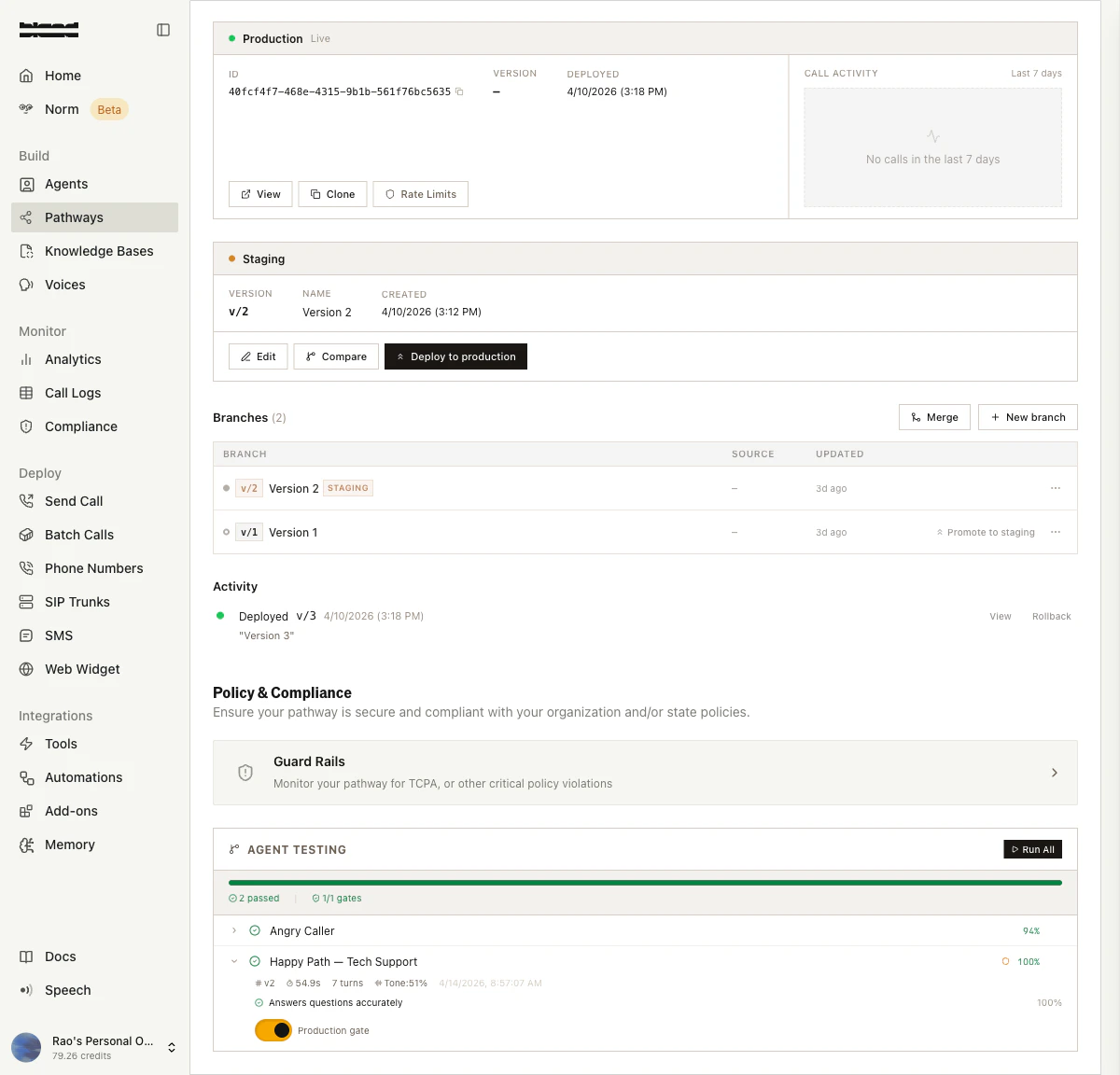
4
Gate Pathway Promotion
Toggle the Production gate switch on critical scenarios. When enabled, these scenarios must pass before a pathway version can be promoted to production. The gate count is shown in the summary bar (e.g., “1/1 gates”).
Simulation Sets
Simulation sets run the same scenario multiple times to detect flaky behavior — cases where your pathway passes sometimes but fails other times. The results include per-scenario statistics:- Pass rate across all runs
- Score distribution (mean, median, stddev, min, max)
- Flakiness detection — scenarios flagged as unreliable
- Common failure modes — recurring issues across runs
- Confidence level (low, medium, high) based on sample size
Tornado Mode
Tornado mode is an iterative auto-fix loop for your pathway. It:- Runs all specified test scenarios
- Analyzes any failures using the Norm analyzer
- Generates a fix plan (prompt changes, node config updates, flow changes)
- Applies the fixes to a forked pathway version
- Re-runs the tests
- Repeats until all tests pass or max iterations are reached
RUNNING → COMPLETED_ALL_PASSED | COMPLETED_PARTIAL | TIMEOUT | STUCK | CANCELLED | ERROR
Analytics
Agent testing provides two levels of analytics for your pathway:Basic Analytics
Pass rate, failure rate, average score, and per-run details over a configurable time window (default 30 days, max 365).Enhanced Analytics
Advanced metrics including:- Health Score — Overall pathway testing health
- Reliability Score — Consistency of test results
- Trend Analysis — Weekly direction (improving, declining, stable) with daily pass rates
- Node Failure Heatmap — Which pathway nodes have the highest failure rates
- Weakest Link — The single node most responsible for test failures
- Sankey Flow Data — Visual flow from scenarios through nodes to outcomes (pass/fail)
Norm Analysis
When a test run fails, you can trigger Norm analysis to get AI-powered suggestions for fixing your pathway. The analyzer examines the conversation, identifies the root cause, and suggests specific changes:- prompt_change — Modify a node’s prompt text
- node_config — Change node configuration settings
- flow_change — Restructure pathway routing
- tone_improvement — Adjust conversational style
API Reference
For full endpoint details, see the Scenarios API Reference.Docs for agents: llms.txt