

Dedicated Infrastructure
Every enterprise customer on Bland runs on their own isolated infrastructure — dedicated compute, dedicated containers, and dedicated resources. Your agents don’t share capacity with anyone else. This isn’t a logical partition or a namespace. It’s real, provisioned infrastructure — Kubernetes pods running exclusively for your organization, scaled to your traffic, and deployed independently of every other customer on the platform. What this means in practice:- No noisy neighbors. Your agent performance is never affected by another customer’s traffic spike.
- Independent deployments. You upgrade on your own schedule, not ours.
- Full isolation. Your calls, your data, and your compute are separated at the infrastructure level.
- Dedicated scaling. Resources are allocated specifically for your workload — not shared from a pool.
Agent Releases
When we ship a new version of the Bland agent runtime, it appears as a named release in your organization’s Releases page. Each release includes a summary of what changed — new capabilities, bug fixes, performance improvements — so you know exactly what you’re deploying.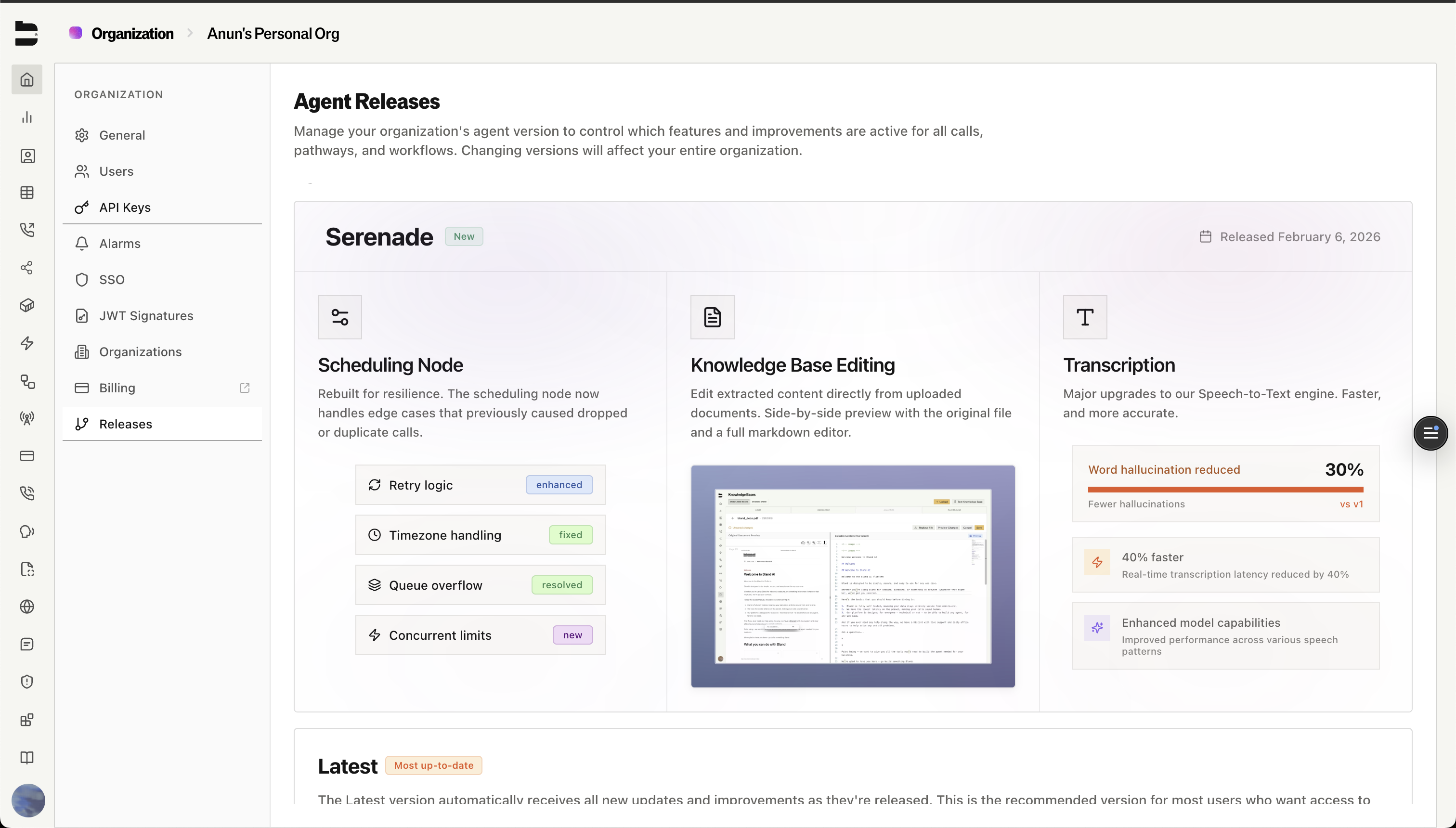
Each release is pinned to a specific version of the agent runtime. Selecting a release deploys that exact version to your dedicated infrastructure.
Deploying a Release
When you select a new release, Bland performs a zero-downtime rolling deployment across your infrastructure. Your containers are updated one by one — at no point are calls dropped or interrupted. We wait until calls are completed before updating the container. You can monitor the rollout in real time. The system tracks how many containers have been updated, how many are ready, and when the deployment is complete. If something goes wrong, the rollout stops automatically.Canary Deployments (Highly Recommended)
For teams that want an extra layer of confidence before going to production, Bland supports canary deployments — a way to run a new release on a separate set of containers alongside your production infrastructure and gradually route real traffic to it. This is how you A/B test a new agent release against your live production version, with real calls, before committing to a full rollout.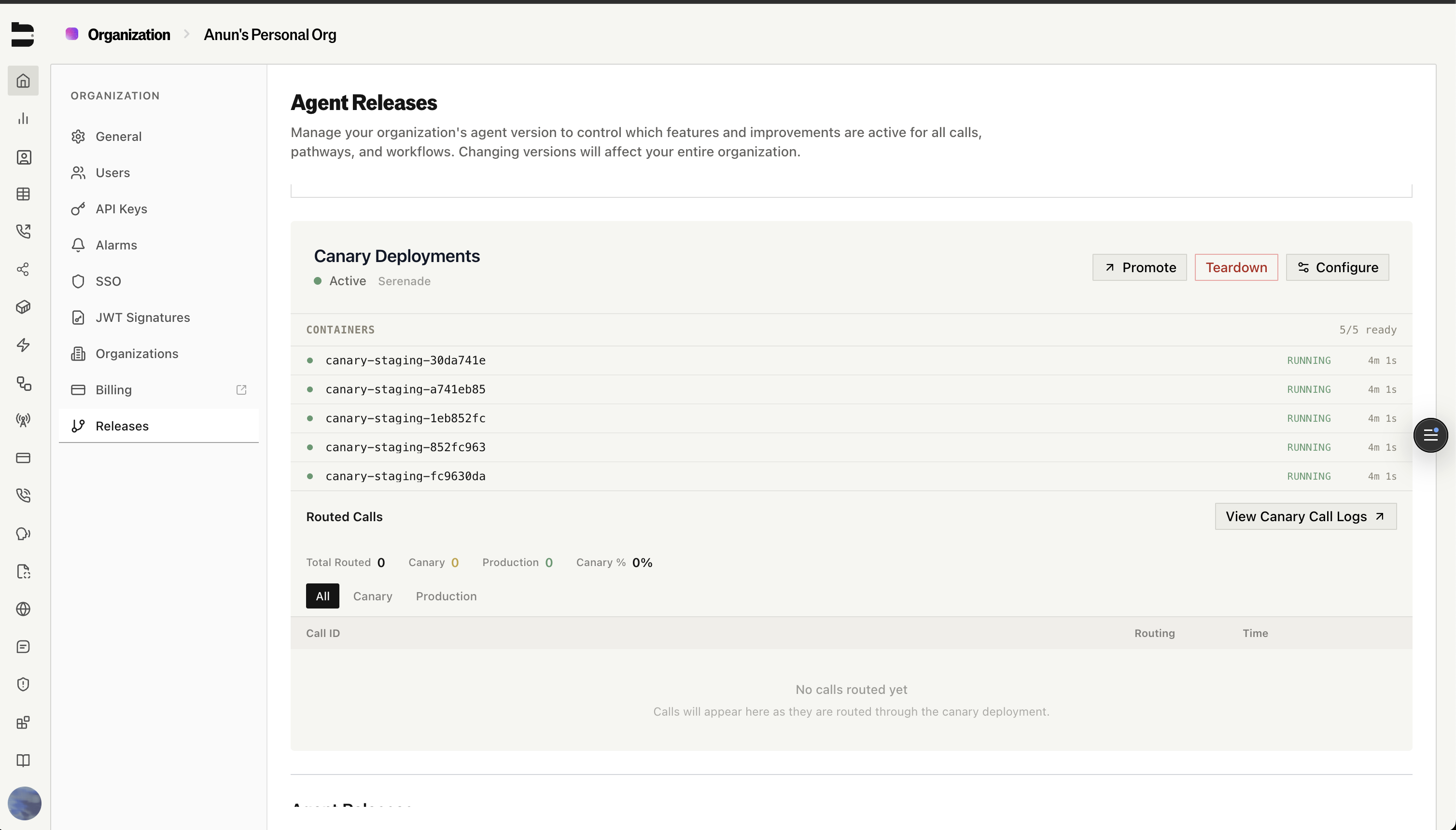
How It Works
1
Deploy a canary
Select a release and deploy it as a canary. Bland spins up dedicated canary containers alongside your production infrastructure. No traffic is routed yet — you’re just standing up the new release.
2
Sandbox and test out calls to your own number
Set up routing rules to route all calls to your number, to the canary deployment. This will help you validate that the new release is working as expected.
3
Configure traffic routing
Choose how much traffic to send to the canary. Start at 1% and scale up gradually, or use routing rules to target specific phone numbers, organizations, or agents.
4
Monitor and compare
Watch real calls flow through both versions. Track which calls are routed to canary vs. production, and compare performance side by side.
5
Promote or roll back
If the canary looks good, promote it — this deploys the canary version to your production infrastructure and tears down the canary containers. If something is not right, ping your Bland rep, and tear down the canary. Production was never touched.
Traffic Routing
Canary routing gives you precise control over which calls hit the new version and which stay on production.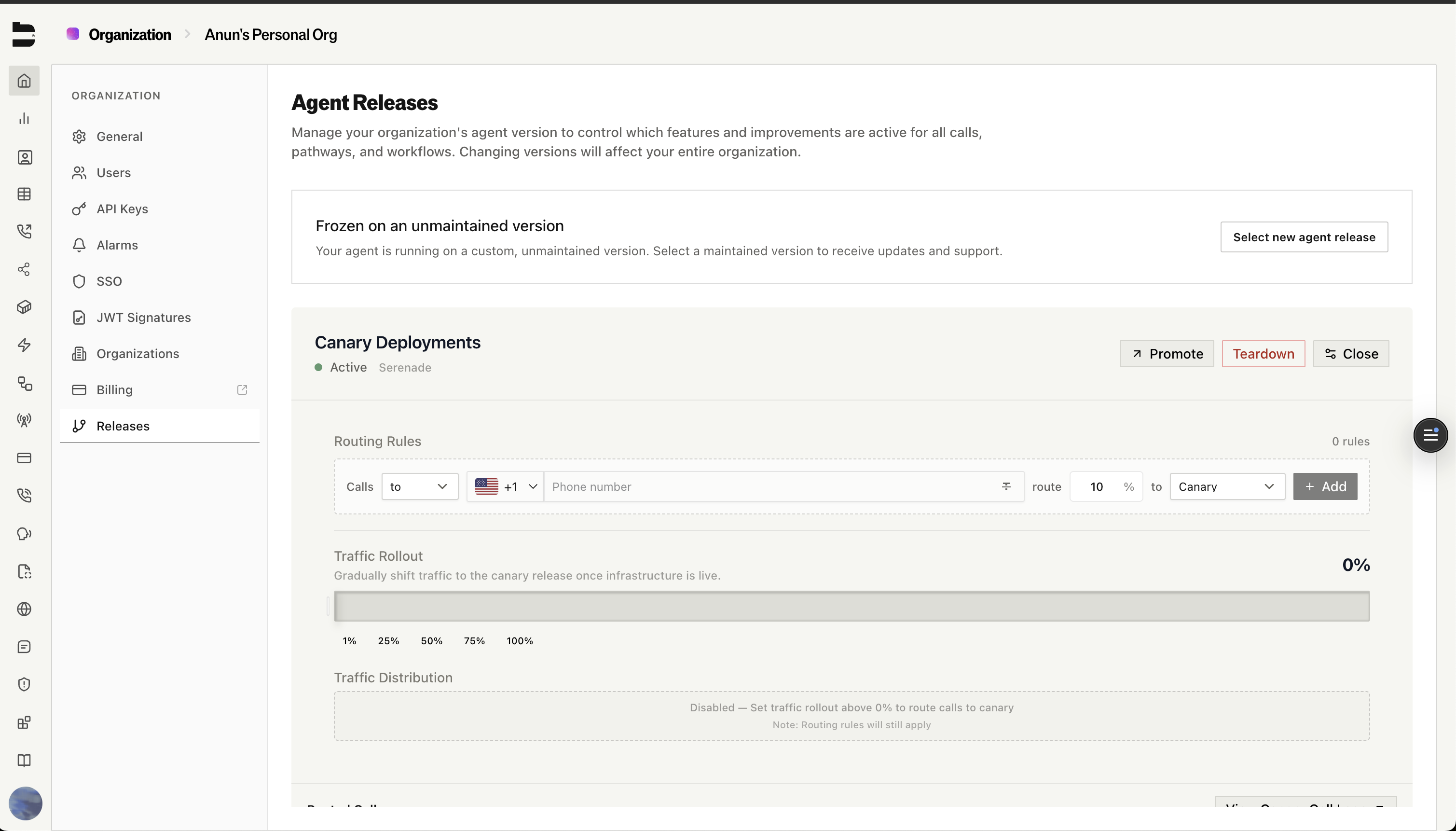
Percentage-Based Rollout
Use the traffic rollout slider to gradually shift traffic to the canary:- 1% — Smoke test with a handful of real calls
- 25% — Validate at moderate scale
- 50% — Split traffic evenly for a true A/B comparison
- 100% — Full canary validation before promoting
Rule-Based Routing
For more targeted testing, you can create routing rules that override the base percentage. Rules let you route specific traffic to the canary based on:- Phone number — Route calls to or from specific numbers
- Organization — Send all traffic from a test org to the canary
- Agent or pathway — Isolate testing to a specific workflow
Example: You’re rolling out a new release that improves the scheduling node. You create a rule that sends 100% of calls from your QA organization to the canary, while production traffic stays on the current version. Once your QA team validates the behavior, you increase the base rollout to 10%, then 50%, and finally promote.
Call Logs
Every routing decision is logged. You can see exactly which calls went to canary vs. production, filter by time range or routing destination, and track the overall canary traffic percentage — giving you full auditability of what ran where.Why This Matters
Upgrading agent infrastructure in production is high-stakes. A regression in call handling, transcription accuracy, or response latency can directly impact your customers. Canary deployments exist so you never have to take that risk blind.- Test with real traffic before committing to a release
- Catch regressions early by comparing canary calls against your production baseline
- Roll back instantly — tearing down a canary takes seconds and production is never affected
- Ship with confidence knowing the new version has already handled live calls successfully
Docs for agents: llms.txt