

Enterprise feature. iMessage and RCS are available on Enterprise plans. Contact your Account Executive or reach out to sales to get set up.
Why it matters
Customers ignore calls and texts from numbers they do not recognize, and most will not install an app to ask one question. A contact they have saved gets answered. Take a clinic. A patient saves the clinic’s contact once. From then on they text it to move an appointment, send a photo of an insurance card, or call it when they would rather talk. When the clinic’s agent calls with a reminder, the patient’s phone shows the clinic’s name. It is the same agent each time, with the same history. Three things make that work:- Your brand is on every call and message. The contact card carries your logo and name. Branded caller ID shows your name, logo, and the reason for the call on outbound calls, even to people who have not saved you. On RCS the business profile is verified.
- It uses what the customer already has. The phone app and the messaging app. There is no app to install and no account to create.
- It is one agent. Calls and messages share instructions, tools, and memory, so a customer who called last week does not start over by text.
How it fits together
You build one agent and give it one identity. That identity is what customers see on every channel.
In the dashboard all of this lives on the agent’s Identity page. You will not find a page named Contact in your phone.
Prerequisites
- An Enterprise workspace on the new dashboard at v2.app.bland.ai
- A square logo, at least 224 x 224 px, PNG or JPEG, up to 2 MB
- For RCS: your legal entity name, business address, privacy policy URL, and terms of service URL
- For branded caller ID: your business details filled in under Settings, Organization, Business details
Build the agent
1
Create an agent
Open Agents and click Create agent. If you already have an agent, use that one.For the ways to create one and how to write its prompt, see Build your first agent and Agent builder.
2
Attach a number
Inside the agent, open Channels under Dispatch and click the Messages tab. Click Attach a number, pick a number, and click Attach number.Once a number is attached, Channel priority appears. It lists iMessage, RCS, and SMS in the order the agent tries them. The first channel is marked Primary, and the others follow as fallbacks. Click Make primary on a row to change the order. In the recording below, iMessage is not available yet because the number is not set up for it.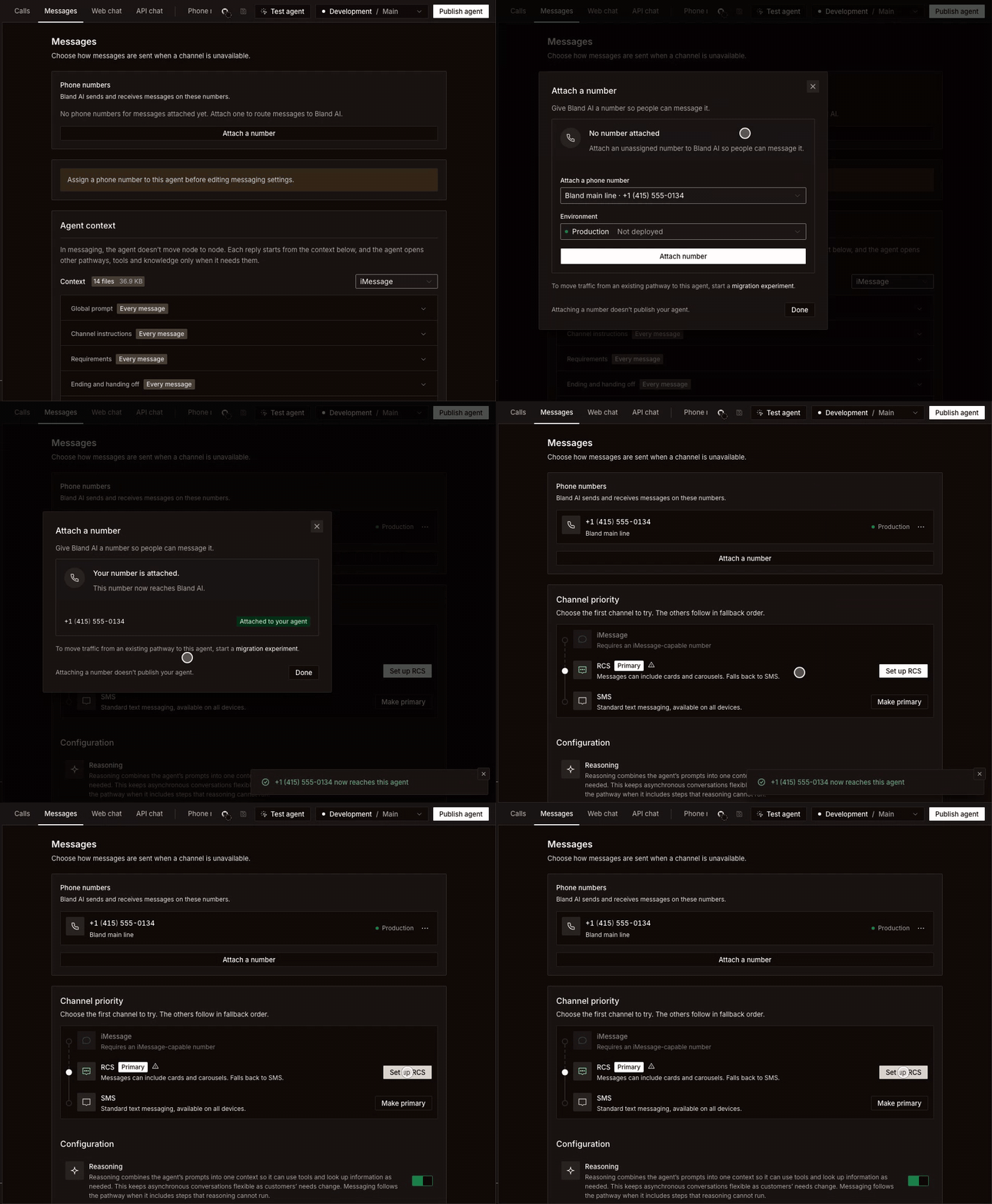
3
Fill in the contact card
Open Agent in the sidebar and click the Identity tab. The Contact card section is what customers see when they save your agent. Phone number is filled in from the number you attached.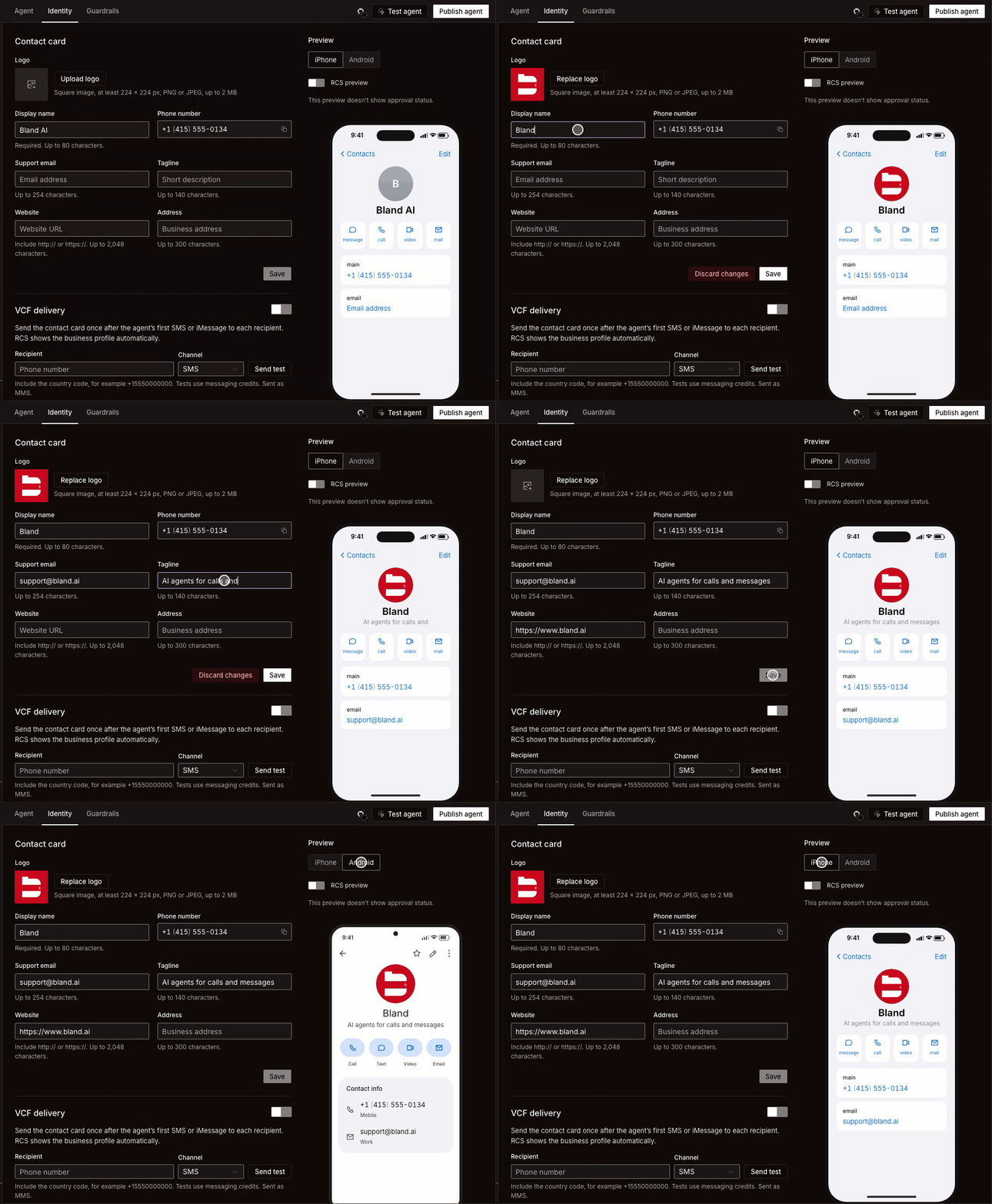
The Preview on the right updates as you type. Switch between iPhone and Android to check both. Click Save when it looks right.
Identity has its own Save. It is separate from saving and publishing the agent, so a change to the contact card does not need a new version.
4
Send the contact card automatically
Still on Identity, turn on VCF delivery. Your agent then sends the contact card once, after its first SMS or iMessage to each person. The customer taps it and saves you.RCS does not need this. It shows your business profile on its own.To see what a customer receives, enter your own number under Recipient, choose a Channel, and click Send test. Include the country code, for example
+15550000000. Tests use messaging credits, and an SMS test is sent as MMS. Download contact card (.vcf) gives you the same file to share anywhere else, such as an email signature or a QR code.5
Publish the agent
Attaching a number does not publish your agent. Click Publish agent and promote it to production so customers reach the version you just built. See Publish and promote.
Turn on each channel
The contact card covers everyone who saves you. The sections below add your brand on each channel, including for people who have not saved you yet.Calls
A standard number attached to the agent answers calls as well as messages, so the number on the contact card is one customers can call. The agent picks up with the same instructions it uses over text. For outbound calls, apply for Branded caller ID. It shows your business name, logo, and call reason on the recipient’s incoming call screen for calls to T-Mobile and Verizon phones. AT&T is not supported yet, so calls to AT&T subscribers show your number as usual. On Identity, find Branded caller ID and click Apply for branded caller ID. The agent needs a number attached first.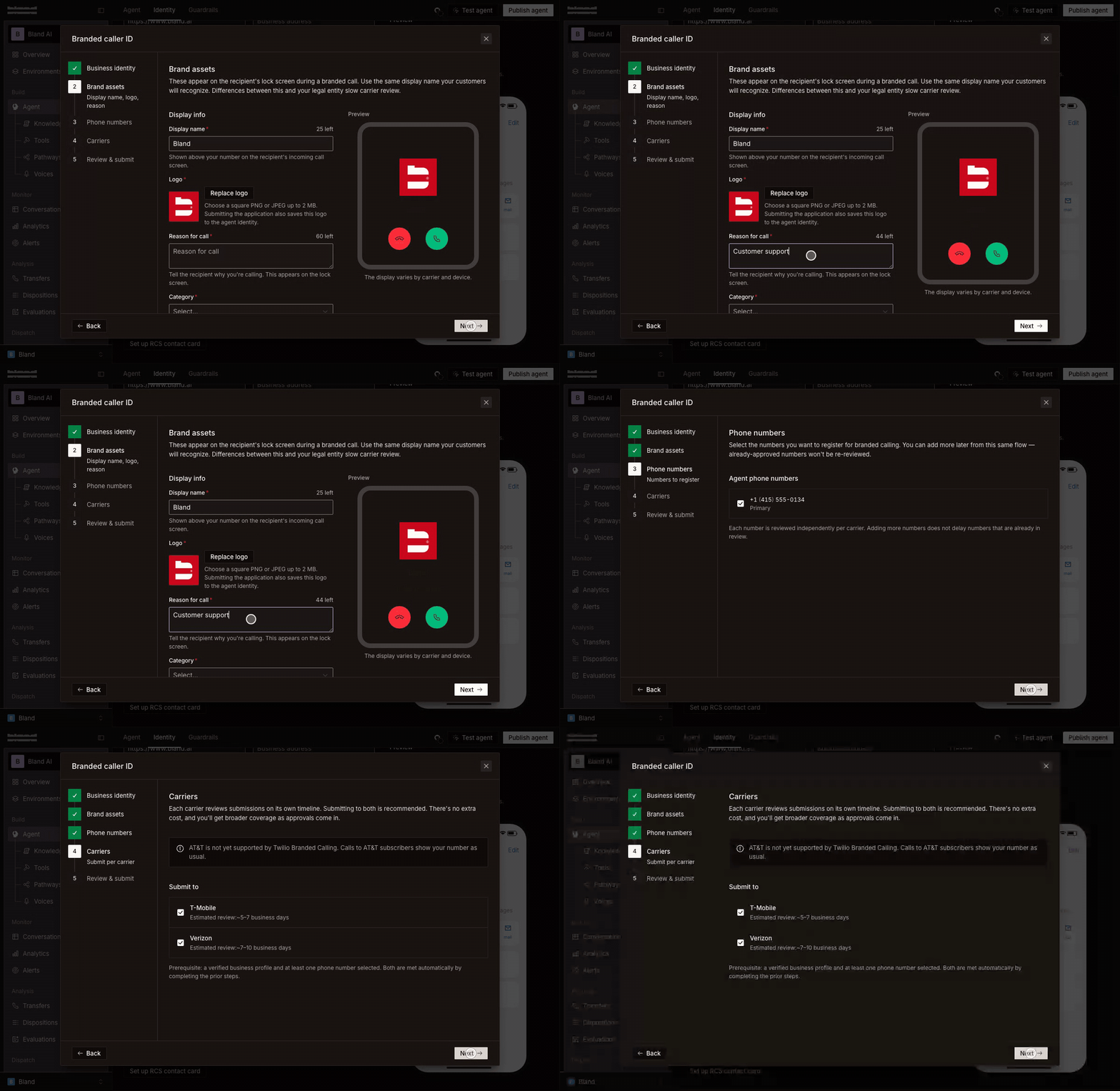
Each carrier reviews on its own schedule: about 5 to 7 business days for T-Mobile and about 7 to 10 for Verizon. The status on the section reads Submitted, then Pending review, then Approved or Rejected. A submitted application is view only. A rejected one can be corrected and sent again.
Branding starts on a carrier once that carrier approves the application and the Branded caller ID switch is on.
iMessage
iMessage needs a number that Bland sets up for it. You cannot turn it on yourself from the dashboard. Until you have one, the iMessage row under Channel priority reads “Requires an iMessage-capable number”. To request one, fill in the iMessage interest form. iMessage numbers are limited, so Bland assigns them in batches and emails you when one is ready for your organization. Enterprise customers can also ask their Account Executive. When the number is on your account, attach it the same way as any other. iMessage becomes available in Channel priority, and messages fall back to RCS or SMS when the customer is not on an Apple device.An iMessage number carries iMessage only. To take calls, SMS, or RCS on the same agent, keep a standard number attached as well.
RCS
You submit RCS yourself, from the dashboard. On Identity, find RCS contact card and click Set up RCS contact card. You can also get there from Set up RCS in Channel priority. The agent needs a number attached first.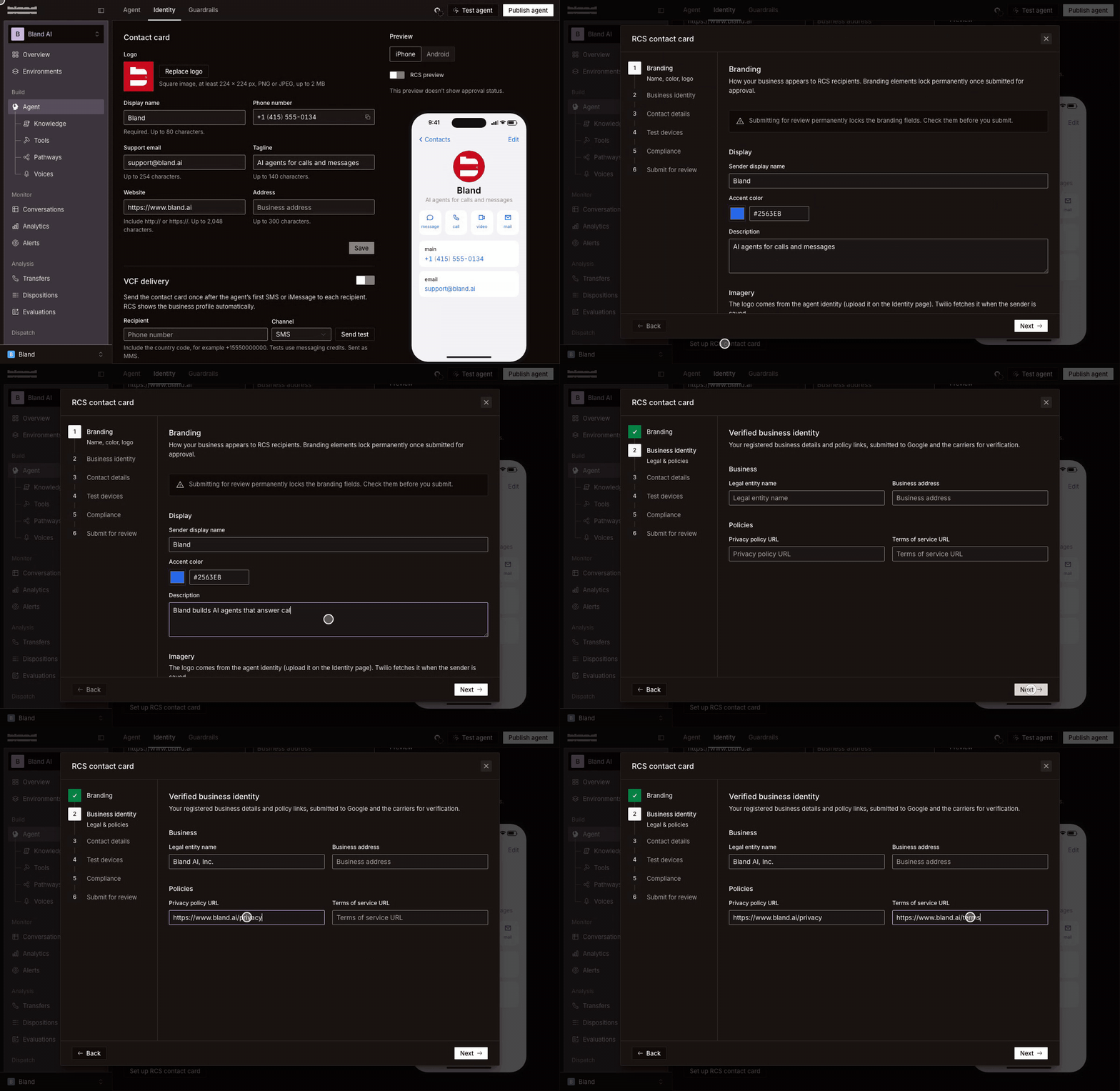
Approval takes about a week. The status on the RCS contact card section moves from Draft to In review, then Pending verification, then Online. Once it is Online, attach it to messaging from the last step and your agent starts sending RCS.
While you wait, add your own phone under Test devices and accept the invitation on that phone. You can then text the agent over RCS and see the real profile.
Turning the RCS contact card switch off sends plain SMS instead.
SMS
SMS is the fallback that reaches every phone. To send SMS to US numbers, the number needs A2P 10DLC registration. Receiving works without it. Start from the SMS row in Channel priority, and see SMS for the details.Check it before you share it
- Send yourself a test from VCF delivery on each messaging channel you turned on.
- Save the contact on your phone and confirm the name, logo, and tagline.
- Text the agent a real question and read the reply. Then call the same number.
- Open Conversations and confirm both the thread and the call are listed under your agent.
Common questions
I don't see Identity or Messages
I don't see Identity or Messages
Both need messaging on your plan. iMessage and RCS are Enterprise only. If your workspace should have them, contact support.
The Phone number field on the contact card is empty
The Phone number field on the contact card is empty
It shows the number attached to the agent and cannot be edited. Attach a number in Channels and it fills in.
Send test, Apply for branded caller ID, or Set up RCS contact card is disabled
Send test, Apply for branded caller ID, or Set up RCS contact card is disabled
All three need a number on the agent. Attach one in Channels first.
The branded caller ID application will not let me past the first step
The branded caller ID application will not let me past the first step
Your business details are incomplete. The first step lists what is missing. Click Edit business details, fill them in, and come back.
Do customers see my name when the agent calls if they have not saved the contact?
Do customers see my name when the agent calls if they have not saved the contact?
On T-Mobile and Verizon, yes, once branded caller ID is approved and switched on. On AT&T, which is not supported yet, they see the number unless they have saved you.
A customer has an Android phone. What do they see?
A customer has an Android phone. What do they see?
Your verified RCS profile once RCS is Online. Before that, or on a phone without RCS, they get SMS, with the contact card sent once if VCF delivery is on.
Next steps
iMessage
Photos, files, voice memos, and tapbacks.
RCS
Verified profile, suggested replies, and cards.
Dispatch
Numbers, call settings, and per-number messaging settings.
Memory
Let the agent remember each customer across calls and texts.
Docs for agents: llms.txt