> ## Documentation Index
> Fetch the complete documentation index at: https://docs.bland.ai/llms.txt
> Use this file to discover all available pages before exploring further.
# Norm
> Bland's AI assistant for building, editing, testing, and debugging voice agents from a prompt.
## Introduction
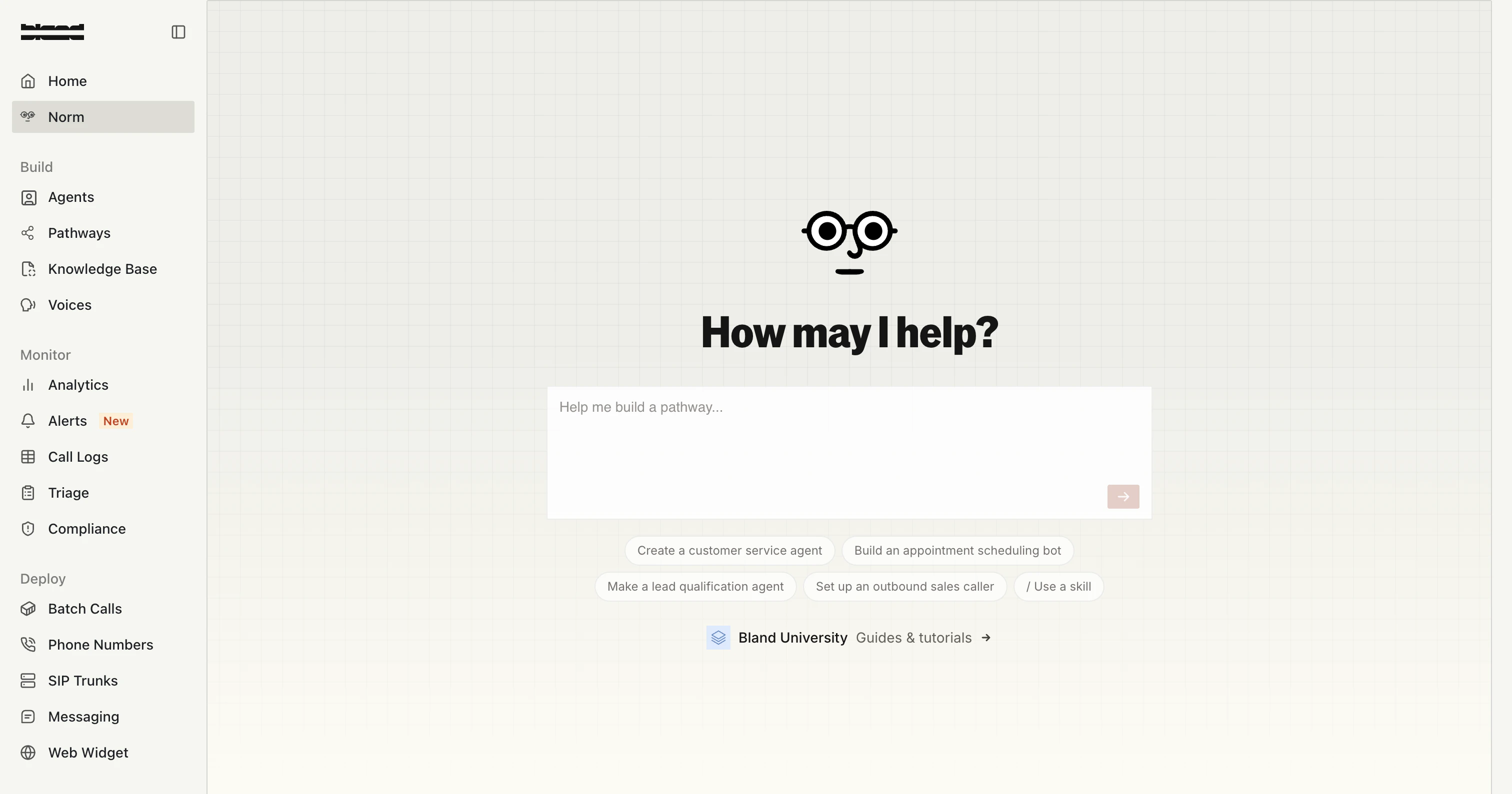
Norm is the AI assistant built into Bland. You describe what you want in plain English, and Norm builds, edits, tests, and debugs your agents for you, pathways, personas, tools, analytics, and triage all from one conversation.
Norm works the way an experienced Bland engineer would: it inspects the live state of your account before making changes, forks a draft so production keeps running, runs tests against real call data, and only persists changes when you're ready.
Describe an agent, a node, a route, or a tool change. Norm makes the change in a draft you can review before it goes live.
Replay real calls against your draft, run simulated conversations, and trace failed calls back to a root cause.
Ask in plain English: "how many calls failed yesterday?", "transfer rate by pathway this week" and get tables, charts, or a single number.
Flag a bad call, and Norm reproduces it, finds the root cause, applies the fix, and verifies it against the original call.
***
## Where to find Norm
The main chat surface in the [Bland dashboard](https://app.bland.ai/dashboard/norm). Use it for any task across your org.
Norm is embedded inside the pathway editor as an assistant panel, scoped to the pathway you have open.
Text Norm at **+1 (321) 424-0172** to build, test, and monitor agents from your phone. See [Norm over iMessage](/tutorials/messaging/imessage#norm-over-imessage).
 ***
## What Norm can do
### Build and edit agents
Norm can create a new pathway from a description, edit an existing one, or wire up a new persona, including its voice, language, knowledge bases, and call configuration.
Common requests:
* *"Build me a scheduling agent that books appointments on Cal.com."*
* *"Add a node after intake that verifies the caller's policy number against our CRM."*
* *"Change the transfer fallback on this pathway to go to billing instead of sales."*
* *"Create a persona that uses the June voice and routes billing questions to my billing pathway."*
Norm understands every editable surface in a pathway; nodes, edges, routes, variables, model configuration, attached tools, response pathways, unit tests, and the global prompt. Norm will then edit each through the right interface rather than hand-writing raw config.
### Test and debug
Norm has direct access to your call logs, transcripts, quality reports, and pathway run logs. When you point it at a problem, it gathers the evidence before suggesting a fix.
Common requests:
* *"Why did call `abc-123` fail to transfer?"*
* *"This pathway is misrouting refund requests to the cancellation flow. Find out why."*
* *"Run my draft against the last 5 calls that hit this node and tell me if the fix holds."*
Norm uses **Test Bed** to replay a real call's recorded state against your draft at a specific node, so you can confirm a fix on the exact broken conversation without redialing anyone. Learn more in the [Test Bed](/tutorials/testbed) docs.
### Query analytics
Ask any question about your call data in plain English. Norm picks the right aggregation, time range, and visualization for the question.
Common requests:
* *"How many calls did I get in the last 10 minutes?"*
* *"Transfer rate by pathway over the last 30 days, as a bar chart."*
* *"Compare average call duration this week vs. last week."*
* *"Top 5 disconnect reasons for failed calls yesterday."*
### Fix issues from Triage
From the [Triage dashboard](https://app.bland.ai/dashboard/monitor/triage), flag any call as an issue and hit **Norm Fix**. Norm pulls in the failing call and its pathway, reproduces the failure, applies a fix in a draft, and verifies it against the original call.
Every change Norm makes is reviewable on the issue, so you can see exactly what it touched before merging the fix into production.
### Run skills
Skills are reusable workflows that scope Norm to a specific task, a built-in skill like `/systematic-debugging`, or a custom skill your team writes.
Type `/` in Norm chat to open the skill menu. Custom skills are scoped to your organization and let you encode anything your team does repeatedly: brand-voice enforcement, common pathway scaffolds, or your standard QA scenarios for every new agent.
***
## How Norm keeps production safe
Norm never edits a live pathway directly. Every change moves through three stages:
When you ask Norm to edit a pathway, it forks the current version into a **draft (working version)**. Production keeps running the existing version while you and Norm work.
Once the draft passes Norm's validation checks and any tests you run, Norm saves it as a **new persisted version** of the pathway. It is still not on live calls yet.
To put the new version on live traffic, Norm relinks the persona to point at it. Until that step, production keeps running the previous version.
The same pattern applies to personas: drafts are kept separate from production, and a promotion step makes the change live.
You can ask Norm to discard a draft at any time. Production is untouched until the final link step.
***
## Tips for working with Norm
* **Anchor on a real call when possible.** If you're debugging, paste the call ID. Norm will pull the full call workspace and reproduce the failure on Test Bed before suggesting a fix.
* **Be specific about scope.** Norm follows surgical-edit rules: it changes what you asked for and nothing else. If you want broader cleanup, say so.
* **Ask Norm to explain before it edits.** "Walk me through what you'd change before doing it" is a valid prompt.
* **Use skills for repeatable work.** If you find yourself giving Norm the same instructions repeatedly, turn them into a custom skill.
***
## Related docs
The flow graph that Norm edits when you ask for agent changes.
The agent identity layer Norm configures, links to pathways, and promotes.
The simulation surface Norm uses to verify changes against real calls.
Test suites Norm can analyze and auto-fix when a scenario run fails.
The tool library Norm authors and attaches to nodes.
Talk to Norm over iMessage from your phone.
***
## What Norm can do
### Build and edit agents
Norm can create a new pathway from a description, edit an existing one, or wire up a new persona, including its voice, language, knowledge bases, and call configuration.
Common requests:
* *"Build me a scheduling agent that books appointments on Cal.com."*
* *"Add a node after intake that verifies the caller's policy number against our CRM."*
* *"Change the transfer fallback on this pathway to go to billing instead of sales."*
* *"Create a persona that uses the June voice and routes billing questions to my billing pathway."*
Norm understands every editable surface in a pathway; nodes, edges, routes, variables, model configuration, attached tools, response pathways, unit tests, and the global prompt. Norm will then edit each through the right interface rather than hand-writing raw config.
### Test and debug
Norm has direct access to your call logs, transcripts, quality reports, and pathway run logs. When you point it at a problem, it gathers the evidence before suggesting a fix.
Common requests:
* *"Why did call `abc-123` fail to transfer?"*
* *"This pathway is misrouting refund requests to the cancellation flow. Find out why."*
* *"Run my draft against the last 5 calls that hit this node and tell me if the fix holds."*
Norm uses **Test Bed** to replay a real call's recorded state against your draft at a specific node, so you can confirm a fix on the exact broken conversation without redialing anyone. Learn more in the [Test Bed](/tutorials/testbed) docs.
### Query analytics
Ask any question about your call data in plain English. Norm picks the right aggregation, time range, and visualization for the question.
Common requests:
* *"How many calls did I get in the last 10 minutes?"*
* *"Transfer rate by pathway over the last 30 days, as a bar chart."*
* *"Compare average call duration this week vs. last week."*
* *"Top 5 disconnect reasons for failed calls yesterday."*
### Fix issues from Triage
From the [Triage dashboard](https://app.bland.ai/dashboard/monitor/triage), flag any call as an issue and hit **Norm Fix**. Norm pulls in the failing call and its pathway, reproduces the failure, applies a fix in a draft, and verifies it against the original call.
Every change Norm makes is reviewable on the issue, so you can see exactly what it touched before merging the fix into production.
### Run skills
Skills are reusable workflows that scope Norm to a specific task, a built-in skill like `/systematic-debugging`, or a custom skill your team writes.
Type `/` in Norm chat to open the skill menu. Custom skills are scoped to your organization and let you encode anything your team does repeatedly: brand-voice enforcement, common pathway scaffolds, or your standard QA scenarios for every new agent.
***
## How Norm keeps production safe
Norm never edits a live pathway directly. Every change moves through three stages:
When you ask Norm to edit a pathway, it forks the current version into a **draft (working version)**. Production keeps running the existing version while you and Norm work.
Once the draft passes Norm's validation checks and any tests you run, Norm saves it as a **new persisted version** of the pathway. It is still not on live calls yet.
To put the new version on live traffic, Norm relinks the persona to point at it. Until that step, production keeps running the previous version.
The same pattern applies to personas: drafts are kept separate from production, and a promotion step makes the change live.
You can ask Norm to discard a draft at any time. Production is untouched until the final link step.
***
## Tips for working with Norm
* **Anchor on a real call when possible.** If you're debugging, paste the call ID. Norm will pull the full call workspace and reproduce the failure on Test Bed before suggesting a fix.
* **Be specific about scope.** Norm follows surgical-edit rules: it changes what you asked for and nothing else. If you want broader cleanup, say so.
* **Ask Norm to explain before it edits.** "Walk me through what you'd change before doing it" is a valid prompt.
* **Use skills for repeatable work.** If you find yourself giving Norm the same instructions repeatedly, turn them into a custom skill.
***
## Related docs
The flow graph that Norm edits when you ask for agent changes.
The agent identity layer Norm configures, links to pathways, and promotes.
The simulation surface Norm uses to verify changes against real calls.
Test suites Norm can analyze and auto-fix when a scenario run fails.
The tool library Norm authors and attaches to nodes.
Talk to Norm over iMessage from your phone.