> ## Documentation Index
> Fetch the complete documentation index at: https://docs.bland.ai/llms.txt
> Use this file to discover all available pages before exploring further.
# Memory
> Preserve context across conversations by enabling memory on your pathway or persona.
## Introduction
Memory lets Bland agents remember people across conversations, including calls, SMS, and other channels, so each interaction feels continuous and personalized. When someone reaches out again, your agent already has context: who they are, what was discussed, and what still needs to happen.
Key capabilities:
Bland creates and links contacts by phone number, email, or external ID with no manual setup.
Rolling summaries, structured facts, and open action items are maintained per contact and persona.
The same contact is recognized across voice and SMS, with one coherent history.
Each pathway or persona keeps its own conversation history with a contact, independently.
***
## How it works
1. **Enable memory** on a [pathway](/tutorials/pathways) or [persona](/tutorials/personas) in the dashboard or via the API.
2. **Bland creates contacts automatically** when someone interacts, matched by phone number, email, or external ID.
3. **For each contact, Bland maintains:**
* **Facts**: structured key-value information (name, preferences, account details, etc.)
* **Summary**: a rolling plain-text overview of past conversations, used for agent context
* **Open items**: action items or follow-ups (e.g. "Follow up on order delay", "Call back Friday")
* **Entities**: structured objects tracked across conversations, like orders, appointments, or tickets
* **Recent messages**: a sliding window of the latest exchanges across all channels
Memory is scoped per contact and per persona (or agent number). One person can have separate histories with different personas, and each stays consistent over time without mixing context.
***
## Enabling memory on a pathway or persona
### Pathways
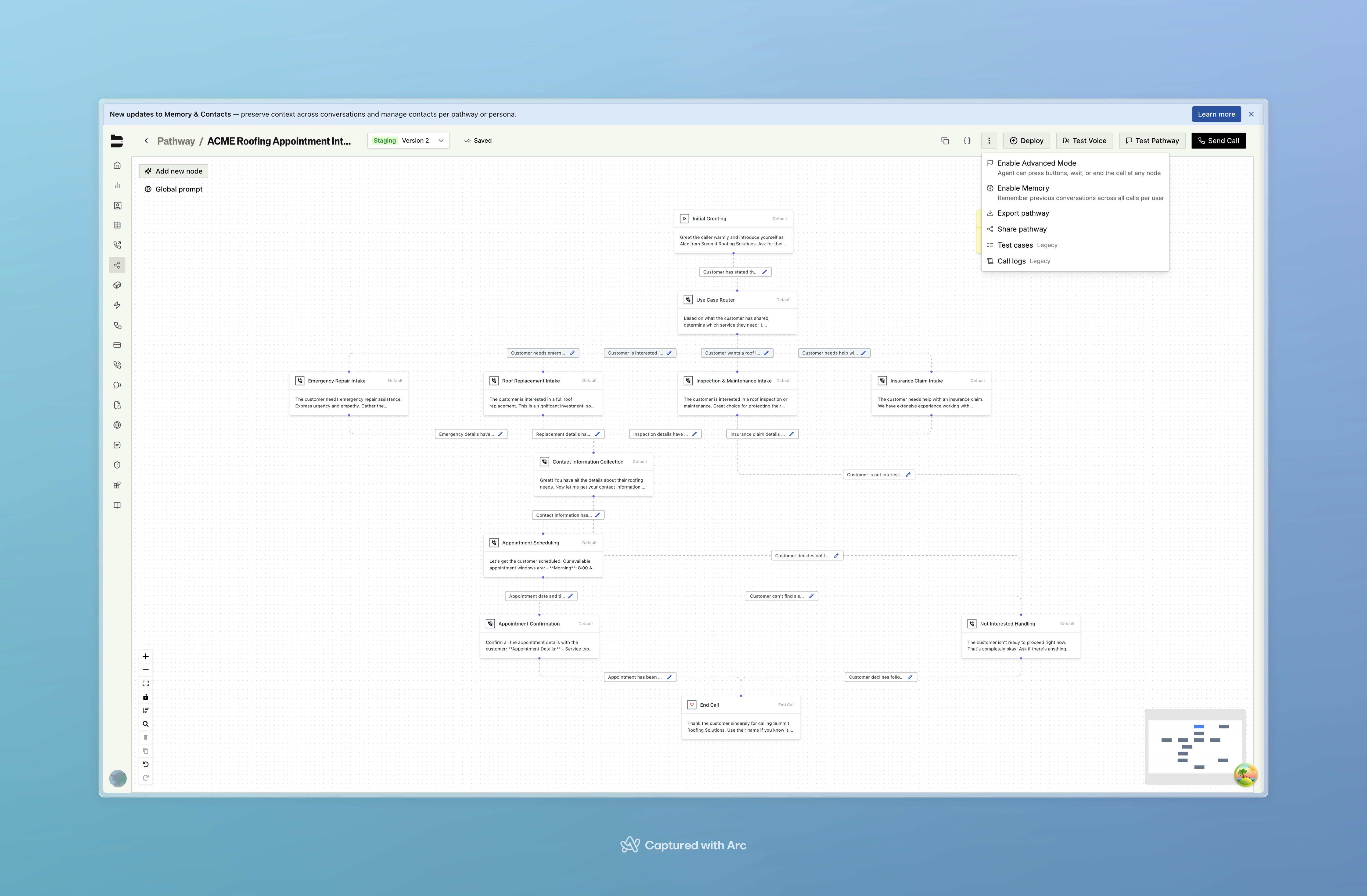
To enable memory for a **pathway**:
1. Open your pathway in the Bland dashboard.
2. In the top-right menu (next to **Send Call**), open the dropdown.
3. Check **Enable Memory** ("Remember previous conversations across all calls per user").
4. Save your pathway. From the next interaction onward, Bland will create and update contact memory automatically.
 ### Personas
To enable memory for a **persona**, go to the **Knowledge** tab for that persona and toggle **Memory** on.
Calls or conversations that use that pathway or persona will automatically read and update the contact's facts, summary, open items, and recent messages. No extra configuration is needed for standard use.
To enable or disable memory per pathway or persona version (e.g. for testing), use the [Enable or Disable Memory](/api-v1/post/memory-enable) API with `pathway_id` + `version_number` or `persona_id` + `version_id`, and `memory_enabled`.
***
## Viewing memory in call and SMS logs
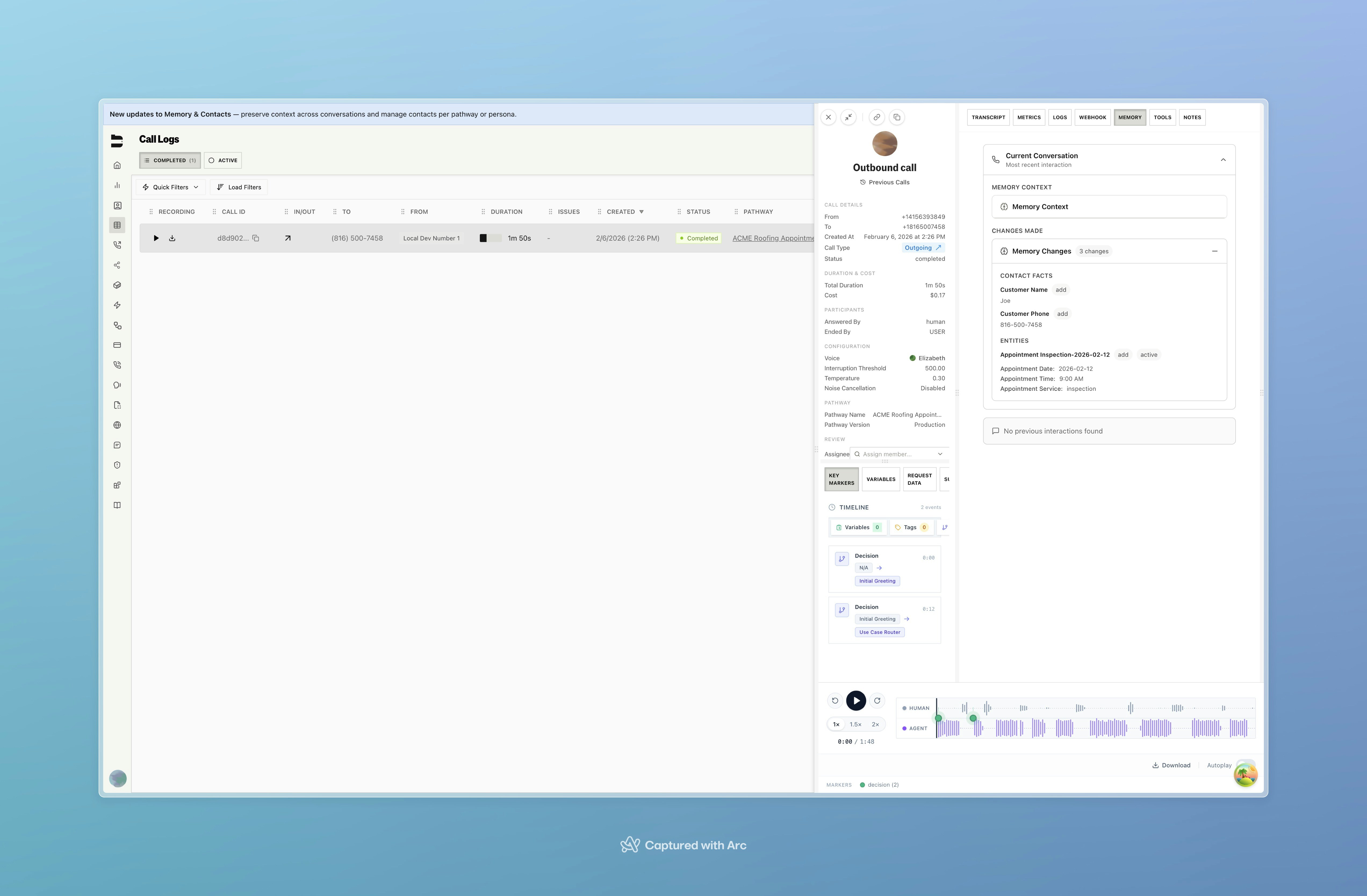
After a call or SMS conversation with memory enabled, Bland captures any new or updated contact information from the interaction. Open a completed call in **Call Logs** and select the **MEMORY** tab, or open an SMS conversation and select the **SMS** tab, to see:
* **Memory context**: what the agent had available going into the conversation.
* **Changes made**: facts and entities that were added or updated during the interaction (e.g. customer name, phone number, appointment details).
### Personas
To enable memory for a **persona**, go to the **Knowledge** tab for that persona and toggle **Memory** on.
Calls or conversations that use that pathway or persona will automatically read and update the contact's facts, summary, open items, and recent messages. No extra configuration is needed for standard use.
To enable or disable memory per pathway or persona version (e.g. for testing), use the [Enable or Disable Memory](/api-v1/post/memory-enable) API with `pathway_id` + `version_number` or `persona_id` + `version_id`, and `memory_enabled`.
***
## Viewing memory in call and SMS logs
After a call or SMS conversation with memory enabled, Bland captures any new or updated contact information from the interaction. Open a completed call in **Call Logs** and select the **MEMORY** tab, or open an SMS conversation and select the **SMS** tab, to see:
* **Memory context**: what the agent had available going into the conversation.
* **Changes made**: facts and entities that were added or updated during the interaction (e.g. customer name, phone number, appointment details).
 Memory is cross-channel: the same contact's context is shared across voice and SMS. Hand-offs between channels, for example a call followed by a follow-up SMS, stay coherent without any extra work on your end.
***
## How memory evolves over time
Here is an example showing a contact and their memory building across two interactions with a support persona.
**First call: contact reaches out about a delayed order**
When the call comes in, Bland matches the phone number to a contact (creating one if it does not exist yet):
```json Contact record theme={null}
{
"id": "aaaaaaaa-bbbb-cccc-dddd-eeeeeeeeeeee",
"phone_number": "+14155550192",
"name": "Sarah Chen",
"org_id": "11111111-2222-3333-4444-555555555555",
"created_at": "2025-07-22T10:30:00.000Z"
}
```
By the end of the call, the memory record for this contact and persona looks like this:
```json Memory after first call theme={null}
{
"facts": {
"name": "Sarah Chen",
"phone": "+14155550192"
},
"summary": "Customer called about order #8821 which was delayed. Promised a follow-up within 24 hours.",
"entities": [
{
"entity_type": "order",
"entity_id": "order-8821",
"facts": {
"order_number": "#8821",
"status": "delayed",
"carrier": "UPS"
},
"status": "delayed",
"last_discussed_at": "2025-07-22T10:30:00.000Z",
"notes": "Customer was promised a follow-up within 24 hours"
}
],
"open_items": [
{
"type": "follow_up",
"description": "Follow up on order #8821 delay status",
"created_at": "2025-07-22T10:30:00.000Z",
"priority": "high",
"related_to": {
"entity_type": "order",
"entity_id": "order-8821"
}
}
]
}
```
**Follow-up SMS: customer checks in the next day**
Bland recognizes the same contact by phone number. The agent already knows about the order and the open follow-up. After the SMS conversation ends:
```json Memory after follow-up SMS theme={null}
{
"facts": {
"name": "Sarah Chen",
"phone": "+14155550192",
"preferred_contact": "sms"
},
"summary": "Order #8821 shipped and is now in transit. Expected delivery Friday July 25. Customer confirmed via SMS and prefers SMS over calls.",
"entities": [
{
"entity_type": "order",
"entity_id": "order-8821",
"facts": {
"order_number": "#8821",
"status": "in_transit",
"carrier": "UPS",
"expected_delivery": "2025-07-25"
},
"status": "in_transit",
"last_discussed_at": "2025-07-23T09:15:00.000Z",
"notes": null
}
],
"open_items": []
}
```
The open item was resolved, the entity's status updated, a new fact was added, and the summary refreshed. On the next interaction, the agent picks up exactly where things left off.
***
## Real-world example
Imagine a company running two separate personas:
* **Appointment scheduling**: books and reschedules inspections, consultations, and follow-ups.
* **Support**: handles open tickets, status updates, and troubleshooting.
With memory enabled on each, the same contact can have one conversation about booking and another about a support issue. Each persona keeps its own history with the right context, without mixing the two.
***
## API and programmatic access
For custom flows or reading and writing memory programmatically:
* **[Contacts API](/api-v1/get/contacts)**: list and look up contacts by phone number, email, or external ID.
* **[Get Memory Context](/api-v1/get/memory-context)**: fetch everything the agent sees at the start of a conversation, including summary, facts, recent messages, entities, and open items.
* **[Get Memory Changes](/api-v1/get/memory-changes)**: see what was captured or updated during a specific call or SMS.
* **[Update Facts](/api-v1/patch/memory-contact-id-facts)** / **[Update Summary](/api-v1/patch/memory-contact-id-summary)**: write memory data directly.
* **[Reset Contact Memory](/api-v1/post/memory-reset)**: permanently clear all memory for a contact/persona pair.
For standard use, you do not need to manage any IDs directly. Enable memory on your pathway or persona and Bland handles the rest.
***
Docs for agents: [llms.txt](/llms.txt)
Memory is cross-channel: the same contact's context is shared across voice and SMS. Hand-offs between channels, for example a call followed by a follow-up SMS, stay coherent without any extra work on your end.
***
## How memory evolves over time
Here is an example showing a contact and their memory building across two interactions with a support persona.
**First call: contact reaches out about a delayed order**
When the call comes in, Bland matches the phone number to a contact (creating one if it does not exist yet):
```json Contact record theme={null}
{
"id": "aaaaaaaa-bbbb-cccc-dddd-eeeeeeeeeeee",
"phone_number": "+14155550192",
"name": "Sarah Chen",
"org_id": "11111111-2222-3333-4444-555555555555",
"created_at": "2025-07-22T10:30:00.000Z"
}
```
By the end of the call, the memory record for this contact and persona looks like this:
```json Memory after first call theme={null}
{
"facts": {
"name": "Sarah Chen",
"phone": "+14155550192"
},
"summary": "Customer called about order #8821 which was delayed. Promised a follow-up within 24 hours.",
"entities": [
{
"entity_type": "order",
"entity_id": "order-8821",
"facts": {
"order_number": "#8821",
"status": "delayed",
"carrier": "UPS"
},
"status": "delayed",
"last_discussed_at": "2025-07-22T10:30:00.000Z",
"notes": "Customer was promised a follow-up within 24 hours"
}
],
"open_items": [
{
"type": "follow_up",
"description": "Follow up on order #8821 delay status",
"created_at": "2025-07-22T10:30:00.000Z",
"priority": "high",
"related_to": {
"entity_type": "order",
"entity_id": "order-8821"
}
}
]
}
```
**Follow-up SMS: customer checks in the next day**
Bland recognizes the same contact by phone number. The agent already knows about the order and the open follow-up. After the SMS conversation ends:
```json Memory after follow-up SMS theme={null}
{
"facts": {
"name": "Sarah Chen",
"phone": "+14155550192",
"preferred_contact": "sms"
},
"summary": "Order #8821 shipped and is now in transit. Expected delivery Friday July 25. Customer confirmed via SMS and prefers SMS over calls.",
"entities": [
{
"entity_type": "order",
"entity_id": "order-8821",
"facts": {
"order_number": "#8821",
"status": "in_transit",
"carrier": "UPS",
"expected_delivery": "2025-07-25"
},
"status": "in_transit",
"last_discussed_at": "2025-07-23T09:15:00.000Z",
"notes": null
}
],
"open_items": []
}
```
The open item was resolved, the entity's status updated, a new fact was added, and the summary refreshed. On the next interaction, the agent picks up exactly where things left off.
***
## Real-world example
Imagine a company running two separate personas:
* **Appointment scheduling**: books and reschedules inspections, consultations, and follow-ups.
* **Support**: handles open tickets, status updates, and troubleshooting.
With memory enabled on each, the same contact can have one conversation about booking and another about a support issue. Each persona keeps its own history with the right context, without mixing the two.
***
## API and programmatic access
For custom flows or reading and writing memory programmatically:
* **[Contacts API](/api-v1/get/contacts)**: list and look up contacts by phone number, email, or external ID.
* **[Get Memory Context](/api-v1/get/memory-context)**: fetch everything the agent sees at the start of a conversation, including summary, facts, recent messages, entities, and open items.
* **[Get Memory Changes](/api-v1/get/memory-changes)**: see what was captured or updated during a specific call or SMS.
* **[Update Facts](/api-v1/patch/memory-contact-id-facts)** / **[Update Summary](/api-v1/patch/memory-contact-id-summary)**: write memory data directly.
* **[Reset Contact Memory](/api-v1/post/memory-reset)**: permanently clear all memory for a contact/persona pair.
For standard use, you do not need to manage any IDs directly. Enable memory on your pathway or persona and Bland handles the rest.
***
Docs for agents: [llms.txt](/llms.txt)