> ## Documentation Index
> Fetch the complete documentation index at: https://docs.bland.ai/llms.txt
> Use this file to discover all available pages before exploring further.
# Flex Mode
> Let your agent choose where to go next based on the conversation, instead of strictly following the edges between nodes.
By default, a pathway is **strict**: at each node, the agent evaluates the outgoing edges and takes the one whose condition matches. That works for linear flows (collect name, then email, then phone) but breaks when the user goes off-script:
* *"Wait, can I come back to the email question? I gave you the wrong one."*
* *"Before we book, what's your cancellation policy?"*
* *"I already told you that, can we skip ahead?"*
**Flex Mode** lets the agent pick the next node based on the conversation, not just the edges you drew. It can backtrack, jump ahead, or stay put.
 ## When to use it
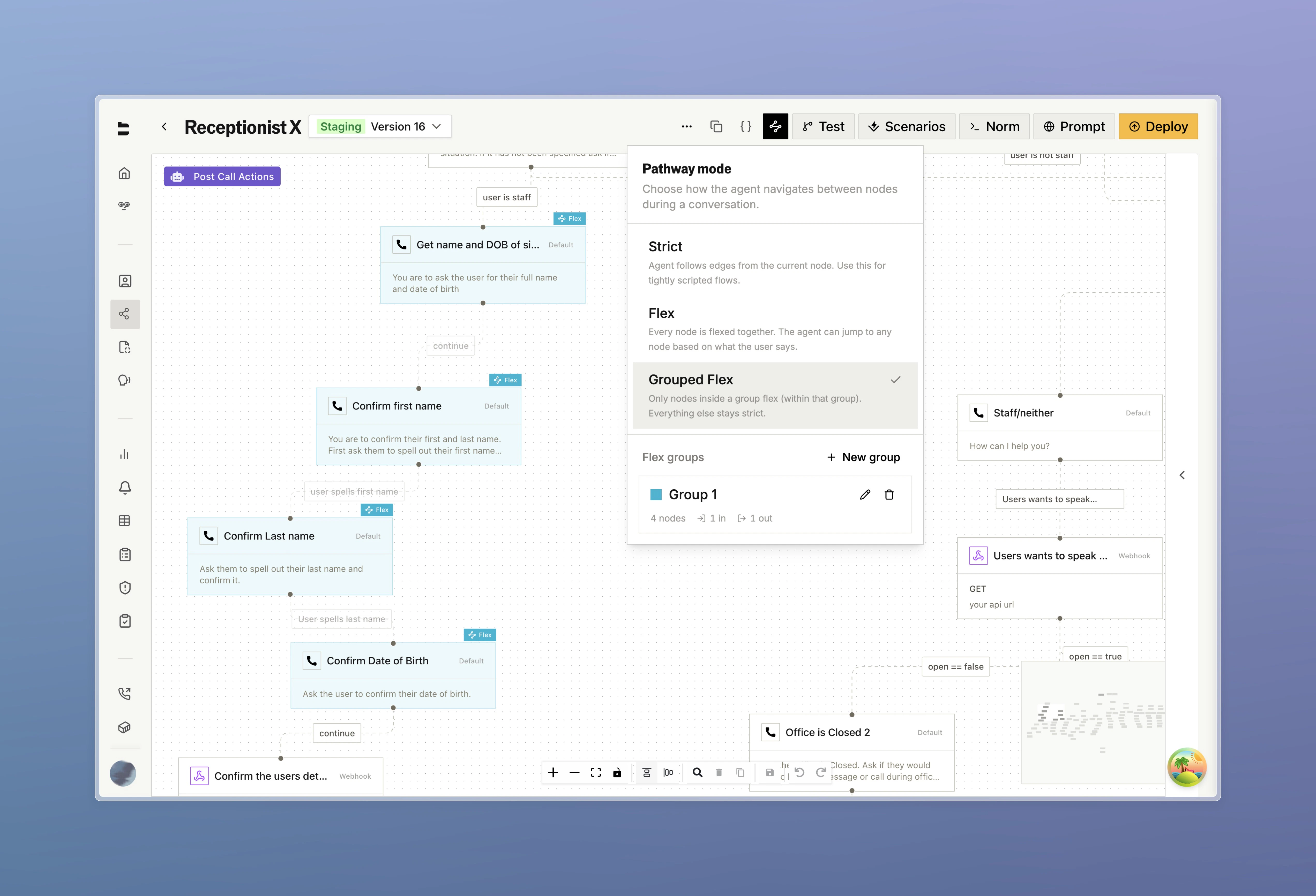
The order is fluid: discovery, sales, or support chats where the user can ask about anything in any order.
The order matters: auth flows, scripted disclosures, ordered data collection, or compliance.
You don't have to choose for the whole pathway. **Flex Groups** let you flex some sections and keep others strict.
***
## How it works
Each turn, the agent looks at:
* The nodes available to flex to (the **flex scope**)
* The recent chat history
* The current node
* The current node's outgoing edges, surfaced as **preferred next steps**
It then picks a node and runs that node's dialogue.
What changes from strict mode:
1. **Edges are suggestions, not commands.** The agent can override them when the conversation has clearly shifted.
2. **Backtracking and skipping work.** The agent can re-pick a node already visited, or jump to one not yet reached.
3. **No new prompts to write.** Flex uses the node names and prompts you already have.
***
## Enabling Flex Mode
Click on the "Flex" button in the pathway page header and set the mode to **Flex**.
## When to use it
The order is fluid: discovery, sales, or support chats where the user can ask about anything in any order.
The order matters: auth flows, scripted disclosures, ordered data collection, or compliance.
You don't have to choose for the whole pathway. **Flex Groups** let you flex some sections and keep others strict.
***
## How it works
Each turn, the agent looks at:
* The nodes available to flex to (the **flex scope**)
* The recent chat history
* The current node
* The current node's outgoing edges, surfaced as **preferred next steps**
It then picks a node and runs that node's dialogue.
What changes from strict mode:
1. **Edges are suggestions, not commands.** The agent can override them when the conversation has clearly shifted.
2. **Backtracking and skipping work.** The agent can re-pick a node already visited, or jump to one not yet reached.
3. **No new prompts to write.** Flex uses the node names and prompts you already have.
***
## Enabling Flex Mode
Click on the "Flex" button in the pathway page header and set the mode to **Flex**.
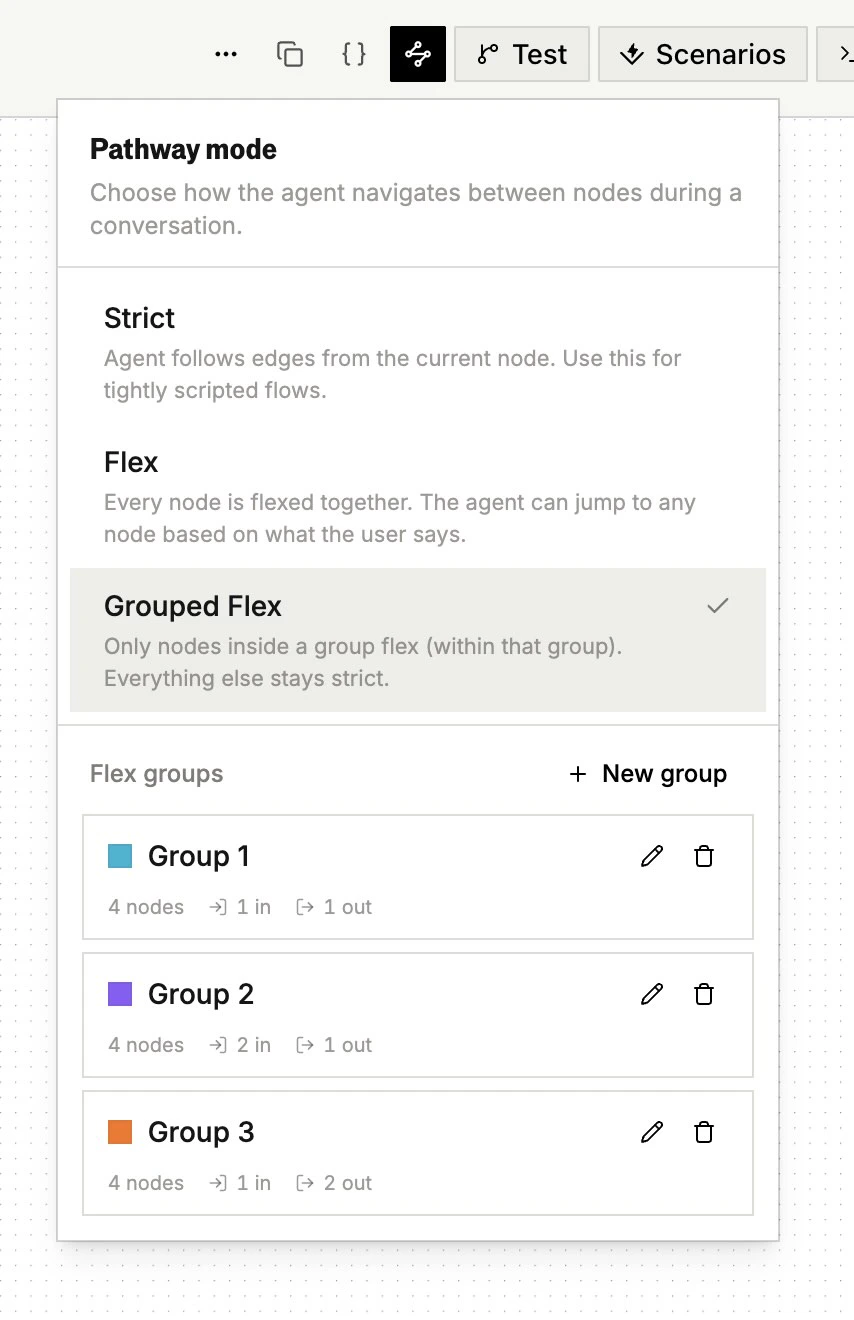 This makes every node in the pathway a flex candidate. That's usually too broad so most pathways want flex in some sections and strict in others. Use **Flex Groups** for that.
***
## Flex Groups
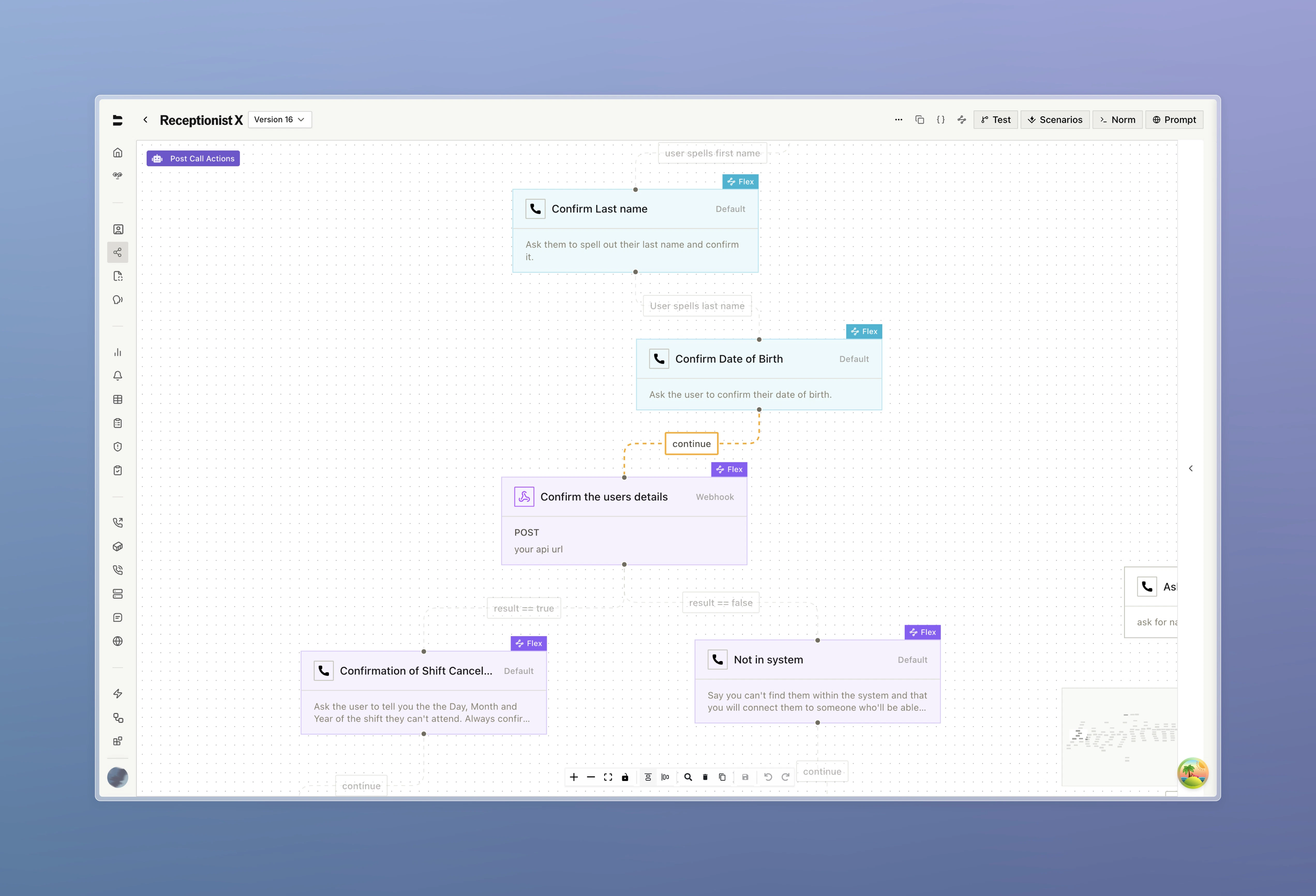
A **Flex Group** is a named, color-coded set of nodes that flex together. You can have multiple groups in one pathway. Nodes outside every group stay strict.
### Behavior
* A node can belong to **only one group**.
* If current node is **inside Group 1**, then the agent can move to any other node in Group 1, plus follow the current node's edges as suggestions (even if they are not in the group).
* If current node is **outside any group**, then the agent is in strict mode. Edges are followed, not suggested.
Moving from one flex group to another flex group must be strict, as it can only happens through an explicit edge.
This makes every node in the pathway a flex candidate. That's usually too broad so most pathways want flex in some sections and strict in others. Use **Flex Groups** for that.
***
## Flex Groups
A **Flex Group** is a named, color-coded set of nodes that flex together. You can have multiple groups in one pathway. Nodes outside every group stay strict.
### Behavior
* A node can belong to **only one group**.
* If current node is **inside Group 1**, then the agent can move to any other node in Group 1, plus follow the current node's edges as suggestions (even if they are not in the group).
* If current node is **outside any group**, then the agent is in strict mode. Edges are followed, not suggested.
Moving from one flex group to another flex group must be strict, as it can only happens through an explicit edge.
 ### Creating a group
1. Open the flex dropdown and click on "Flex Groups"
2. Click **+ New Group** and pick a color
3. Nodes can be toggled on and off, or you can drag to select a group of nodes
4. Save the group. Nodes inside the group will have a tag with the group color.
### Common patterns
| Pattern | Group contents | Why |
| ---------------------- | ----------------------------------------------- | ------------------------------------------------------------------------------- |
| **Open discovery** | Every "ask about X" + "follow up on X" node | The user can volunteer details in any order. |
| **Objection handling** | One node per objection + a "back to pitch" node | The user can object anytime; strict edges out of the group return to the pitch. |
| **FAQ side-quests** | One group per topic (pricing, hours, policies) | The agent answers freely without losing the main flow. |
***
## Within-group vs. exit routing
Inside a Flex Group, the agent sees two kinds of candidates:
* **Preferred next nodes**: the current node's outgoing edges.
* **Other nodes in the group**: off-script candidates.
The agent prefers the first list unless the conversation has clearly steered elsewhere.
### Conditional edges that exit the group
If an exit edge has a **structured condition** (e.g. `open == true`), it's evaluated against the current call variables before the agent picks. The result is shown alongside the edge label. Matching edges get a strong bias, but the agent can still stay in the group if the conversation calls for it.
Edges between nodes **inside** the group are not pre-evaluated. They're still shown to the agent as part of the current node's preferred next steps, just without an evaluated result.
***
## Best practices
### Write clear node names and prompts
The agent decides where to flex based on what each node says it does. "Node 3" with no prompt forces a guess.
**Bad:**
```
Name: Node 3
Prompt: ask for the thing
```
**Good:**
```
Name: Confirm Booking Details
Prompt: Read back the date, time, and party size, and ask the user to confirm.
If they want to change anything, listen and update.
```
### Keep groups small
Aim for **3–20 nodes** per group, each with a distinct purpose.
### Use strict edges where order matters
Use strict edges deliberately for:
* Conversation phase hand-offs (discovery to pitch).
* Ordered steps inside a group (authenticate before access).
* Webhook responses where a variable should decide.
***
## Interactions with other features
### Webhooks and tool calls
Webhook response pathways targeting a node **outside** the current group appear alongside the current node's edges, with their condition pre-evaluated. Targets **inside** the group are reachable through normal group membership.
### Global nodes
[Global Nodes](https://docs.bland.ai/tutorials/pathways#global-nodes) work the same in Flex Mode as in strict mode. They are not flex candidates.
***
## Troubleshooting
The group is probably too large, or node prompts overlap. Check:
* Are node prompts distinct enough to tell apart?
* Is the right next node in the same group, or a different one?
* Have you included a "wrap up" node in a discovery group by mistake?
Two common causes:
1. **The target is in the same group.** The agent picks freely within a group, so your edge is a suggestion.
2. **The edge has a structured condition** and the variable isn't set as expected. Check extracted variables in the logs.
For handoffs that *must* happen, either move the target outside the current group, or switch that section to strict mode.
***
## Quick reference
| Concept | What it is |
| ------------------------ | ---------------------------------------------------------------------------------------------------------------------------- |
| **Strict mode** | Default. The agent follows outgoing edges based on conditions. |
| **Flex Mode** | The agent picks the next node each turn from a pool of candidates. |
| **Flex Group** | A color-coded set of nodes that flex together. |
| **Flex scope** | The candidate pool on a given turn: the flex group containing the current node. |
| **Preferred next nodes** | The current node's outgoing edges, some of which may not be in the flex group. These are surfaced as the natural next steps. |
### Creating a group
1. Open the flex dropdown and click on "Flex Groups"
2. Click **+ New Group** and pick a color
3. Nodes can be toggled on and off, or you can drag to select a group of nodes
4. Save the group. Nodes inside the group will have a tag with the group color.
### Common patterns
| Pattern | Group contents | Why |
| ---------------------- | ----------------------------------------------- | ------------------------------------------------------------------------------- |
| **Open discovery** | Every "ask about X" + "follow up on X" node | The user can volunteer details in any order. |
| **Objection handling** | One node per objection + a "back to pitch" node | The user can object anytime; strict edges out of the group return to the pitch. |
| **FAQ side-quests** | One group per topic (pricing, hours, policies) | The agent answers freely without losing the main flow. |
***
## Within-group vs. exit routing
Inside a Flex Group, the agent sees two kinds of candidates:
* **Preferred next nodes**: the current node's outgoing edges.
* **Other nodes in the group**: off-script candidates.
The agent prefers the first list unless the conversation has clearly steered elsewhere.
### Conditional edges that exit the group
If an exit edge has a **structured condition** (e.g. `open == true`), it's evaluated against the current call variables before the agent picks. The result is shown alongside the edge label. Matching edges get a strong bias, but the agent can still stay in the group if the conversation calls for it.
Edges between nodes **inside** the group are not pre-evaluated. They're still shown to the agent as part of the current node's preferred next steps, just without an evaluated result.
***
## Best practices
### Write clear node names and prompts
The agent decides where to flex based on what each node says it does. "Node 3" with no prompt forces a guess.
**Bad:**
```
Name: Node 3
Prompt: ask for the thing
```
**Good:**
```
Name: Confirm Booking Details
Prompt: Read back the date, time, and party size, and ask the user to confirm.
If they want to change anything, listen and update.
```
### Keep groups small
Aim for **3–20 nodes** per group, each with a distinct purpose.
### Use strict edges where order matters
Use strict edges deliberately for:
* Conversation phase hand-offs (discovery to pitch).
* Ordered steps inside a group (authenticate before access).
* Webhook responses where a variable should decide.
***
## Interactions with other features
### Webhooks and tool calls
Webhook response pathways targeting a node **outside** the current group appear alongside the current node's edges, with their condition pre-evaluated. Targets **inside** the group are reachable through normal group membership.
### Global nodes
[Global Nodes](https://docs.bland.ai/tutorials/pathways#global-nodes) work the same in Flex Mode as in strict mode. They are not flex candidates.
***
## Troubleshooting
The group is probably too large, or node prompts overlap. Check:
* Are node prompts distinct enough to tell apart?
* Is the right next node in the same group, or a different one?
* Have you included a "wrap up" node in a discovery group by mistake?
Two common causes:
1. **The target is in the same group.** The agent picks freely within a group, so your edge is a suggestion.
2. **The edge has a structured condition** and the variable isn't set as expected. Check extracted variables in the logs.
For handoffs that *must* happen, either move the target outside the current group, or switch that section to strict mode.
***
## Quick reference
| Concept | What it is |
| ------------------------ | ---------------------------------------------------------------------------------------------------------------------------- |
| **Strict mode** | Default. The agent follows outgoing edges based on conditions. |
| **Flex Mode** | The agent picks the next node each turn from a pool of candidates. |
| **Flex Group** | A color-coded set of nodes that flex together. |
| **Flex scope** | The candidate pool on a given turn: the flex group containing the current node. |
| **Preferred next nodes** | The current node's outgoing edges, some of which may not be in the flex group. These are surfaced as the natural next steps. |