> ## Documentation Index
> Fetch the complete documentation index at: https://docs.bland.ai/llms.txt
> Use this file to discover all available pages before exploring further.
# Evals
> Grade real calls for quality at scale using configurable LLM judges.
## Introduction
Evals let you measure the quality of your calls with LLM judges. You define **eval agents**, each of which grades one dimension of a call (resolution, tone, hallucination, audio quality, and so on), then run them against a batch of real or test calls to get per-call verdicts and aggregate scores. Use Evals to track quality over time, compare prompt or pathway changes, and catch regressions before they reach production.
You can build and run Evals from the **Evals** section of the [dashboard](https://app.bland.ai), or drive the entire workflow through the [Evals API](/api-v1/get/evals-status).
Configurable LLM judges. Each grades one quality of every call against an instruction prompt and a set of graded levels.
Score a batch of calls against a group of eval agents in one run. Get per-call verdicts plus an aggregate score and pass/fail.
Save a reusable bundle of agents, weights, targets, and a pass threshold so the same composition re-runs with a stable identity.
Start from a shipped template like Hallucination Detection or Resolution, or save your own agents as reusable templates.
 ***
## Core concepts
### Eval agents
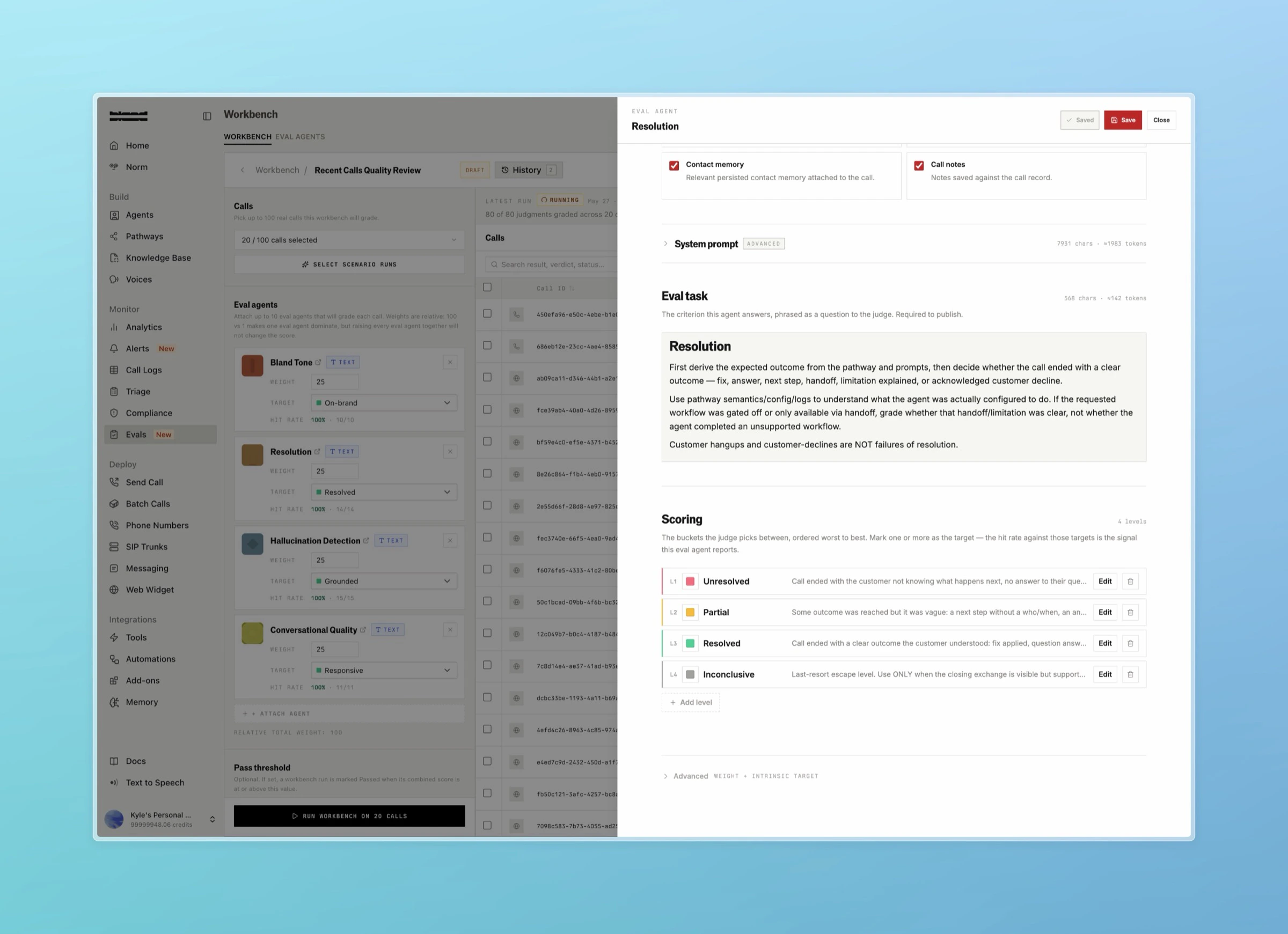
An eval agent is a single LLM judge that grades one quality of a call. Each agent has:
* **Instruction prompt**: the rubric the judge follows when grading a call.
* **Modality**: `text` (grades the transcript) or `audio` (grades the recording).
* **Levels**: the verdicts the judge can choose from. An agent runs in one of two modes:
* **Pass/fail**: `0` levels. The judge returns a simple pass or fail.
* **Graded**: `2` to `5` levels (for example *Poor*, *Adequate*, *Excellent*). Each level has a key, a label, a description prompt, and an optional color.
* **Target levels**: which levels count as "hitting the target." Used to compute hit rate. Pass/fail agents do not set targets.
* **Weight**: `0` to `100`. Controls how much this agent contributes to a call's overall score when it runs alongside other agents.
***
## Core concepts
### Eval agents
An eval agent is a single LLM judge that grades one quality of a call. Each agent has:
* **Instruction prompt**: the rubric the judge follows when grading a call.
* **Modality**: `text` (grades the transcript) or `audio` (grades the recording).
* **Levels**: the verdicts the judge can choose from. An agent runs in one of two modes:
* **Pass/fail**: `0` levels. The judge returns a simple pass or fail.
* **Graded**: `2` to `5` levels (for example *Poor*, *Adequate*, *Excellent*). Each level has a key, a label, a description prompt, and an optional color.
* **Target levels**: which levels count as "hitting the target." Used to compute hit rate. Pass/fail agents do not set targets.
* **Weight**: `0` to `100`. Controls how much this agent contributes to a call's overall score when it runs alongside other agents.
 ### Versions
Eval agents are versioned. Editing an agent writes your changes into an **editable draft** version. Publishing snapshots that draft into a new **archived** version and points the agent's active version at it. Two pointers track this:
* `current_version_id`: the working draft you edit.
* `active_version_id`: the published version that experiments run against.
Versioning means historical results never drift: an experiment freezes the exact agent version it ran, so editing an agent later does not change past results.
### Verdicts
When a judge grades a call, it returns a verdict for that call and agent:
| Field | Meaning |
| -------------------------- | --------------------------------------------------------------------- |
| `selected_level_key` | The level the judge picked |
| `score_normalized_0_100` | The verdict normalized to a 0 to 100 score |
| `is_target_match` | Whether the pick is one of the agent's target levels |
| `confidence` | The judge's confidence, `0` to `1` |
| `is_insufficient_evidence` | `true` when the call lacked enough evidence to grade |
| `reasoning_md` | The judge's written rationale |
| `evidence` | Quoted snippets from the transcript or audio that support the verdict |
### Versions
Eval agents are versioned. Editing an agent writes your changes into an **editable draft** version. Publishing snapshots that draft into a new **archived** version and points the agent's active version at it. Two pointers track this:
* `current_version_id`: the working draft you edit.
* `active_version_id`: the published version that experiments run against.
Versioning means historical results never drift: an experiment freezes the exact agent version it ran, so editing an agent later does not change past results.
### Verdicts
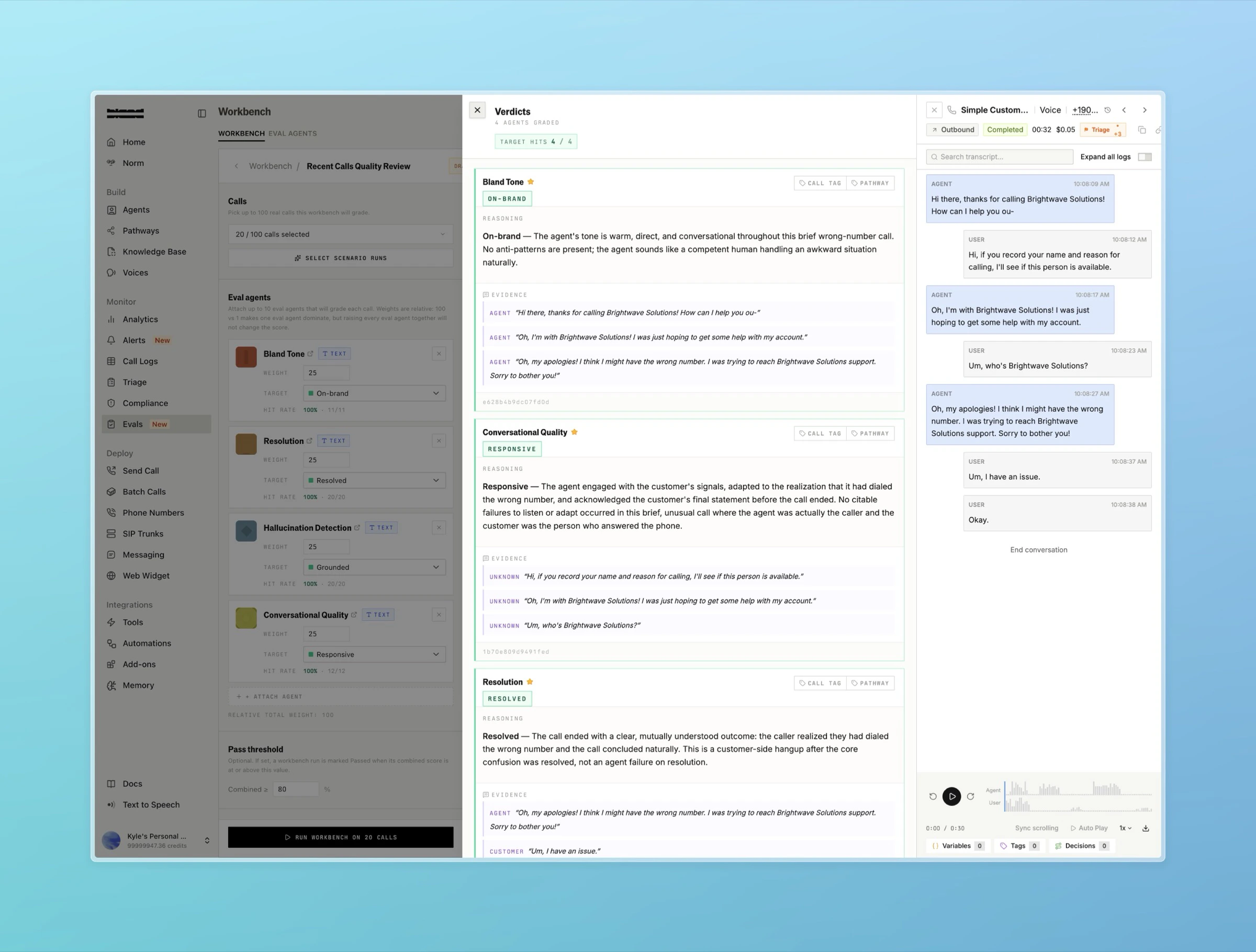
When a judge grades a call, it returns a verdict for that call and agent:
| Field | Meaning |
| -------------------------- | --------------------------------------------------------------------- |
| `selected_level_key` | The level the judge picked |
| `score_normalized_0_100` | The verdict normalized to a 0 to 100 score |
| `is_target_match` | Whether the pick is one of the agent's target levels |
| `confidence` | The judge's confidence, `0` to `1` |
| `is_insufficient_evidence` | `true` when the call lacked enough evidence to grade |
| `reasoning_md` | The judge's written rationale |
| `evidence` | Quoted snippets from the transcript or audio that support the verdict |
 ### Experiments
An experiment (an **eval run** in the API) is one batch of calls scored by one group of eval agents. You submit:
* **Calls**: up to 5,000 call IDs per run.
* **Attached agents**: up to 50 agents, each with a weight and target levels for this run.
* **Run mode**: `text`, `audio`, or `full`. Controls which agents score against each call based on modality.
* **Pass threshold**: the percentage at or above which the run counts as an overall pass.
### Experiments
An experiment (an **eval run** in the API) is one batch of calls scored by one group of eval agents. You submit:
* **Calls**: up to 5,000 call IDs per run.
* **Attached agents**: up to 50 agents, each with a weight and target levels for this run.
* **Run mode**: `text`, `audio`, or `full`. Controls which agents score against each call based on modality.
* **Pass threshold**: the percentage at or above which the run counts as an overall pass.
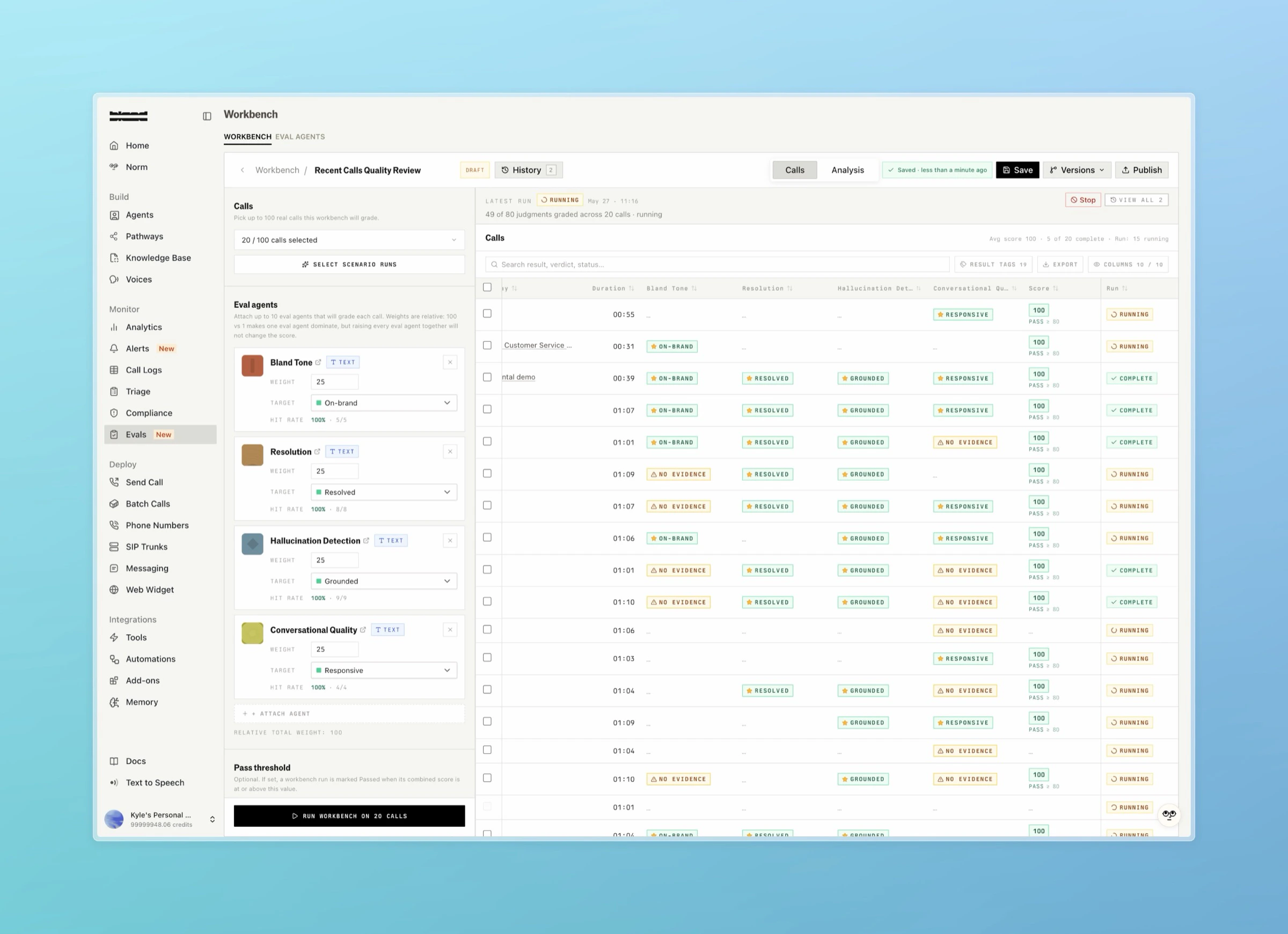 Each call paired with each agent is one judge evaluation. The run produces:
* **Per-call results**: the aggregate score for each call plus each agent's verdict on it.
* **Per-agent results**: every individual judge verdict in the run.
* **Agent snapshots**: the frozen agent configurations the run scored against.
* **Summary**: aggregate means (overall, text, audio), target match counts, and whether the run passed its threshold.
Runs move through these statuses:
```
PENDING → QUEUED → RUNNING → COMPLETE | PARTIAL | FAILED | CANCELLED
```
`QUEUED` means the run is alive but its judge calls are waiting at the provider rate limit. `PARTIAL` means the run finished with some calls graded and some failed.
Call [estimate](/api-v1/post/evals-runs-estimates) before starting a run to preview the resolved evaluation count, token usage, and cost. A valid billing record is required to start a run.
### Workbench setups
A workbench setup is a saved, named, versioned bundle of attached agents, their weights and targets, a pass threshold, a run mode, and an optional default call selection. Setups give a recurring evaluation a stable identity, so you can re-run the same composition and compare results over time.
Like eval agents, setups are versioned with a draft and a published active version. When you start a run from a setup, the run pins the setup version it used, so editing the setup afterward does not change that run's results.
A published setup can also be attached to a [Persona](/tutorials/personas) from its Analysis tab to score every call that persona handles automatically once the call ends.
### Templates
Templates are starting points for new eval agents:
* **Shipped templates**: a read-only library of curated agents covering common qualities: Hallucination Detection, Resolution, Conversational Quality, Bland Tone, Audio Quality, Discovery, Issue Understanding, Objection Handling, Scheduling Clarity, and Appointment Booked.
* **User templates**: agents your organization saves for reuse. Save an existing agent as a template, then create new agents from it.
Creating an agent from a template copies the template's prompt and levels into a fresh agent. From then on the agent is independent: editing the template does not change agents already created from it.
***
## How scoring works
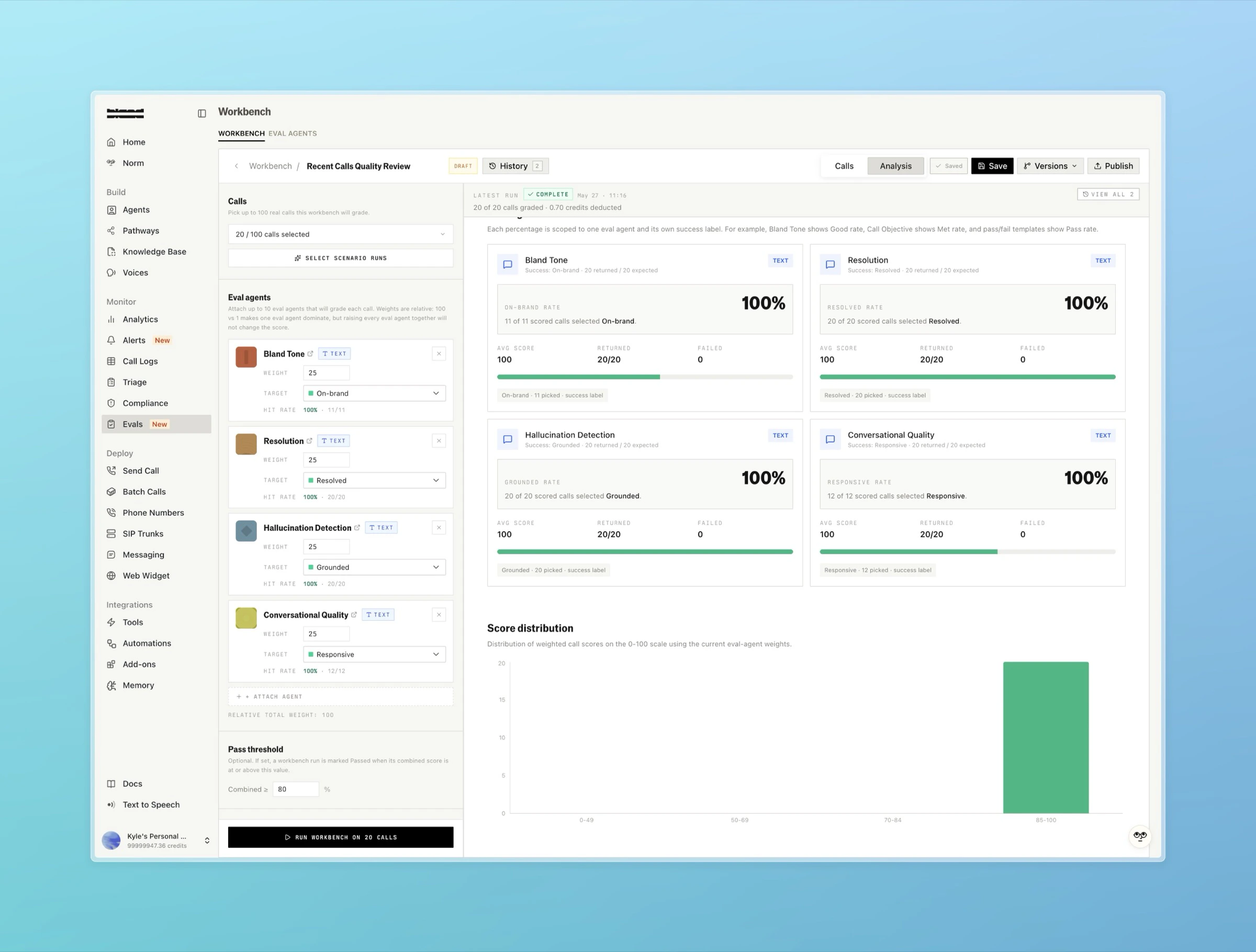
For each call in a run, every attached agent of a matching modality produces a verdict. The verdict's `score_normalized_0_100` is combined across agents using their weights to produce the call's overall score. The run's summary averages these across all calls and compares the result against the pass threshold to decide `overall_pass`.
Verdicts marked `is_insufficient_evidence` or that failed to grade are excluded from the averages so they do not dilute the score.
Each call paired with each agent is one judge evaluation. The run produces:
* **Per-call results**: the aggregate score for each call plus each agent's verdict on it.
* **Per-agent results**: every individual judge verdict in the run.
* **Agent snapshots**: the frozen agent configurations the run scored against.
* **Summary**: aggregate means (overall, text, audio), target match counts, and whether the run passed its threshold.
Runs move through these statuses:
```
PENDING → QUEUED → RUNNING → COMPLETE | PARTIAL | FAILED | CANCELLED
```
`QUEUED` means the run is alive but its judge calls are waiting at the provider rate limit. `PARTIAL` means the run finished with some calls graded and some failed.
Call [estimate](/api-v1/post/evals-runs-estimates) before starting a run to preview the resolved evaluation count, token usage, and cost. A valid billing record is required to start a run.
### Workbench setups
A workbench setup is a saved, named, versioned bundle of attached agents, their weights and targets, a pass threshold, a run mode, and an optional default call selection. Setups give a recurring evaluation a stable identity, so you can re-run the same composition and compare results over time.
Like eval agents, setups are versioned with a draft and a published active version. When you start a run from a setup, the run pins the setup version it used, so editing the setup afterward does not change that run's results.
A published setup can also be attached to a [Persona](/tutorials/personas) from its Analysis tab to score every call that persona handles automatically once the call ends.
### Templates
Templates are starting points for new eval agents:
* **Shipped templates**: a read-only library of curated agents covering common qualities: Hallucination Detection, Resolution, Conversational Quality, Bland Tone, Audio Quality, Discovery, Issue Understanding, Objection Handling, Scheduling Clarity, and Appointment Booked.
* **User templates**: agents your organization saves for reuse. Save an existing agent as a template, then create new agents from it.
Creating an agent from a template copies the template's prompt and levels into a fresh agent. From then on the agent is independent: editing the template does not change agents already created from it.
***
## How scoring works
For each call in a run, every attached agent of a matching modality produces a verdict. The verdict's `score_normalized_0_100` is combined across agents using their weights to produce the call's overall score. The run's summary averages these across all calls and compares the result against the pass threshold to decide `overall_pass`.
Verdicts marked `is_insufficient_evidence` or that failed to grade are excluded from the averages so they do not dilute the score.
 ***
## Using the API
The Evals API is rooted at `/v1/evals`. A typical end-to-end flow:
Call [`GET /v1/evals/status`](/api-v1/get/evals-status) to confirm Evals is enabled for your organization.
[`POST /v1/evals/agents`](/api-v1/post/evals-agents), optionally from a `template_key`. Edit its draft version with [`PATCH /v1/evals/agents/{id}/versions/{version_id}`](/api-v1/patch/evals-agents-id-versions-id), then publish with [`POST /v1/evals/agents/{id}/publications`](/api-v1/post/evals-agents-id-publish).
Preview cost with [`POST /v1/evals/runs/estimates`](/api-v1/post/evals-runs-estimates), then start the run with [`POST /v1/evals/runs`](/api-v1/post/evals-runs).
Poll [`GET /v1/evals/runs/{run_id}`](/api-v1/get/evals-runs-id) for status, then fetch [call results](/api-v1/get/evals-runs-id-call-results) and [agent results](/api-v1/get/evals-runs-id-agent-results).
To run the same composition repeatedly, save it as a [workbench setup](/api-v1/post/evals-workbench-setups) and pass `workbench_setup_id` plus `workbench_setup_version_id` when creating a run.
***
## Auto-running evals after a call
Instead of submitting eval runs manually, you can attach a workbench setup to a call at creation. When the call completes, Bland automatically runs that workbench against the call.
Pass `post_call_evals` on [`POST /v1/calls`](/api-v1/post/calls) with your `workbench_setup_id`, or pin an exact `workbench_setup_version_id`:
```json theme={null}
{
"phone_number": "+15551234567",
"task": "Confirm the appointment for tomorrow at 10 AM.",
"post_call_evals": {
"workbench_setup_id": "b7c2e1d4-8f3a-4c9e-9a2b-1e5f6d7c8a9b"
}
}
```
A few things to know:
* **Recording is required.** Eval judges run against the recording, so calls with `post_call_evals` are recorded automatically. If you explicitly set `record: false`, the request is rejected.
* **The setup version is pinned at call creation.** Editing the workbench mid-call does not change what gets evaluated, mirroring how manual eval runs pin the version at submission.
* **The main post-call webhook acknowledges the attachment** with `post_call_evals: { workbench_setup_id, workbench_setup_version_id, status: "pending" }`. Eval scores arrive later on a separate `evals` webhook event when the run finishes.
* **Auto runs appear alongside manual runs.** Filter for them with `triggered_by=auto` on [`GET /v1/evals/runs`](/api-v1/get/evals-runs).
* **Strip the field from webhooks** by adding `post_call_evals` to your organization's `webhook_excluded_fields` preference.
***
## Using the API
The Evals API is rooted at `/v1/evals`. A typical end-to-end flow:
Call [`GET /v1/evals/status`](/api-v1/get/evals-status) to confirm Evals is enabled for your organization.
[`POST /v1/evals/agents`](/api-v1/post/evals-agents), optionally from a `template_key`. Edit its draft version with [`PATCH /v1/evals/agents/{id}/versions/{version_id}`](/api-v1/patch/evals-agents-id-versions-id), then publish with [`POST /v1/evals/agents/{id}/publications`](/api-v1/post/evals-agents-id-publish).
Preview cost with [`POST /v1/evals/runs/estimates`](/api-v1/post/evals-runs-estimates), then start the run with [`POST /v1/evals/runs`](/api-v1/post/evals-runs).
Poll [`GET /v1/evals/runs/{run_id}`](/api-v1/get/evals-runs-id) for status, then fetch [call results](/api-v1/get/evals-runs-id-call-results) and [agent results](/api-v1/get/evals-runs-id-agent-results).
To run the same composition repeatedly, save it as a [workbench setup](/api-v1/post/evals-workbench-setups) and pass `workbench_setup_id` plus `workbench_setup_version_id` when creating a run.
***
## Auto-running evals after a call
Instead of submitting eval runs manually, you can attach a workbench setup to a call at creation. When the call completes, Bland automatically runs that workbench against the call.
Pass `post_call_evals` on [`POST /v1/calls`](/api-v1/post/calls) with your `workbench_setup_id`, or pin an exact `workbench_setup_version_id`:
```json theme={null}
{
"phone_number": "+15551234567",
"task": "Confirm the appointment for tomorrow at 10 AM.",
"post_call_evals": {
"workbench_setup_id": "b7c2e1d4-8f3a-4c9e-9a2b-1e5f6d7c8a9b"
}
}
```
A few things to know:
* **Recording is required.** Eval judges run against the recording, so calls with `post_call_evals` are recorded automatically. If you explicitly set `record: false`, the request is rejected.
* **The setup version is pinned at call creation.** Editing the workbench mid-call does not change what gets evaluated, mirroring how manual eval runs pin the version at submission.
* **The main post-call webhook acknowledges the attachment** with `post_call_evals: { workbench_setup_id, workbench_setup_version_id, status: "pending" }`. Eval scores arrive later on a separate `evals` webhook event when the run finishes.
* **Auto runs appear alongside manual runs.** Filter for them with `triggered_by=auto` on [`GET /v1/evals/runs`](/api-v1/get/evals-runs).
* **Strip the field from webhooks** by adding `post_call_evals` to your organization's `webhook_excluded_fields` preference.