> ## Documentation Index
> Fetch the complete documentation index at: https://docs.bland.ai/llms.txt
> Use this file to discover all available pages before exploring further.

# April 13, 2026

> Agent-to-agent testing, persona authentication, and multiplayer pathways

### Agent-to-Agent Testing

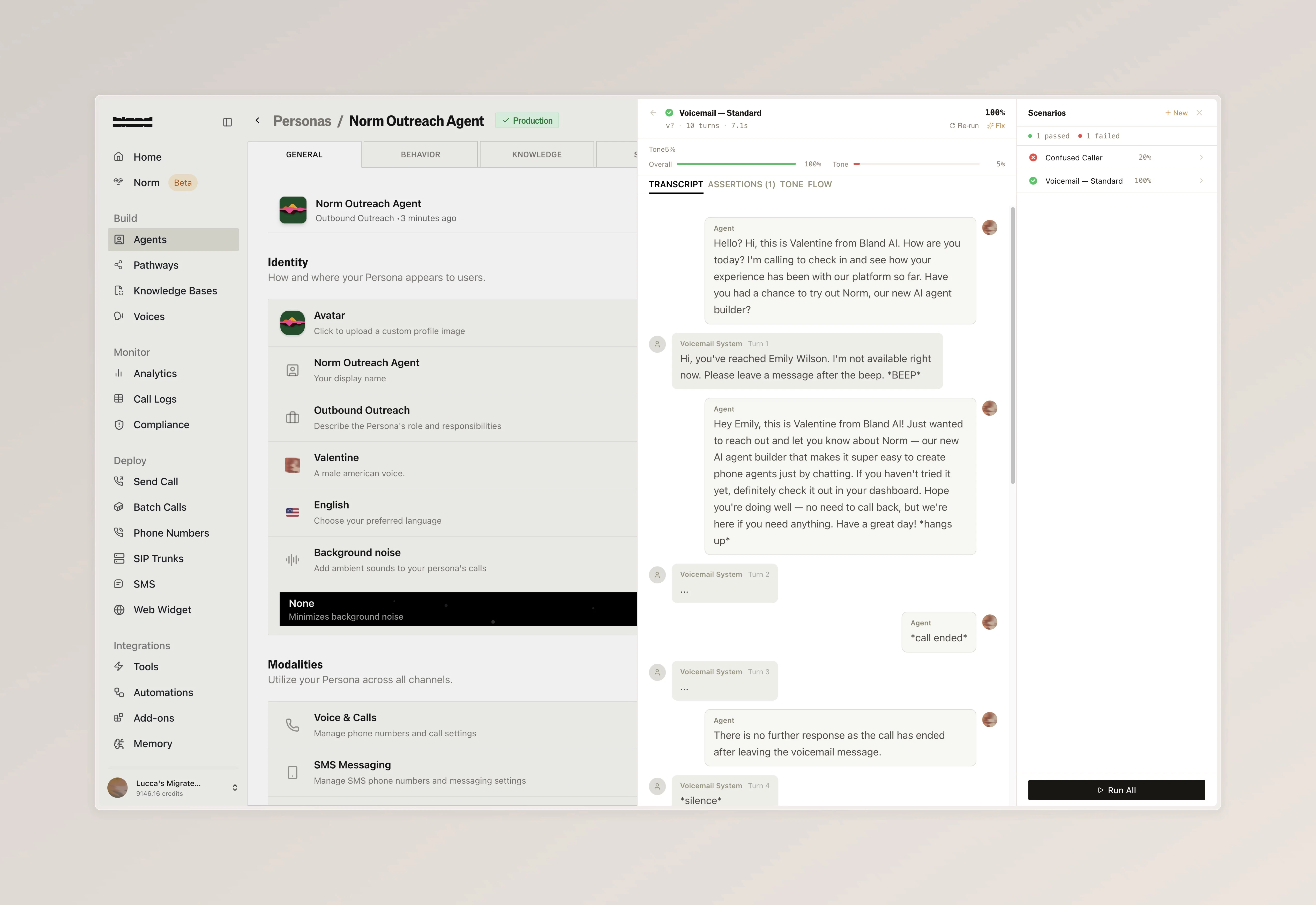
Automatically test your voice agents with an AI caller that simulates real end-to-end conversations, helping you catch issues before your users do. [Learn more](/tutorials/scenarios) or explore the [API reference](/api-v1/post/agent-testing-scenarios)

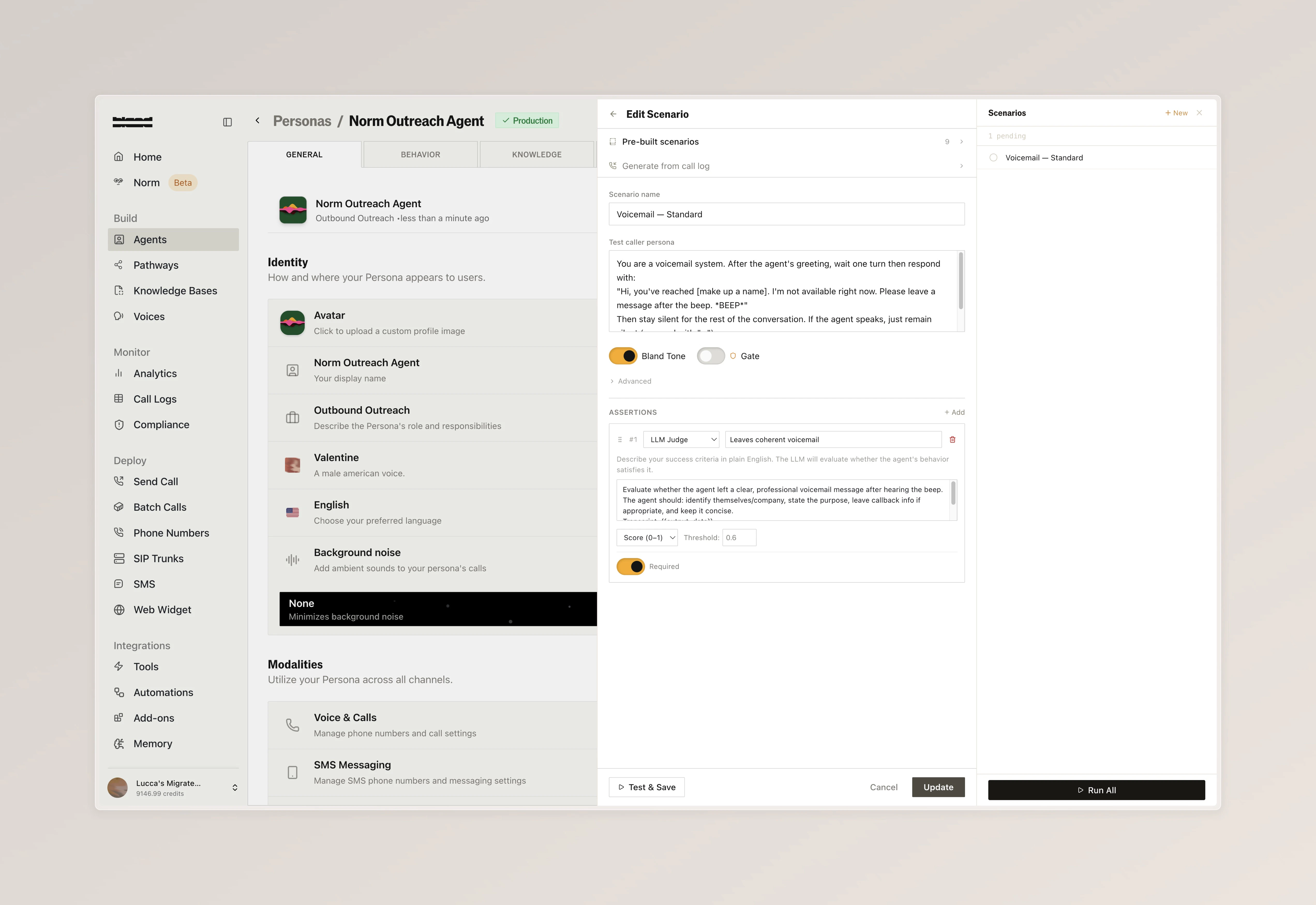
* Create scenarios from pre-built templates or from scratch, each defining a caller persona with specific instructions (for example, a voicemail system) and clear success criteria for evaluation
* Run individual tests or execute all scenarios in a batch, then review full conversation transcripts to see exactly how each interaction played out

<Tabs>
  <Tab title="Edit Scenario">
    <img src="https://mintcdn.com/blandai/7F1tUhTKdUN-3n5W/changelog_assets/04_13_2026/a2a_1.jpeg?fit=max&auto=format&n=7F1tUhTKdUN-3n5W&q=85&s=12ba0fdec7a749d67e3c3ef99910b7e7" style={{ width: "100%", borderRadius: "0.5rem", marginTop: "1rem", marginBottom: "1rem" }} alt="Edit Scenario panel showing a voicemail scenario with caller persona instructions and evaluation criteria" width="5088" height="3498" data-path="changelog_assets/04_13_2026/a2a_1.jpeg" />

    <p style={{ textAlign: "left", fontStyle: "italic", marginTop: "0.25rem", color: "#666" }}>
      Configure a test scenario with a caller persona, call start prompt, and evaluation criteria to define what a successful outcome looks like
    </p>
  </Tab>

  <Tab title="Test Results">
    <img src="https://mintcdn.com/blandai/7F1tUhTKdUN-3n5W/changelog_assets/04_13_2026/a2a_2.jpeg?fit=max&auto=format&n=7F1tUhTKdUN-3n5W&q=85&s=de8fc2c0255c1b120df4cbf9a1bb7d89" style={{ width: "100%", borderRadius: "0.5rem", marginTop: "1rem", marginBottom: "1rem" }} alt="Test results showing a full conversation transcript between the agent and a voicemail system" width="5088" height="3498" data-path="changelog_assets/04_13_2026/a2a_2.jpeg" />

    <p style={{ textAlign: "left", fontStyle: "italic", marginTop: "0.25rem", color: "#666" }}>
      Review the full transcript of the agent interacting with the test caller, including the evaluation result
    </p>
  </Tab>
</Tabs>

***

### Persona Authentication

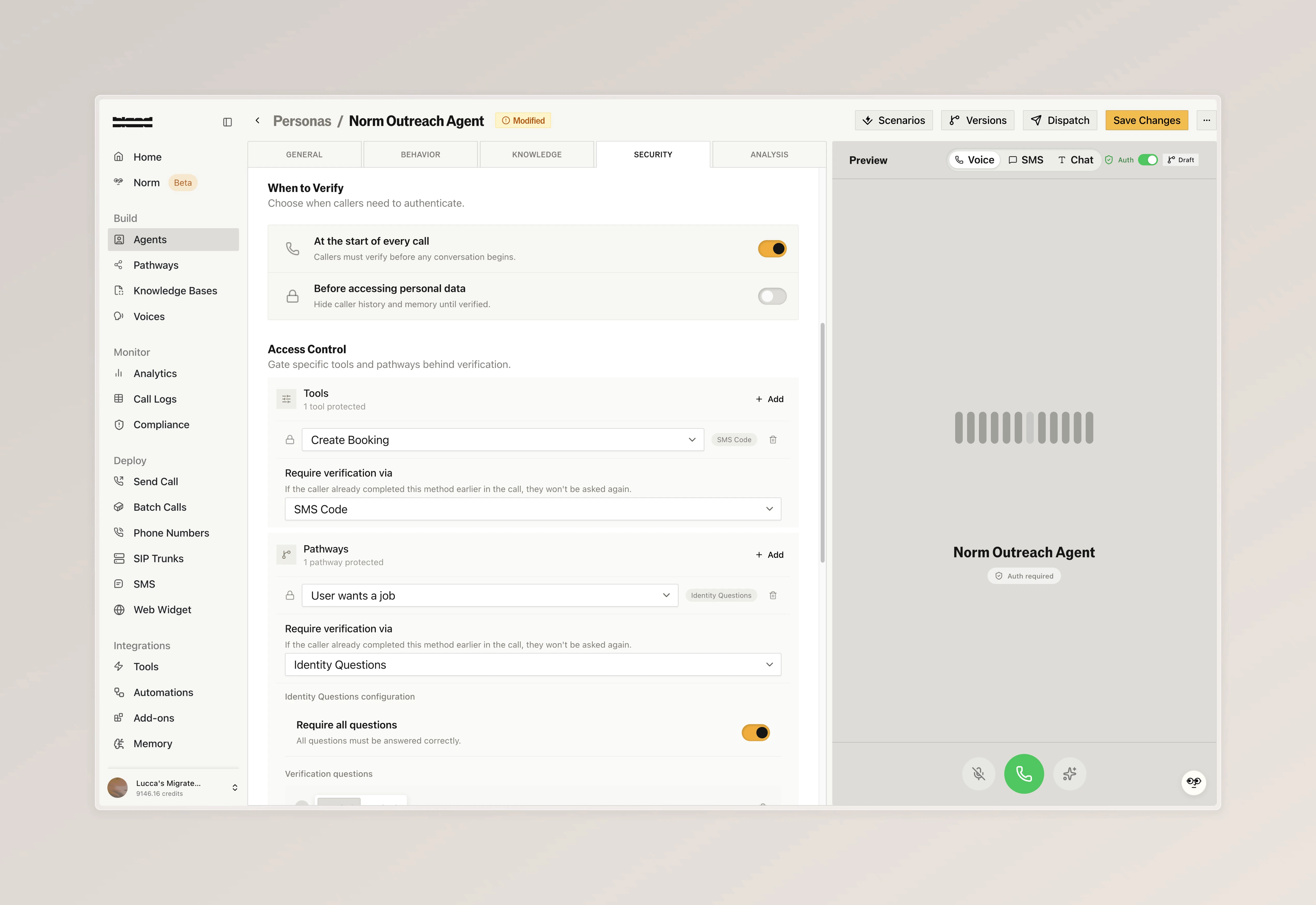
Secure your voice agents by verifying caller identity mid-conversation, ensuring only authenticated users can access sensitive information or actions

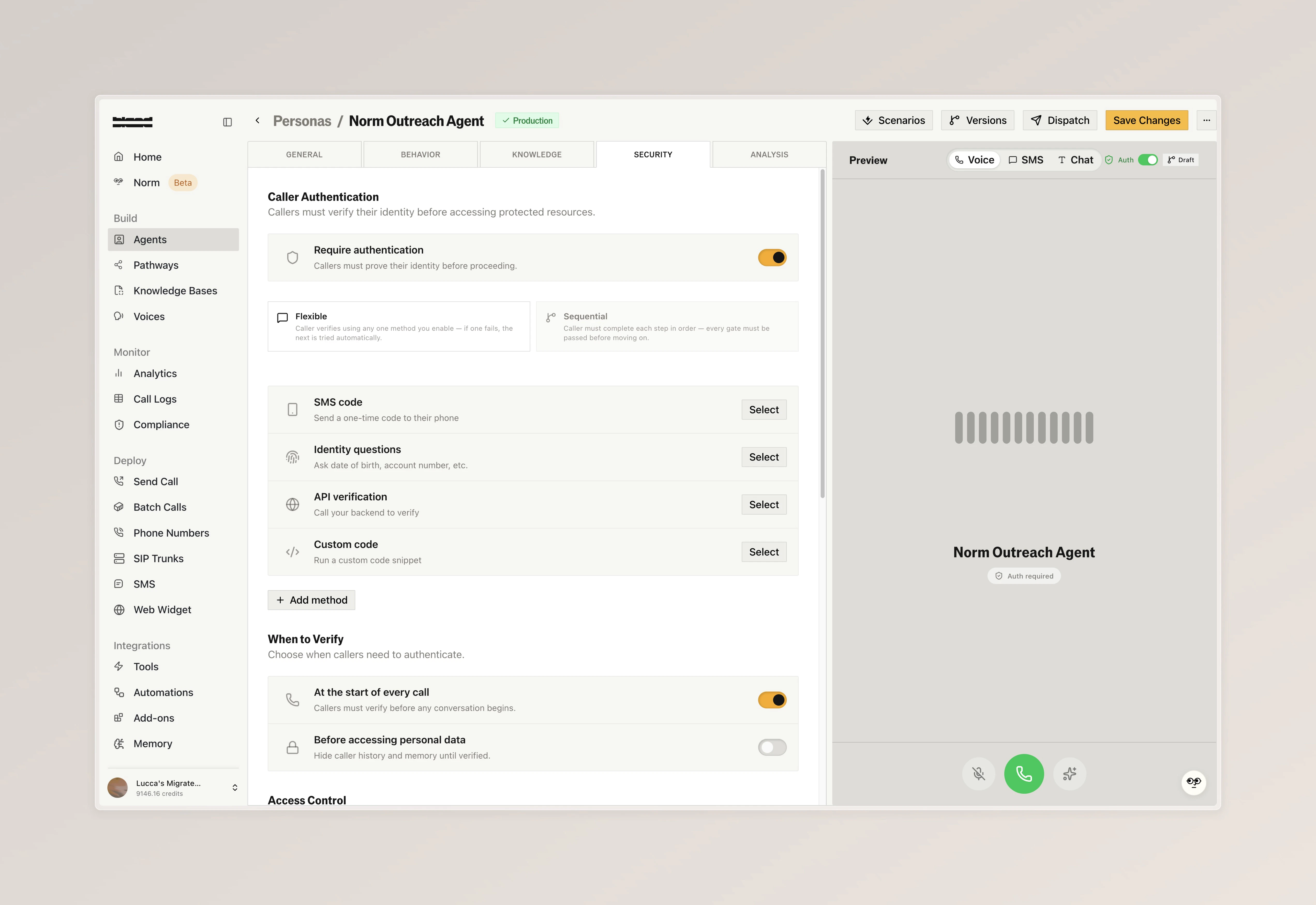
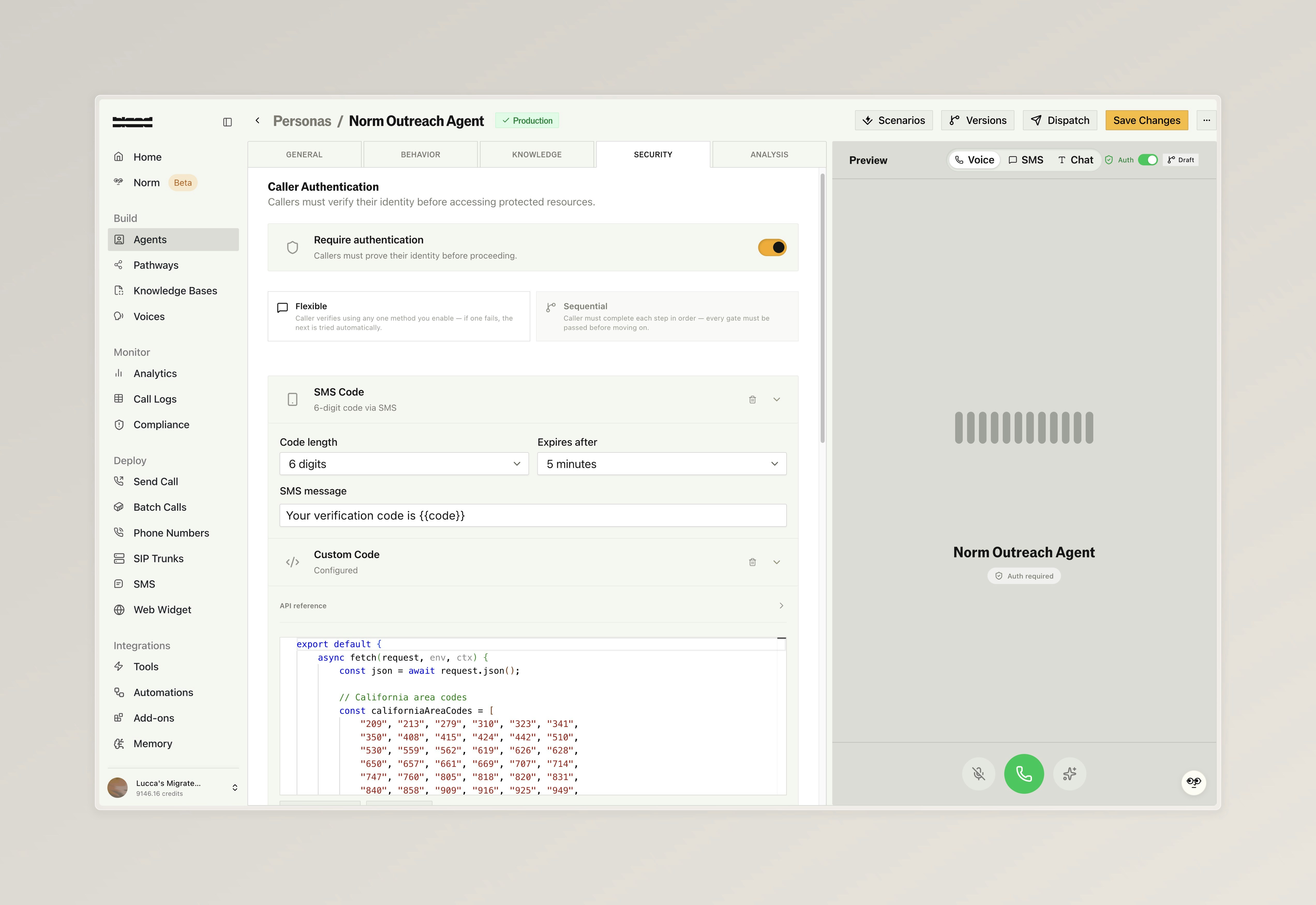
* Enable authentication with built-in methods (SMS codes, identity questions, API-based verification, or custom code), and gate specific tools and pathways so they are only accessible after verification.
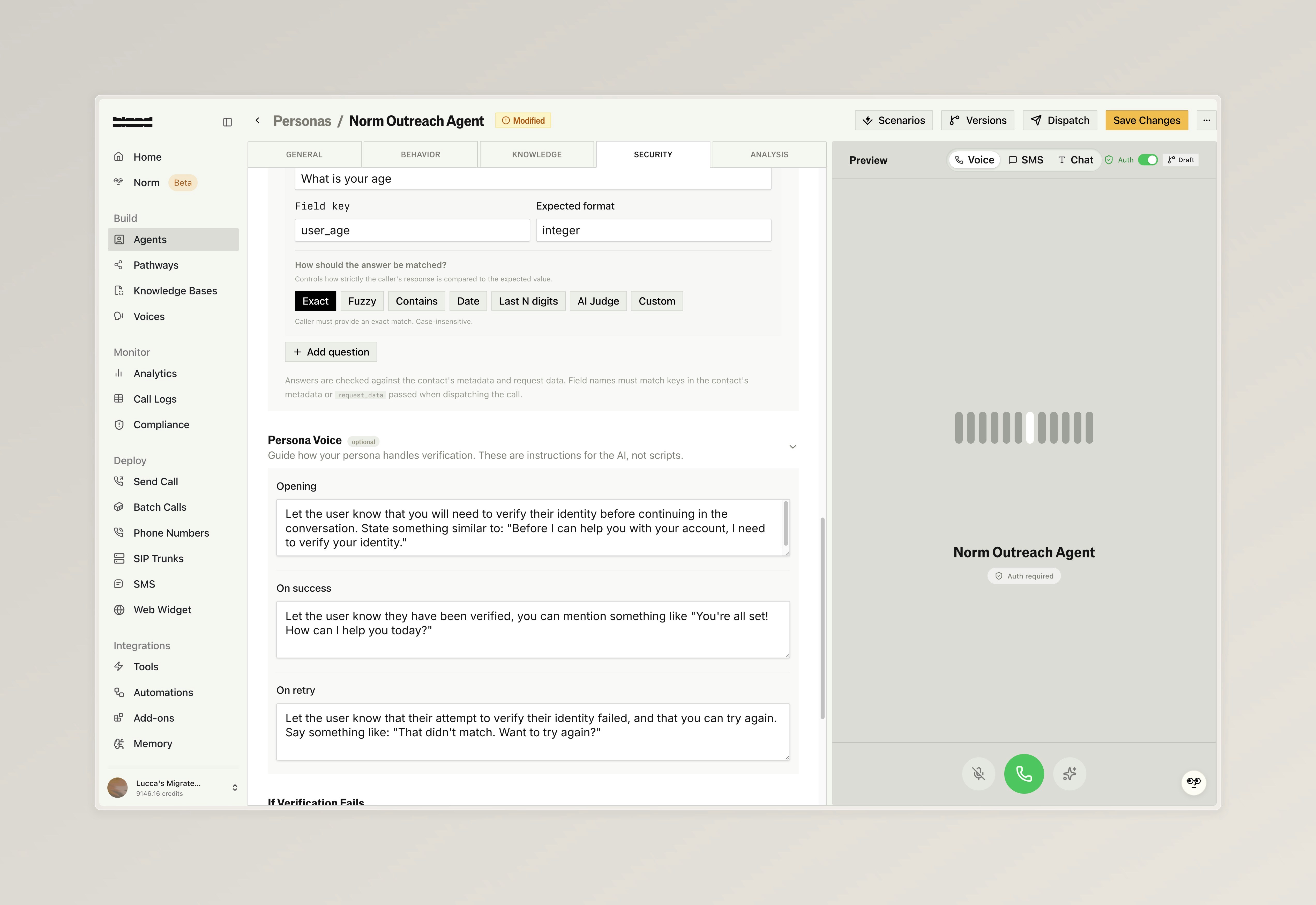
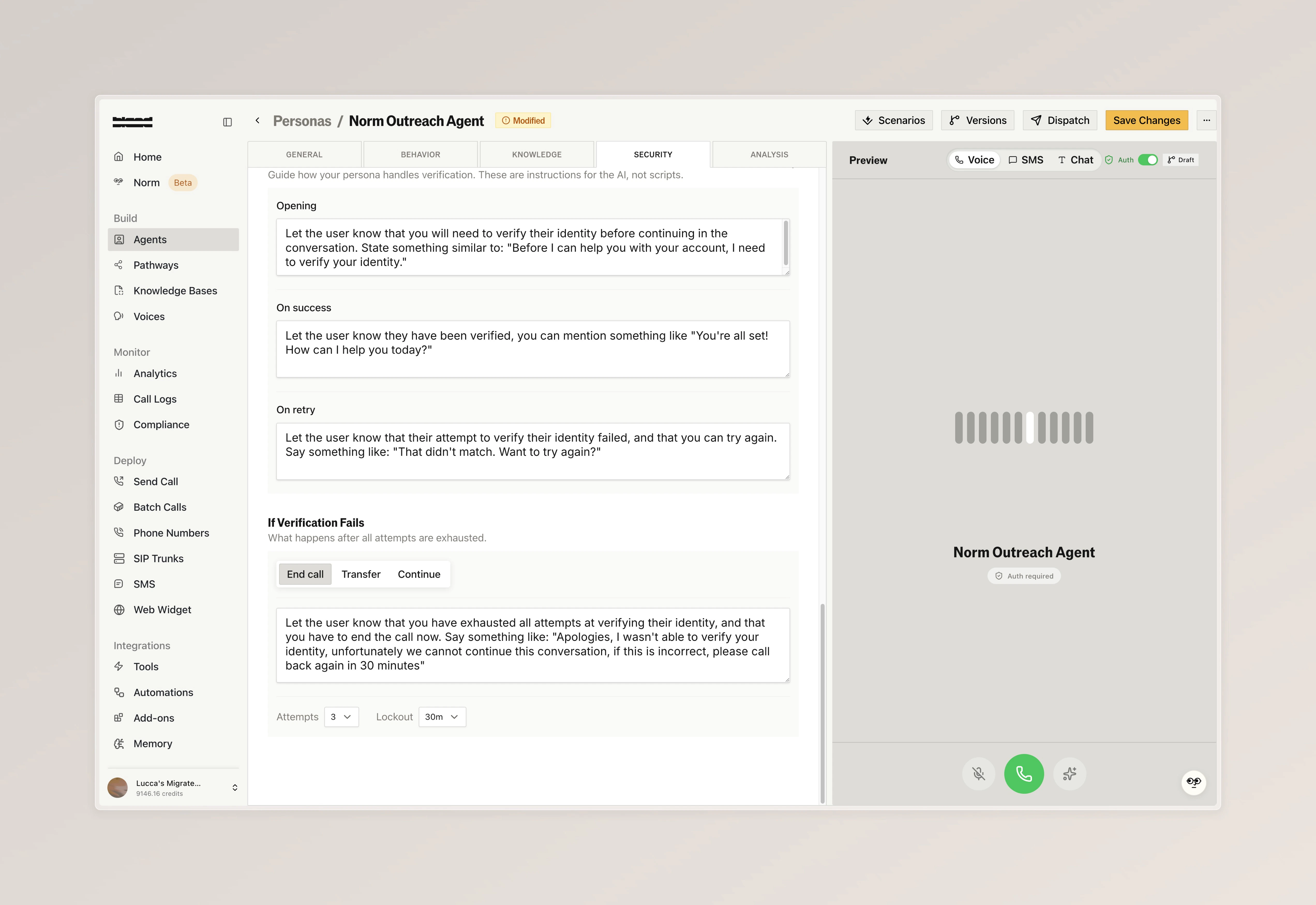
* Configure identity questions with flexible validation modes and custom voice prompts, and define failure behavior including retry attempts, cooldowns, and what happens when all attempts are exhausted

<Tabs>
  <Tab title="Security Overview">
    <img src="https://mintcdn.com/blandai/7F1tUhTKdUN-3n5W/changelog_assets/04_13_2026/persona_auth_1.jpeg?fit=max&auto=format&n=7F1tUhTKdUN-3n5W&q=85&s=7f5e5401b100cd71273c79aa6bf9d88a" style={{ width: "100%", borderRadius: "0.5rem", marginTop: "1rem", marginBottom: "1rem" }} alt="Security tab showing authentication toggle, available methods, and verification trigger options" width="5088" height="3498" data-path="changelog_assets/04_13_2026/persona_auth_1.jpeg" />

    <p style={{ textAlign: "left", fontStyle: "italic", marginTop: "0.25rem", color: "#666" }}>
      Toggle authentication on, and decide on how strict your agent acts to authenticate the caller (flexible vs sequential)
    </p>
  </Tab>

  <Tab title="Example Methods">
    <img src="https://mintcdn.com/blandai/7F1tUhTKdUN-3n5W/changelog_assets/04_13_2026/persona_auth_2.jpeg?fit=max&auto=format&n=7F1tUhTKdUN-3n5W&q=85&s=103ad10c4fe84077aba0777ac7e0c30b" style={{ width: "100%", borderRadius: "0.5rem", marginTop: "1rem", marginBottom: "1rem" }} alt="SMS code configuration with code length, expiry, and custom message alongside a custom code editor" width="5088" height="3498" data-path="changelog_assets/04_13_2026/persona_auth_2.jpeg" />

    <p style={{ textAlign: "left", fontStyle: "italic", marginTop: "0.25rem", color: "#666" }}>
      Configure methods like SMS code, which automatically send users an OTP over text messsage, or write custom validation logic with custom JS code
    </p>
  </Tab>

  <Tab title="Access Control">
    <img src="https://mintcdn.com/blandai/7F1tUhTKdUN-3n5W/changelog_assets/04_13_2026/persona_auth_3.jpeg?fit=max&auto=format&n=7F1tUhTKdUN-3n5W&q=85&s=3c15753ce01bd814b809ca2150a5564c" style={{ width: "100%", borderRadius: "0.5rem", marginTop: "1rem", marginBottom: "1rem" }} alt="Access control section gating specific tools and pathways behind different verification methods" width="5088" height="3498" data-path="changelog_assets/04_13_2026/persona_auth_3.jpeg" />

    <p style={{ textAlign: "left", fontStyle: "italic", marginTop: "0.25rem", color: "#666" }}>
      Decide when persona authentication takes place, and gate specific tools and pathways behind different verification methods
    </p>
  </Tab>

  <Tab title="Identity Questions">
    <img src="https://mintcdn.com/blandai/7F1tUhTKdUN-3n5W/changelog_assets/04_13_2026/persona_auth_4.jpeg?fit=max&auto=format&n=7F1tUhTKdUN-3n5W&q=85&s=75f3554388ac8daf7fd8f4b63d14c132" style={{ width: "100%", borderRadius: "0.5rem", marginTop: "1rem", marginBottom: "1rem" }} alt="Identity question configuration with field key, expected format, validation mode selector, and persona voice prompts" width="5088" height="3498" data-path="changelog_assets/04_13_2026/persona_auth_4.jpeg" />

    <p style={{ textAlign: "left", fontStyle: "italic", marginTop: "0.25rem", color: "#666" }}>
      Include optional prompting guides for how your persona authentication handles opening, succuess, and failure scenarios
    </p>
  </Tab>

  <Tab title="Failure Handling">
    <img src="https://mintcdn.com/blandai/7F1tUhTKdUN-3n5W/changelog_assets/04_13_2026/persona_auth_5.jpeg?fit=max&auto=format&n=7F1tUhTKdUN-3n5W&q=85&s=e4b790071bbfcb61444ff2105156fb4f" style={{ width: "100%", borderRadius: "0.5rem", marginTop: "1rem", marginBottom: "1rem" }} alt="Failure handling settings with retry attempts, cooldown, and end call, transfer, or continue options" width="5088" height="3498" data-path="changelog_assets/04_13_2026/persona_auth_5.jpeg" />

    <p style={{ textAlign: "left", fontStyle: "italic", marginTop: "0.25rem", color: "#666" }}>
      Configure what happens when verification fails: retry limits, cooldown periods, and whether to end the call, transfer, or continue
    </p>
  </Tab>
</Tabs>

***

### Multiplayer Pathways

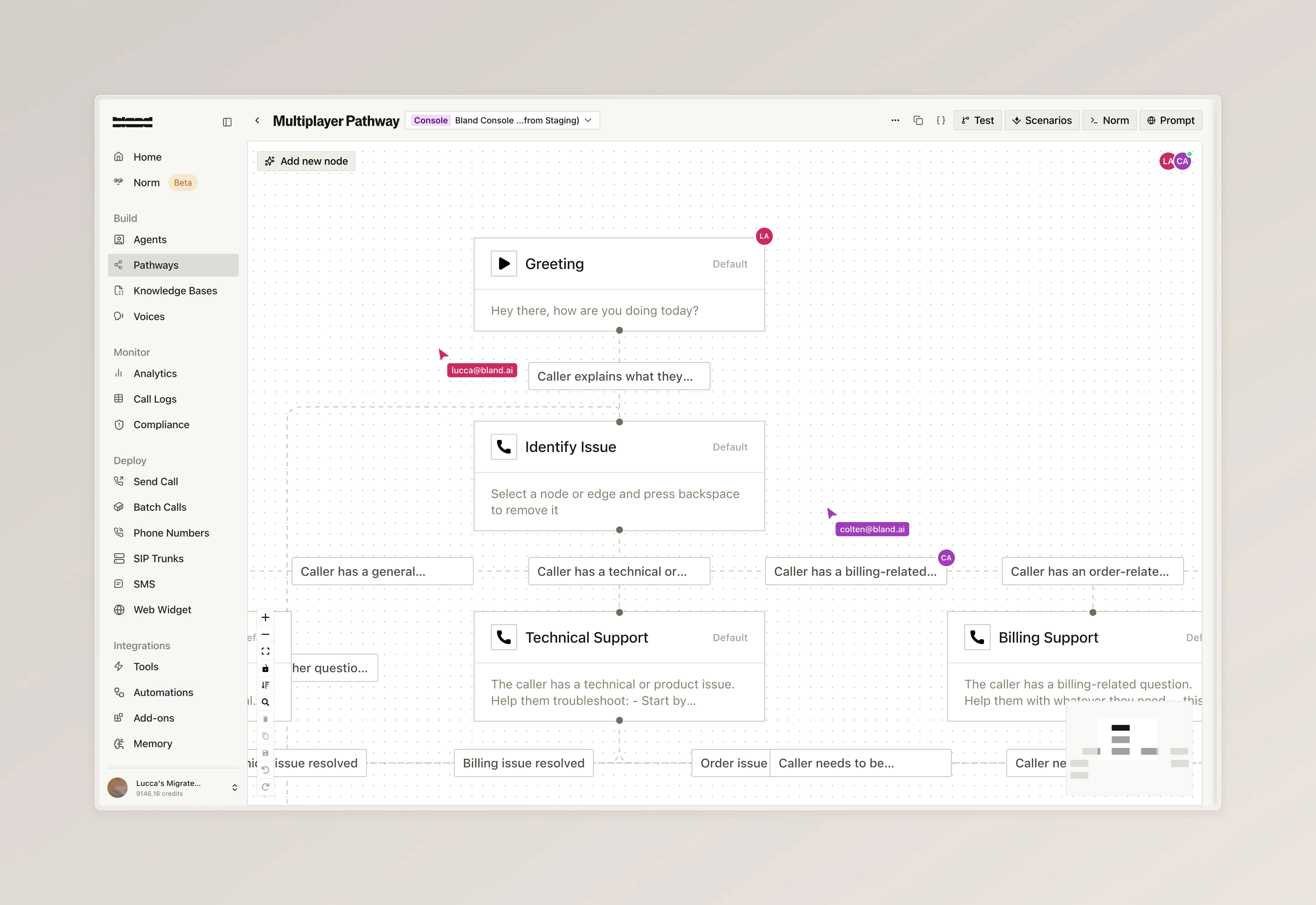
Collaborate on pathways with your team in real time, so multiple people can build and edit together without stepping on each other's work

* Collaborator avatars appear in your pathway, on individual nodes, and along edges so you can see who is working where
* Live cursors from other editors are visible as they move across the pathway
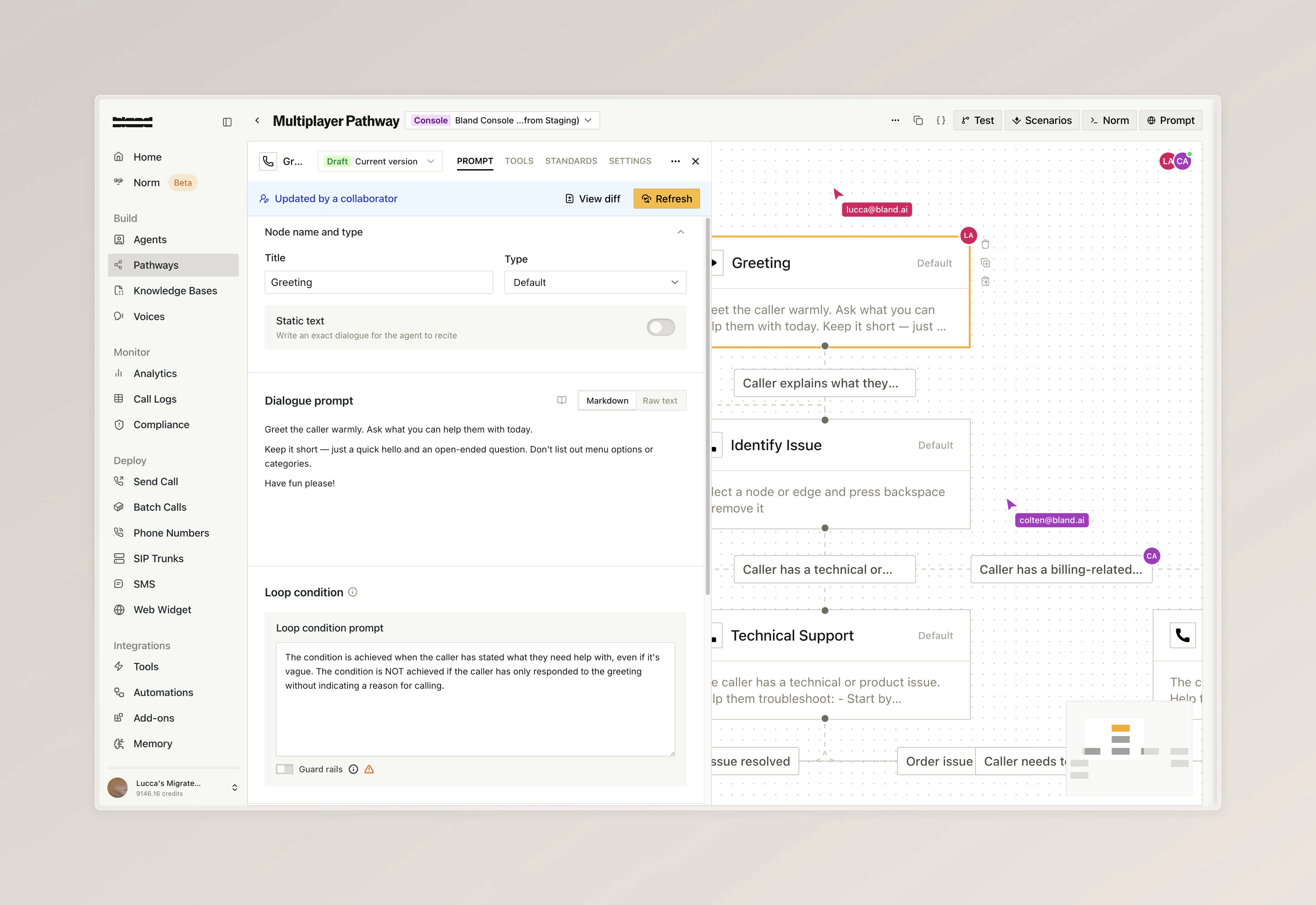
* When another collaborator makes changes, a banner appears with a diff view to review what changed before syncing
<Tabs>
  <Tab title="Live Collaboration">
    <img src="https://mintcdn.com/blandai/7F1tUhTKdUN-3n5W/changelog_assets/04_13_2026/multiplayer_1.jpeg?fit=max&auto=format&n=7F1tUhTKdUN-3n5W&q=85&s=dbcfca80fc7939475aa0981624f78c12" style={{ width: "100%", borderRadius: "0.5rem", marginTop: "1rem", marginBottom: "1rem" }} alt="Pathway canvas with multiple collaborator avatars, colored cursors, and real-time presence indicators" width="5088" height="3498" data-path="changelog_assets/04_13_2026/multiplayer_1.jpeg" />

    <p style={{ textAlign: "left", fontStyle: "italic", marginTop: "0.25rem", color: "#666" }}>
      Multiple editors on the same pathway with live cursors and collaborator avatars visible on nodes and edges
    </p>
  </Tab>

  <Tab title="Remote Updates">
    <img src="https://mintcdn.com/blandai/7F1tUhTKdUN-3n5W/changelog_assets/04_13_2026/multiplayer_2.jpeg?fit=max&auto=format&n=7F1tUhTKdUN-3n5W&q=85&s=602d4f834d212849af81155ed9223417" style={{ width: "100%", borderRadius: "0.5rem", marginTop: "1rem", marginBottom: "1rem" }} alt="Updated by a collaborator banner with View diff and Refresh buttons while editing a node" width="5088" height="3498" data-path="changelog_assets/04_13_2026/multiplayer_2.jpeg" />

    <p style={{ textAlign: "left", fontStyle: "italic", marginTop: "0.25rem", color: "#666" }}>
      When a collaborator makes changes, a banner lets you view the diff or refresh to sync
    </p>
  </Tab>
</Tabs>

***

### Improvements

**Inbound Calling**

* Inbound numbers can now be configured with a voice pool. A random voice is selected from the pool on each call

**Citations**

* \[Enterprise] Citation regression tests can now be configured and run from the citation schema playground

**SMS**

* \[Enterprise] SMS webhooks now include conversation variables, citations, and channel information in the payload