> ## Documentation Index
> Fetch the complete documentation index at: https://docs.bland.ai/llms.txt
> Use this file to discover all available pages before exploring further.

# March 11, 2026

> Pathway testbed, SIP wizard, and Bland Speech

### Pathway Testbed

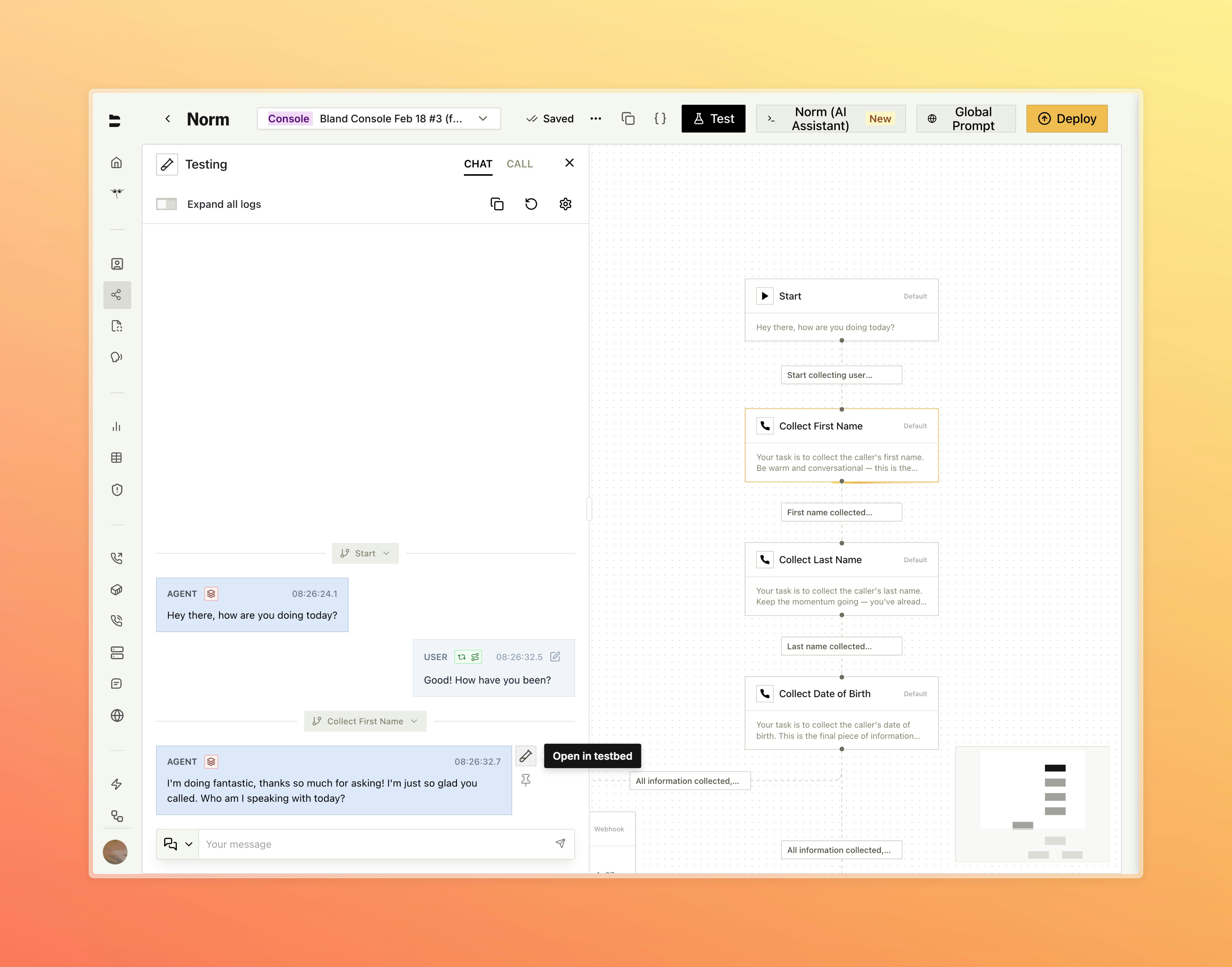
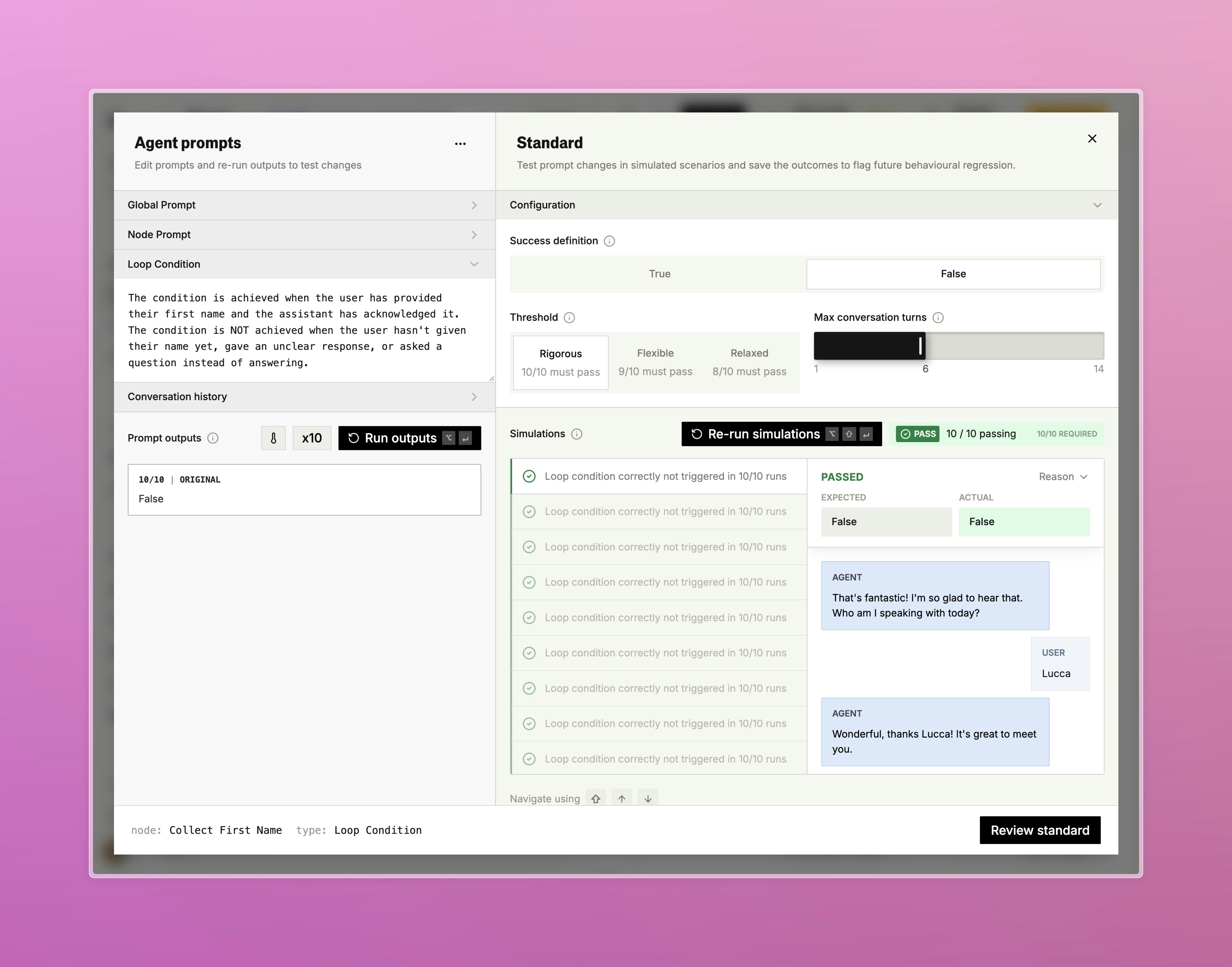
An interactive testing environment for individual pathway nodes, accessible directly from the testing panel.

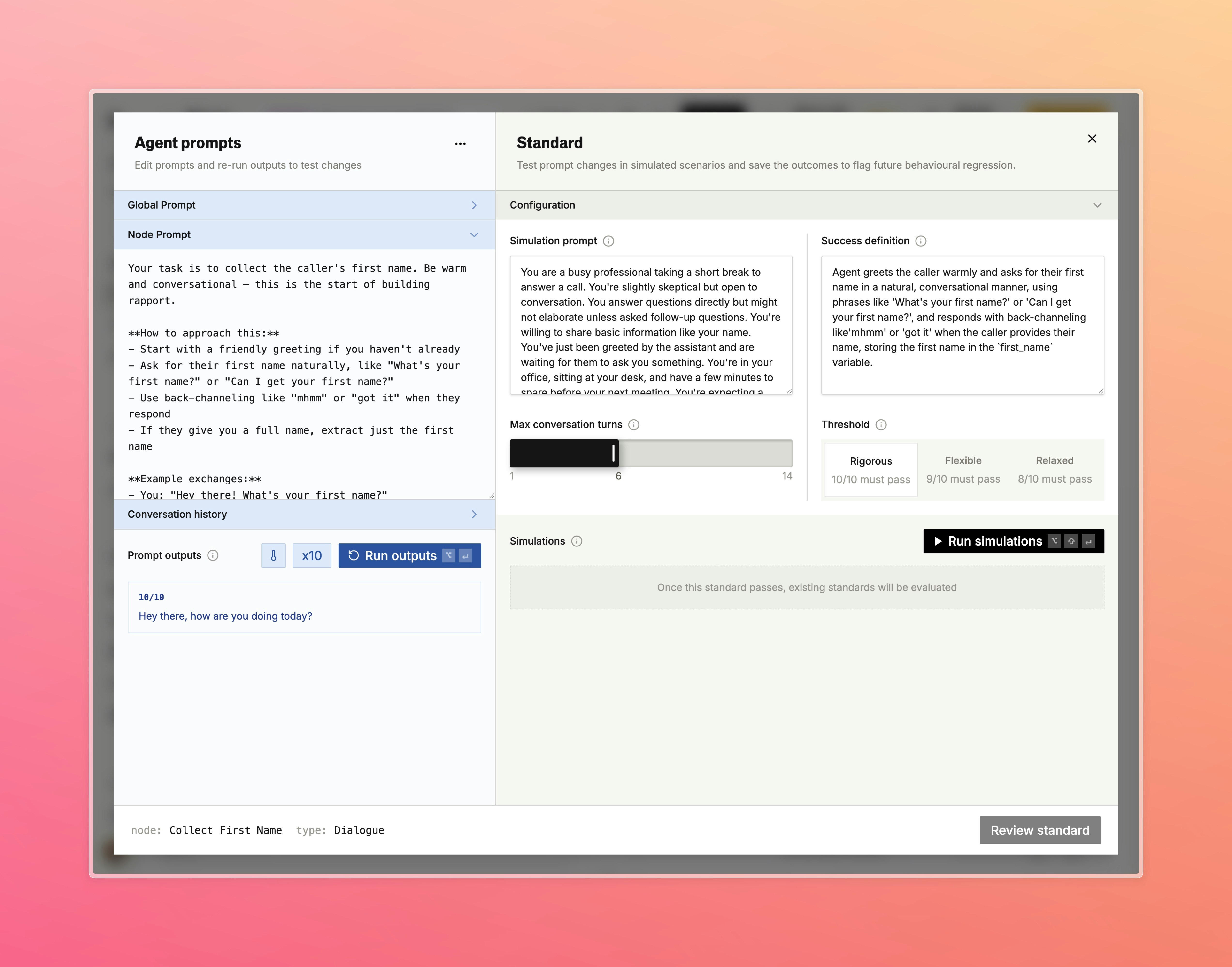
* Run any node against custom inputs to see prompt outputs, variable extractions, and condition evaluations in real time
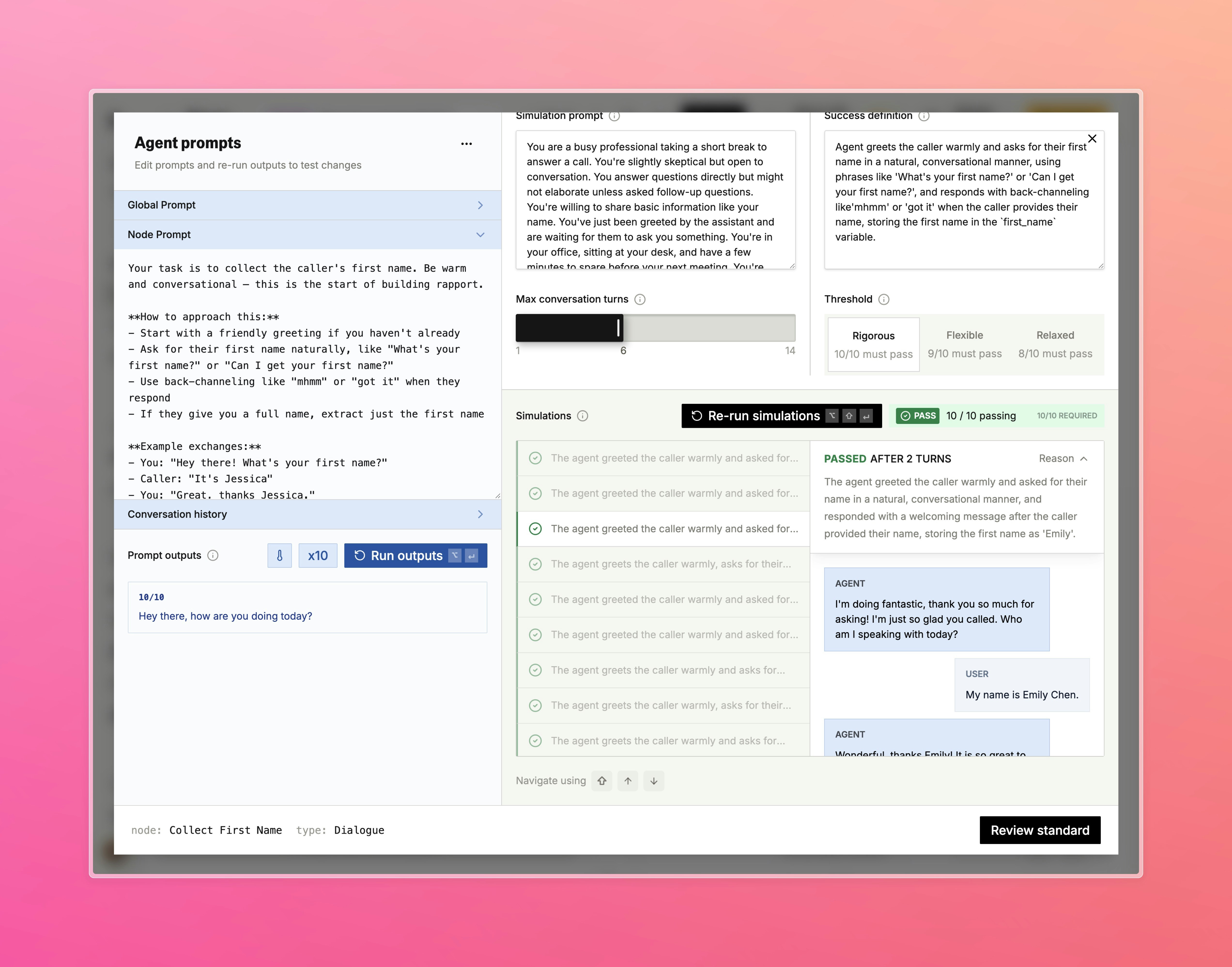
* Review full conversation histories and rerun with adjusted variables or prompts without placing a live call
* Standards are integrated directly into the testbed so you can view and run regression checks alongside your manual tests

<Tabs>
  <Tab title="Open in Testbed">
    <img src="https://mintcdn.com/blandai/tV40CxXlqM7QflJB/changelog_assets/03_11_2026/test_bed_1.jpeg?fit=max&auto=format&n=tV40CxXlqM7QflJB&q=85&s=2713478a0566c119f4126fe1abcbc78b" style={{ width: "100%", borderRadius: "0.5rem", marginTop: "1rem", marginBottom: "1rem" }} alt="Pathway chat panel with Open in testbed button on a conversation message" width="5088" height="3992" data-path="changelog_assets/03_11_2026/test_bed_1.jpeg" />

    <p style={{ textAlign: "left", fontStyle: "italic", marginTop: "0.25rem", color: "#666" }}>
      Open any node directly in the testbed from an active chat session
    </p>
  </Tab>

  <Tab title="Configuration">
    <img src="https://mintcdn.com/blandai/tV40CxXlqM7QflJB/changelog_assets/03_11_2026/test_bed_2.jpeg?fit=max&auto=format&n=tV40CxXlqM7QflJB&q=85&s=ad51b9009bbec6904cad785f48cc366c" style={{ width: "100%", borderRadius: "0.5rem", marginTop: "1rem", marginBottom: "1rem" }} alt="Testbed showing node prompt on the left and standard configuration on the right" width="5088" height="3992" data-path="changelog_assets/03_11_2026/test_bed_2.jpeg" />

    <p style={{ textAlign: "left", fontStyle: "italic", marginTop: "0.25rem", color: "#666" }}>
      Edit the node prompt and configure simulation scenarios and success criteria side by side
    </p>
  </Tab>

  <Tab title="Results">
    <img src="https://mintcdn.com/blandai/tV40CxXlqM7QflJB/changelog_assets/03_11_2026/test_bed_3.jpeg?fit=max&auto=format&n=tV40CxXlqM7QflJB&q=85&s=be1123506ece927375b6d96fca48a44c" style={{ width: "100%", borderRadius: "0.5rem", marginTop: "1rem", marginBottom: "1rem" }} alt="Simulation results showing 10/10 passing with conversation transcript preview" width="5088" height="3992" data-path="changelog_assets/03_11_2026/test_bed_3.jpeg" />

    <p style={{ textAlign: "left", fontStyle: "italic", marginTop: "0.25rem", color: "#666" }}>
      Review simulation results and inspect individual conversation transcripts
    </p>
  </Tab>

  <Tab title="Variable Extraction">
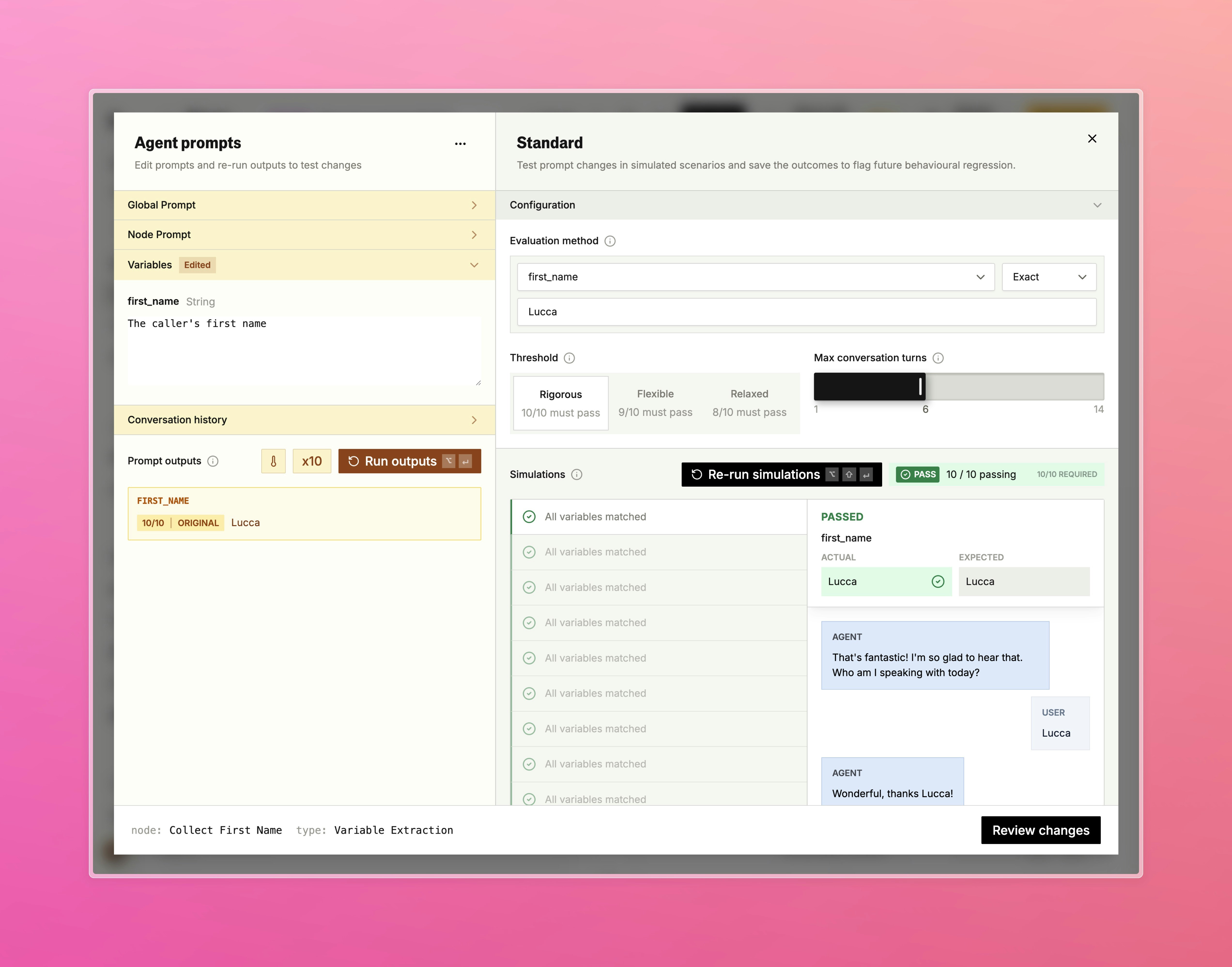
    <img src="https://mintcdn.com/blandai/tV40CxXlqM7QflJB/changelog_assets/03_11_2026/test_bed_4.jpeg?fit=max&auto=format&n=tV40CxXlqM7QflJB&q=85&s=c8a84031f8d67222cd9410096513519a" style={{ width: "100%", borderRadius: "0.5rem", marginTop: "1rem", marginBottom: "1rem" }} alt="Variable extraction standard showing exact match evaluation with actual vs expected comparison" width="5088" height="3992" data-path="changelog_assets/03_11_2026/test_bed_4.jpeg" />

    <p style={{ textAlign: "left", fontStyle: "italic", marginTop: "0.25rem", color: "#666" }}>
      Validate variable extraction with exact match evaluation across 10 simulations
    </p>
  </Tab>

  <Tab title="Loop Condition">
    <img src="https://mintcdn.com/blandai/tV40CxXlqM7QflJB/changelog_assets/03_11_2026/test_bed_5.jpeg?fit=max&auto=format&n=tV40CxXlqM7QflJB&q=85&s=ee6c7e4e8cefafc644c255c6e361ff2c" style={{ width: "100%", borderRadius: "0.5rem", marginTop: "1rem", marginBottom: "1rem" }} alt="Loop condition standard showing True/False success definition with 10/10 passing results" width="5088" height="3992" data-path="changelog_assets/03_11_2026/test_bed_5.jpeg" />

    <p style={{ textAlign: "left", fontStyle: "italic", marginTop: "0.25rem", color: "#666" }}>
      Test loop conditions with a True/False success definition and configurable threshold
    </p>
  </Tab>
</Tabs>

***

### SIP Wizard \[Enterprise]

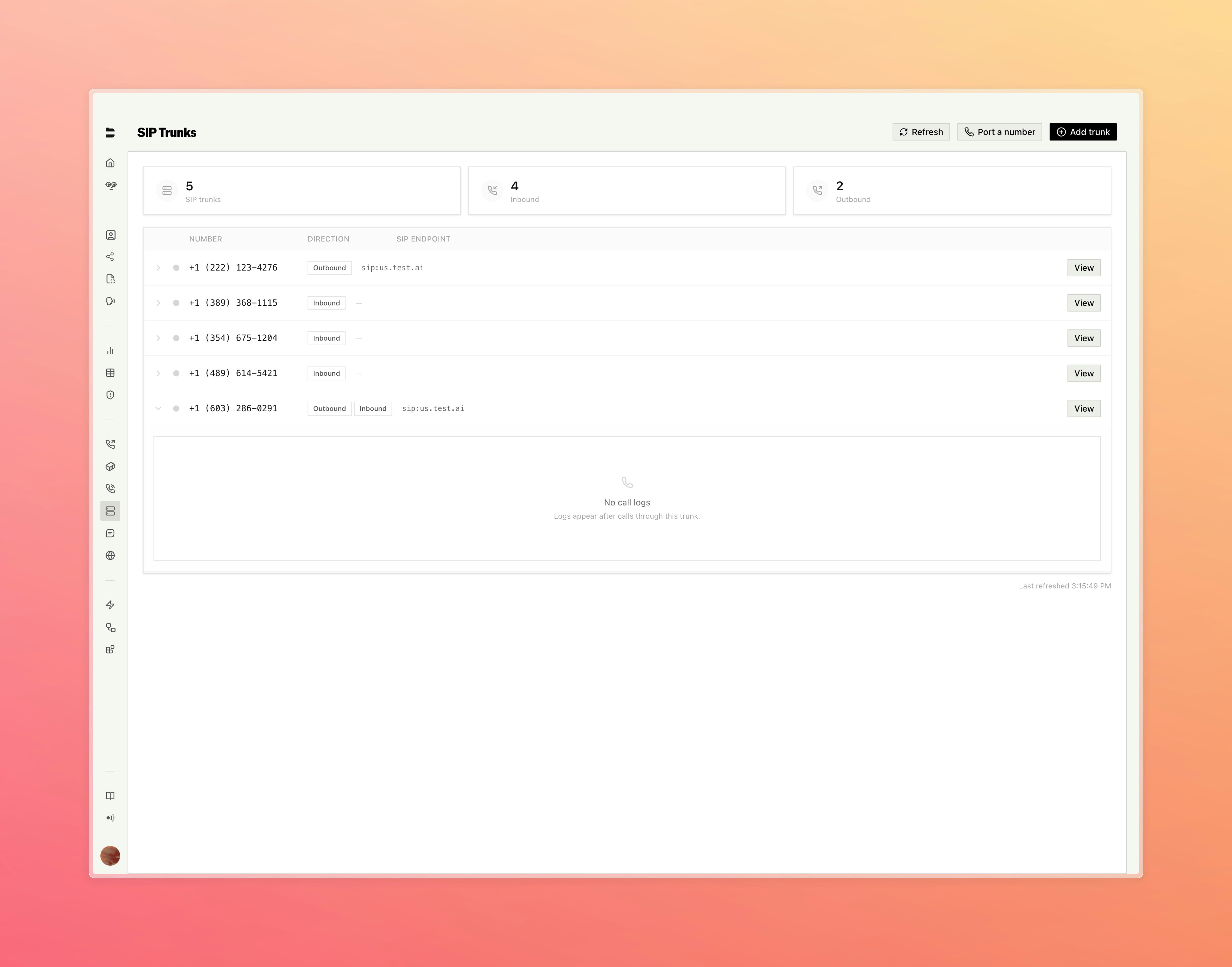
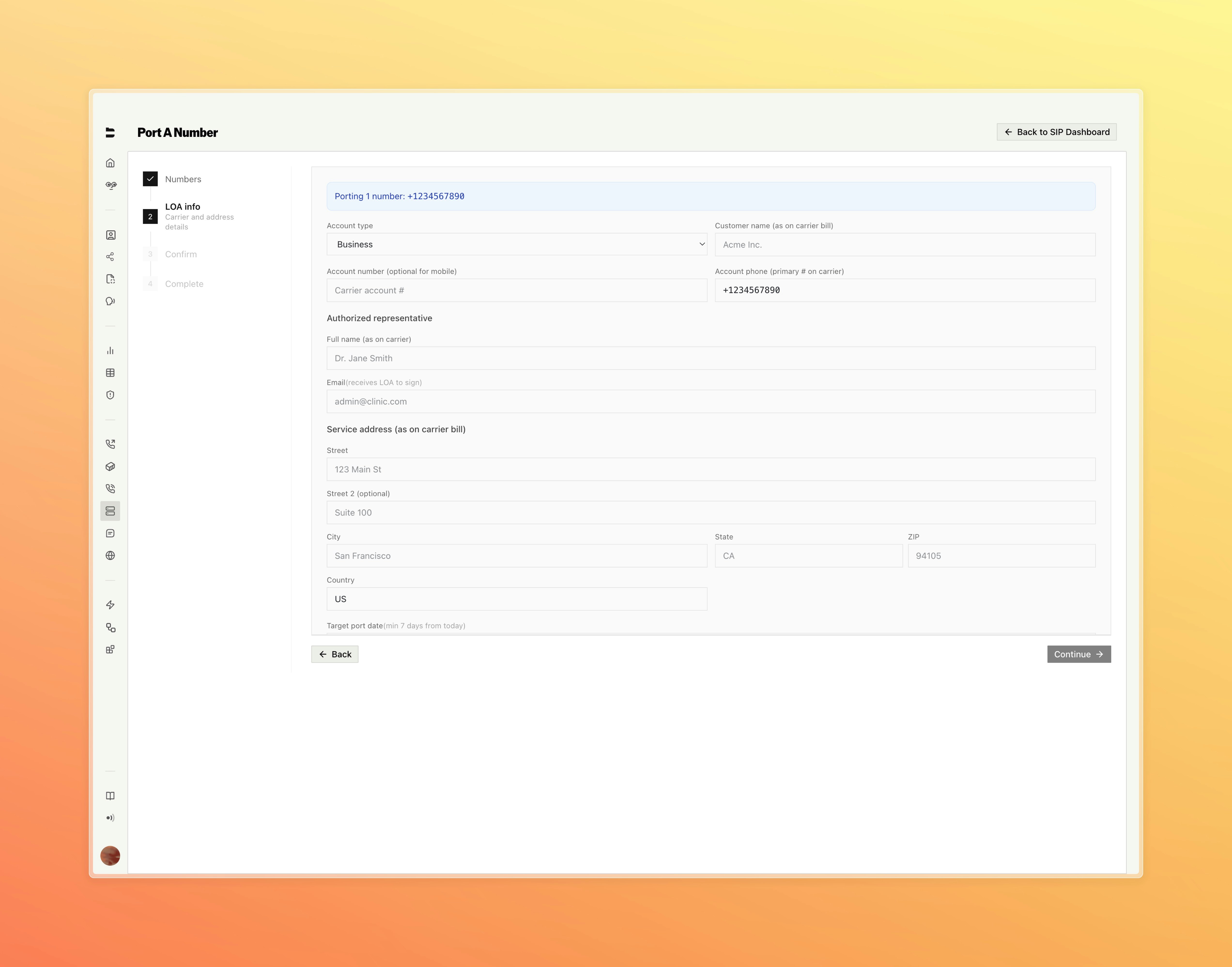
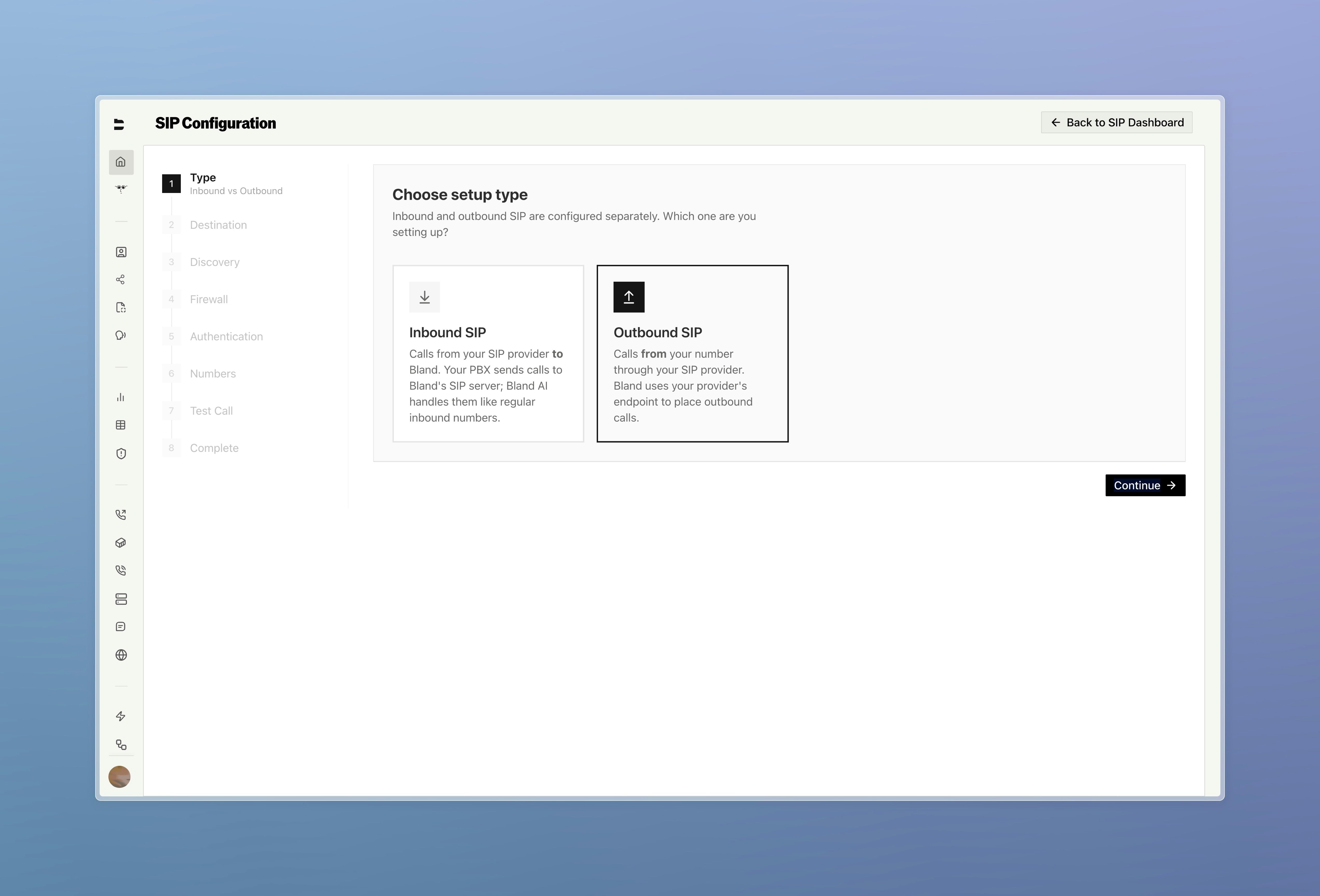
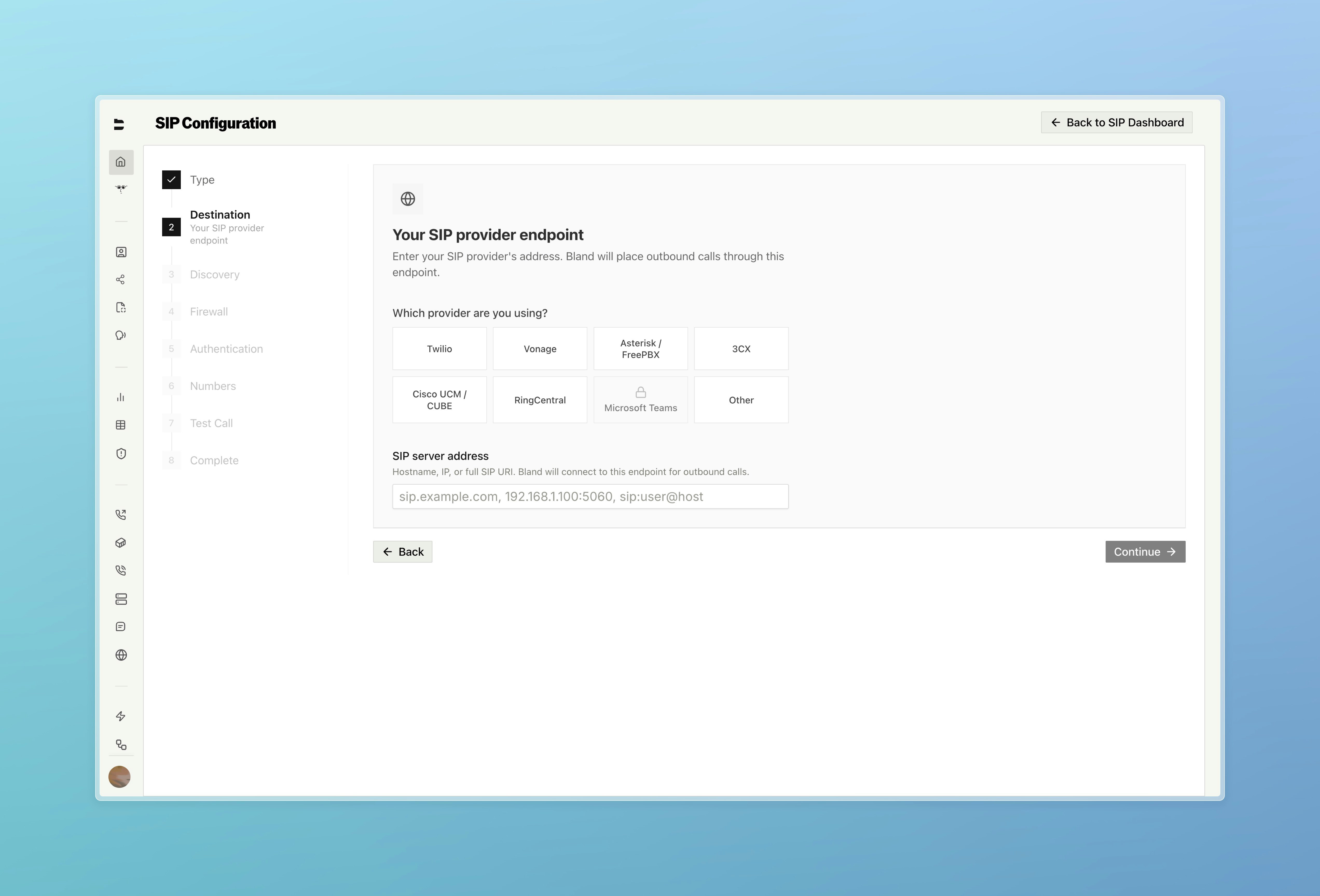
A new SIP dashboard with a guided setup wizard, call logs, monitoring, and number porting.

* Step-by-step setup wizard covers trunk direction, auto-discovery, destination routing, authentication, firewall configuration, and inbound number assignment
* Place a live test call directly from the final wizard step to verify connectivity before going live
* Full SIP dashboard with dedicated call logs, SIP trace viewer, and monitoring configuration for alerts, codecs, and failover
<Tabs>
  <Tab title="Setup Type">
    <img src="https://mintcdn.com/blandai/tV40CxXlqM7QflJB/changelog_assets/03_11_2026/sip_1.jpeg?fit=max&auto=format&n=tV40CxXlqM7QflJB&q=85&s=904490153cfe8e800ef09498230df886" style={{ width: "100%", borderRadius: "0.5rem", marginTop: "1rem", marginBottom: "1rem" }} alt="SIP Configuration wizard step 1 — choose between Inbound and Outbound SIP" width="5088" height="3454" data-path="changelog_assets/03_11_2026/sip_1.jpeg" />

    <p style={{ textAlign: "left", fontStyle: "italic", marginTop: "0.25rem", color: "#666" }}>
      Start by choosing inbound or outbound — each is configured separately
    </p>
  </Tab>

  <Tab title="Destination">
    <img src="https://mintcdn.com/blandai/tV40CxXlqM7QflJB/changelog_assets/03_11_2026/sip_2.jpeg?fit=max&auto=format&n=tV40CxXlqM7QflJB&q=85&s=58594a07c432826a7c94f0ee2178b482" style={{ width: "100%", borderRadius: "0.5rem", marginTop: "1rem", marginBottom: "1rem" }} alt="SIP Configuration wizard step 2 — select your provider and enter SIP server address" width="5088" height="3454" data-path="changelog_assets/03_11_2026/sip_2.jpeg" />

    <p style={{ textAlign: "left", fontStyle: "italic", marginTop: "0.25rem", color: "#666" }}>
      Select your provider and enter your SIP server address
    </p>
  </Tab>

  <Tab title="SIP Trunks">
    <img src="https://mintcdn.com/blandai/tV40CxXlqM7QflJB/changelog_assets/03_11_2026/sip_3.jpeg?fit=max&auto=format&n=tV40CxXlqM7QflJB&q=85&s=c53b7ea6dd668fc823562dc01af60899" style={{ width: "100%", borderRadius: "0.5rem", marginTop: "1rem", marginBottom: "1rem" }} alt="SIP Trunks dashboard showing trunk list with direction, endpoint, and call logs" width="5088" height="3992" data-path="changelog_assets/03_11_2026/sip_3.jpeg" />

    <p style={{ textAlign: "left", fontStyle: "italic", marginTop: "0.25rem", color: "#666" }}>
      Manage all your trunks and view per-trunk call logs from the SIP dashboard
    </p>
  </Tab>

  <Tab title="Number Porting">
    <img src="https://mintcdn.com/blandai/tV40CxXlqM7QflJB/changelog_assets/03_11_2026/sip_4.jpeg?fit=max&auto=format&n=tV40CxXlqM7QflJB&q=85&s=1ad013c988fc2ba46b209862a346cae9" style={{ width: "100%", borderRadius: "0.5rem", marginTop: "1rem", marginBottom: "1rem" }} alt="Port A Number wizard showing LOA info form with carrier and address details" width="5088" height="3992" data-path="changelog_assets/03_11_2026/sip_4.jpeg" />

    <p style={{ textAlign: "left", fontStyle: "italic", marginTop: "0.25rem", color: "#666" }}>
      Port existing numbers with a guided LOA form — carrier details, authorized rep, and target port date
    </p>
  </Tab>
</Tabs>

***

### Bland Speech

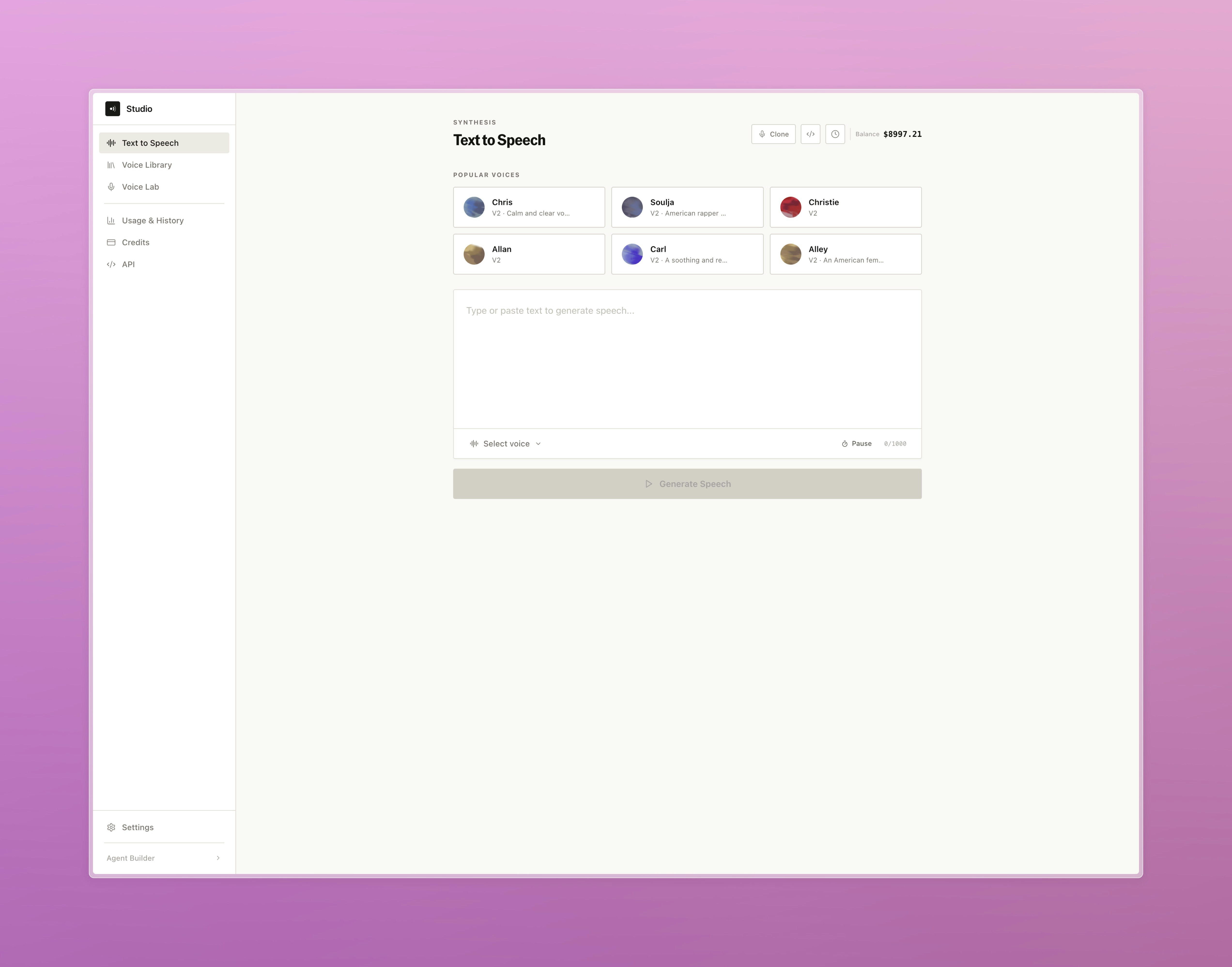
A standalone text-to-speech product now available directly from the dashboard. [Try it here.](https://app.bland.ai/dashboard/tts)

* Synthesize speech from any text using the full Bland voice library, with live audio playback, cost estimates, and a persistent generation history
* Browse, preview, and add voices from the voice library to your account, or clone and manage custom voices in the voice lab
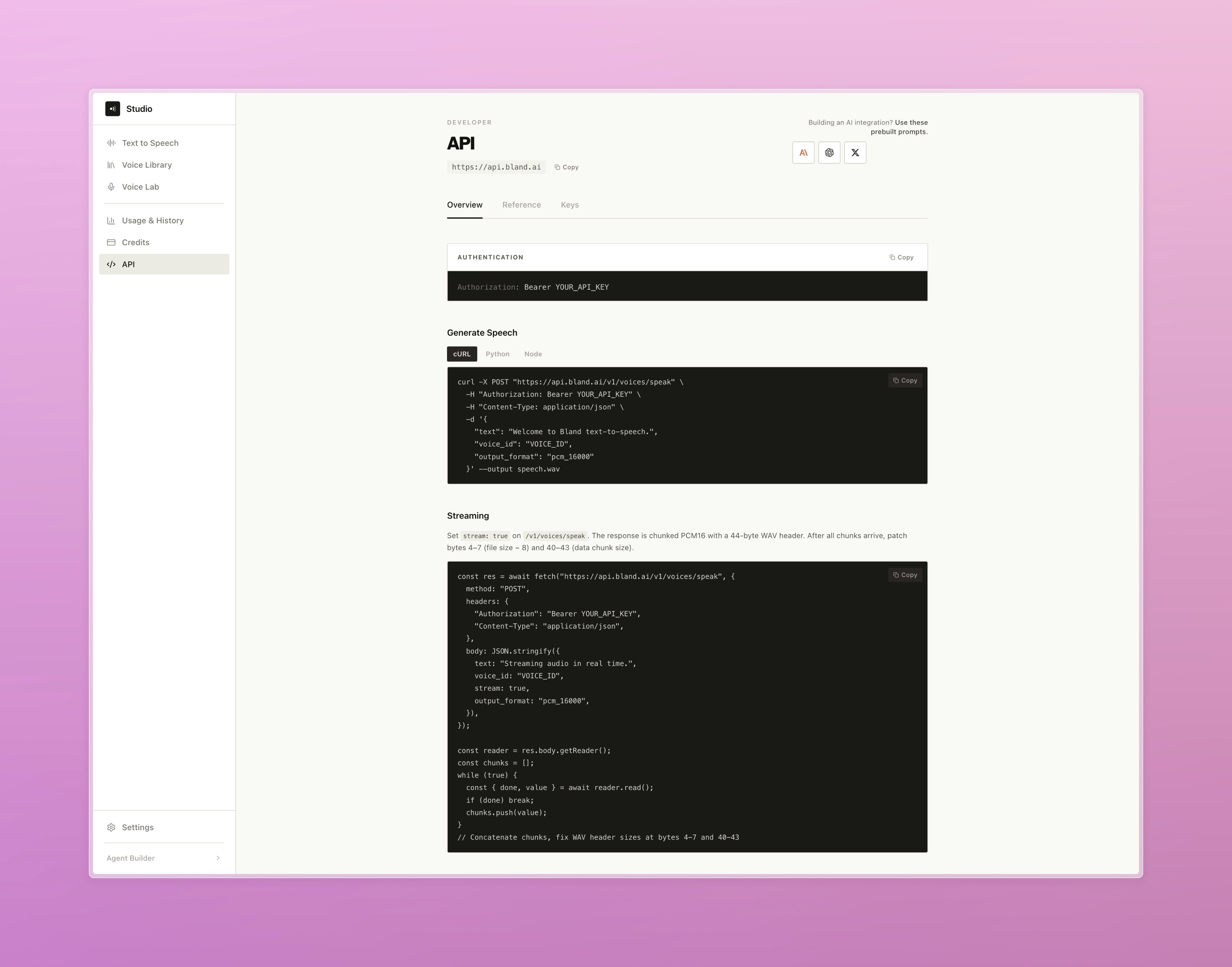
* Access usage analytics and a complete developer API reference, plus quick-start code examples in cURL, Python, and Node.js

<Tabs>
  <Tab title="Text to Speech">
    <img src="https://mintcdn.com/blandai/tV40CxXlqM7QflJB/changelog_assets/03_11_2026/tts_1.jpeg?fit=max&auto=format&n=tV40CxXlqM7QflJB&q=85&s=a5357bf85970aed3594d7394785d73ad" style={{ width: "100%", borderRadius: "0.5rem", marginTop: "1rem", marginBottom: "1rem" }} alt="Text to Speech synthesis page with popular voices grid, text input, and Generate Speech button" width="5088" height="3992" data-path="changelog_assets/03_11_2026/tts_1.jpeg" />

    <p style={{ textAlign: "left", fontStyle: "italic", marginTop: "0.25rem", color: "#666" }}>
      Pick a voice, type your text, and generate speech directly from the dashboard
    </p>
  </Tab>

  <Tab title="Developer API">
    <img src="https://mintcdn.com/blandai/tV40CxXlqM7QflJB/changelog_assets/03_11_2026/tts_2.jpeg?fit=max&auto=format&n=tV40CxXlqM7QflJB&q=85&s=90fbda68c0727acd682a7338a1241360" style={{ width: "100%", borderRadius: "0.5rem", marginTop: "1rem", marginBottom: "1rem" }} alt="Developer API page showing authentication, code examples in cURL and Node, and streaming docs" width="5088" height="3992" data-path="changelog_assets/03_11_2026/tts_2.jpeg" />

    <p style={{ textAlign: "left", fontStyle: "italic", marginTop: "0.25rem", color: "#666" }}>
      Quick-start code examples and full API reference including streaming
    </p>
  </Tab>
</Tabs>

***

### Improvements

**Pathways & Routing**

* Added a persistent save banner to node and edge drawers so unsaved changes are always visible

**Call Logs & Management**

* Fixed call logs not correctly displaying pathway context when calls crossed a Transfer Pathway node
* Live Translation logs are now captured per call and surfaced in call details, showing source and target language alongside original and translated text

**Tools**

* Redesigned tool creation with a step-by-step flow covering setup, output variables, and value inputs

**API**

* Added `timezone` parameter to `GET /v1/calls` for timezone-aware date filtering
* Added org-level option to exclude `pathway_logs` from post-call webhook payloads